23
Recall Settings:
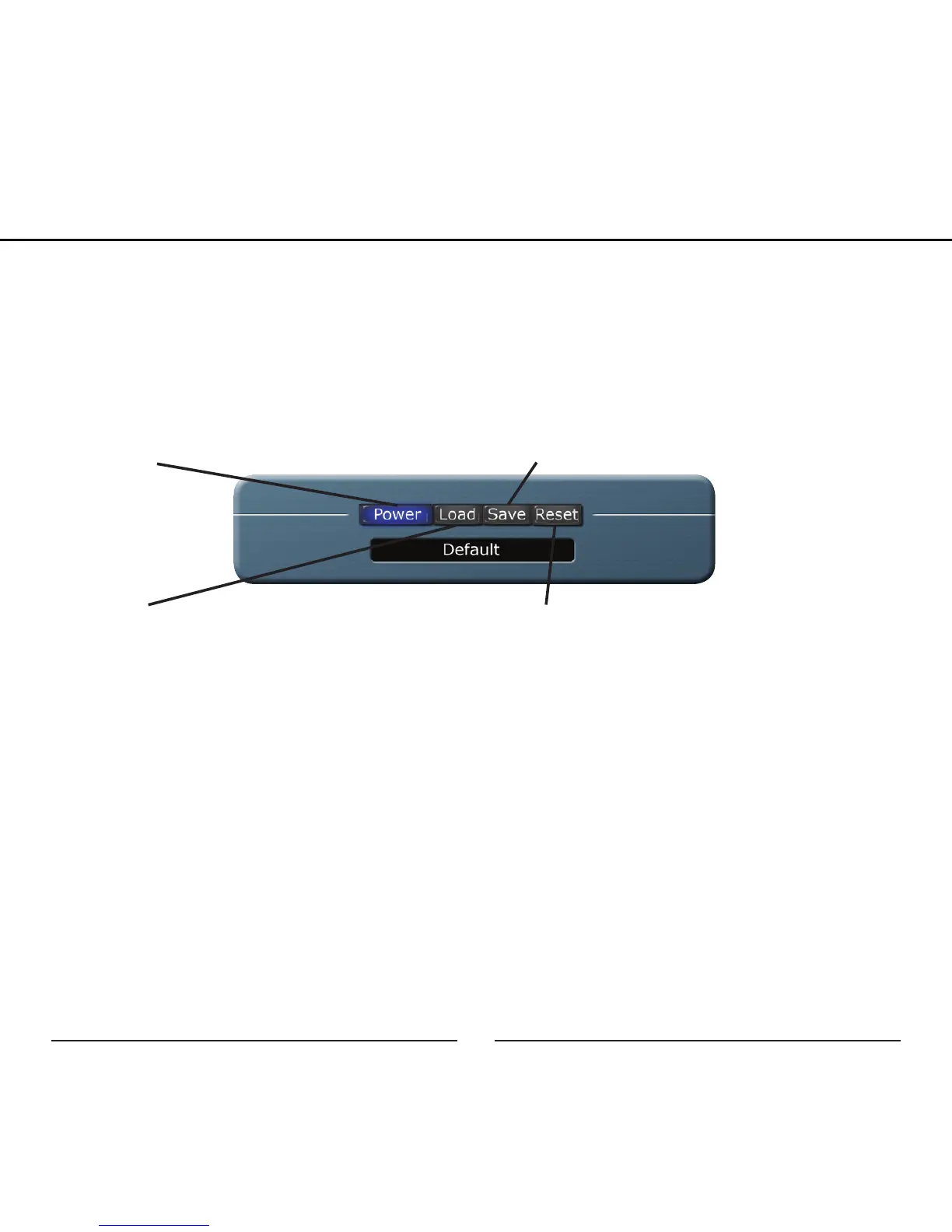
This section is for saving, loading, and resetting all of the parameters on the Studio
Control GUI.
Save: After you have setup the perfect
monitoring mix and optimized your recording
level save the settings for quick and easy
recall later.
Load: Resuming a recording session from
the day before or have a favorite starting
point this is where you recall all your set-
tings. The name of the current settings will
display in the window below the Load button.
Reset: When it’s time to start fresh go back
to the default settings by hitting Reset
Power: Instead of an X in the corner of the
window close the Studio Control GUI with
the Power button
General Behavior:
• Knobs: To rotate a knob left-click and drag the mouse up/down.
• Buttons: Just left-click the button once to turn it on/off.
• To move the Studio Control GUI click anywhere on the blue background
and drag it to a new location.
• If you see an error message when changing adjusting a setting chances
are the microphone is not plugged in.
Graphic User Interface


 To Next Page