the low-frequency vibrations from the speakers are picked
up by the record-playing stylus and are re-amplified).
If
you encounter a sustained
low~frequency
roar, or frequent
groove-jumping, immediately turn down the
Volume and
switch off the
BASS
EQ
until a more nearly vibration-free
mounting for the turntable
is
found.
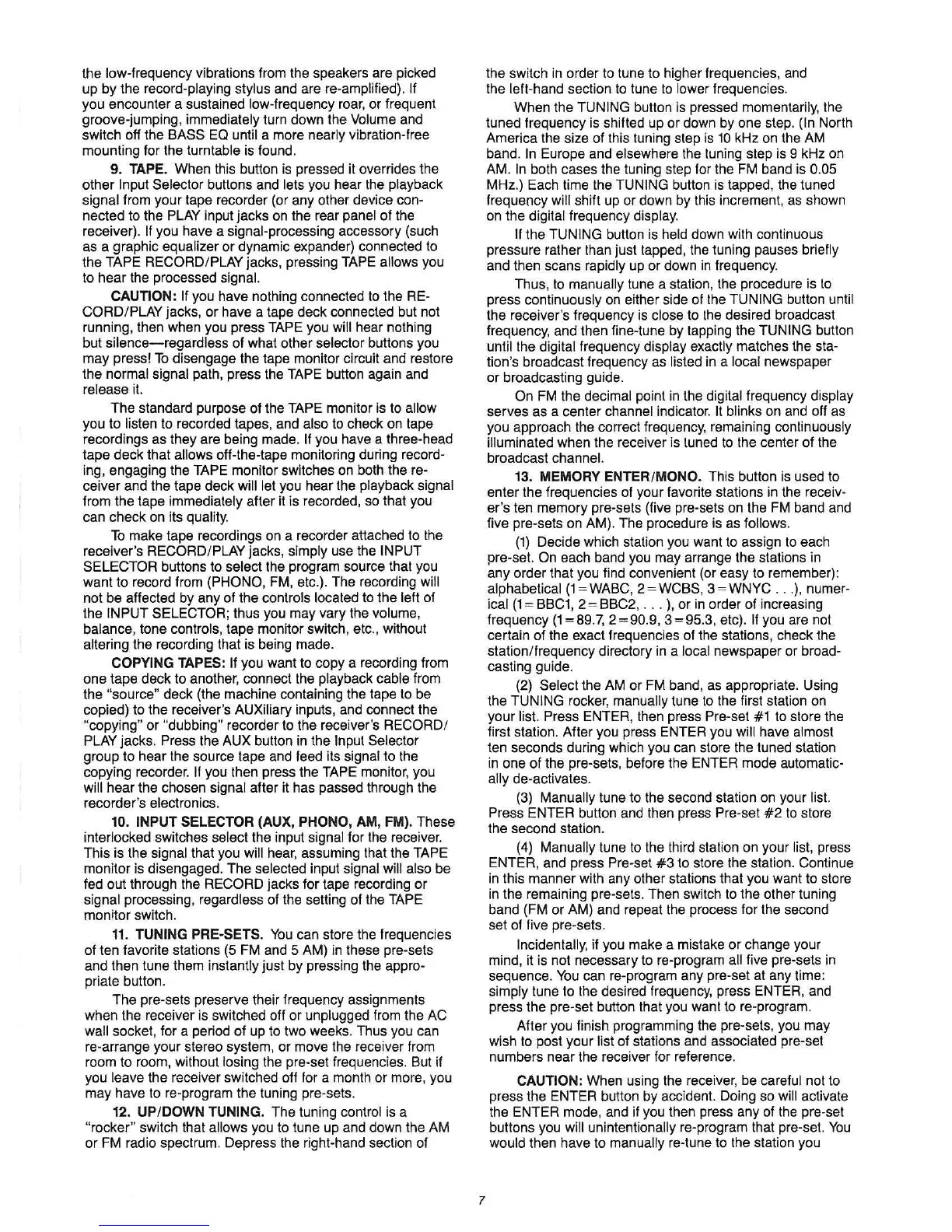
9. TAPE. When this button
is
pressed it overrides the
other
Input Selector buttons and lets you hear the playback
Signal from your tape recorder (or any other device con-
nected to the PLAY input jacks on the rear panel
of
the
receiver).
If
you have a signal-processing accessory (such
as a graphic equalizer or dynamic expander) connected to
the
TAPE RECORD/PLAY jacks, pressing TAPE allows you
to hear the processed
signal.
CAUTION: If
you have nothing connected
to
the RE-
CORD/PLAY
jacks,
or
have a tape deck connected but not
running, then when you press
TAPE you will hear nothing
but
silence-regardless
of what other selector buttons you
may press!
To
disengage the tape monitor circuit and restore
the
normal signal path, press the TAPE button again and
release
it.
The
standard purpose of the TAPE monitor
is
to allow
you to listen to recorded tapes, and also to check on tape
recordings as they are being made.
If you have a three-head
tape deck that
allows off-the-tape monitoring during record-
ing, engaging the TAPE monitor switches on both the re-
ceiver and the tape deck will let you hear the playback signal
from the tape immediately after
it
is recorded,
so
that you
can check on its quality.
To
make tape recordings on a recorder attached to the
receiver's
RECORD/ PLAY jacks, simply use the INPUT
SELECTOR
buttons to select the program source that you
want
to
record from (PHONO, FM, etc.). The recording will
not be affected by any of the controls located to the
left of
the
INPUT SELECTOR; thus you may vary the volume,
balance, tone controls, tape monitor switch, etc
.,
without
altering the recording that is being made.
COPYING TAPES: If you want to copy a recording from
one tape deck to another, connect the playback cable from
the
"source" deck (the machine containing the tape to be
copied) to the receiver's
AUXiliary inputs, and connect the
"copying" or "dubbing" recorder to the receiver's RECORD/
PLAY
jacks. Press the AUX button in the Input Selector
group to hear the source tape and feed its signal to the
copying recorder.
If
you then press the TAPE monitor, you
will hear the chosen signal after it has passed through the
recorder's electronics.
10. INPUT SELECTOR (AUX, PHONO, AM, FM). These
interlocked switches
select the input signal for the receiver.
This is the
signal that you will hear, assuming that the TAPE
monitor is disengaged. The selected input signal will also be
fed out through the
RECORD jacks for tape recording or
signal processing, regardless of the setting of the
TAPE
monitor switch.
11.
TUNING PRE·SETS.
You
can store the frequencies
of ten favorite stations
(5
FM and 5 AM) in these pre-sets
and then tune them instantly just by pressing the
appro-
priate button.
The pre-sets preserve their frequency assignments
when the receiver
is
switched off
or
unplugged from the AC
wall
socket, for a period of up to two weeks. Thus you can
re-arrange your stereo system, or move the receiver from
room to room, without losing the pre-set frequencies. But if
you
leave the receiver switched off for a month or more, you
may have to re-program the tuning pre-sets.
12
. UP/DOWN TUNING. The tuning control is a
"rocker" switch that allows you to tune up and down the AM
or
FM radio spectrum. Depress the right-hand section of
7
the switch in order to tune to higher frequencies, and
the left-hand section
to
tune
to
lower frequencies.
When the
TUNING button
is
pressed momentarily, the
tuned frequency
is
shifted up or down by one step. (In North
America the size of this tuning step
is
10
kHz on the AM
band.
In
Europe and elsewhere the luning step
is
9 kHz on
AM.
In
both cases the tuning step for the FM band is 0.05
MHz.) Each time the TUNING button is tapped, the tuned
frequency
will shift up or down by this increment,
as
shown
on the
digital frequency display.
If the TUNING button is held down with continuous
pressure rather than just tapped, the tuning pauses
briefly
and then scans rapidly up or down
in
frequency.
Thus,
to
manually tune a station, the procedure is
to
press continuously on either side of the TUNING button until
the receiver's frequency
is
close to Ihe desired broadcast
frequency, and then fine-tune by tapping the
TUNING button
until the digital frequency display exactly matches the sta-
tion's broadcast frequency as listed
in
a local newspaper
or broadcasting
gUide.
On
FM
the decimal point
in
the digital frequency display
serves as a center channel indicator. It blinks on and off as
you approach the correct frequency, remaining continuously
illuminated when the receiver is tuned
to
the center
of
the
broadcast
channel.
13. MEMORY ENTER/MONO. This button
is
used to
enter the frequencies of your favorite stations in the receiv-
er's ten memory pre-sets (five pre-sets on the FM band and
five pre-sets
on
AM). The procedure is as follows.
(1)
Decide which station you want to assign
to
each
pre-set.
On each band you may arrange the stations in
any order that you find convenient (or easy to remember):
alphabetical
(1
= WABC, 2 = WCBS, 3 = WNYC
..
,),
numer-
ical
(1
= BBC1,
2=
BBC2,
...
),
or
in
order of increasing
frequency
(1
=89.7, 2 = 90.9, 3
=95.3,
etc). If you are not
certain of the exact frequencies of the stations, check the
station/frequency directory
in
a local newspaper or broad-
casting guide.
(2)
Select the AM or FM band, as appropriate. Using
the
TUNING rocker, manually tune
to
the first station on
your list.
Press ENTER, then press Pre-set #1 to store the
first station. After you press ENTER you will have
almost
ten seconds during which you can store the tuned station
in one of the pre-sets, before the ENTER mode
automatic-
ally
de-activates.
(3) Manually tune to the second station on your
list.
Press
ENTER button and then press Pre-set
#2
to
store
the second station.
(4) Manually tune
to
the third station on your list, press
ENTER, and press
Pre-set
#3
to store the station. Continue
in this manner with any other stations that you want to store
in
the remaining pre-sets. Then switch
to
the other tuning
band (FM or AM) and repeat the process for the second
set of five pre-sets.
Incidentally, if you make a mistake
or
change your
mind, it is not necessary to re-program
all five pre-sets in
sequence.
You
can re-program any pre-set at any time:
simply tune to the desired frequency, press ENTER, and
press the pre-set button that you want to re-program.
After you finish programming the pre-sets, you may
wish
to
post your list of stations and associated pre-set
numbers near the receiver for reference.
CAUTION: When using the receiver, be careful not to
press the ENTER button by accident. Doing so
will activate
the ENTER mode, and if you then press any of the pre-set
buttons you
will unintentionally re-program that pre-set.
You
would then have to manually re-tune to the station you



 To Next Page
 Loading...