TROUBLESHOOTING
GB
7
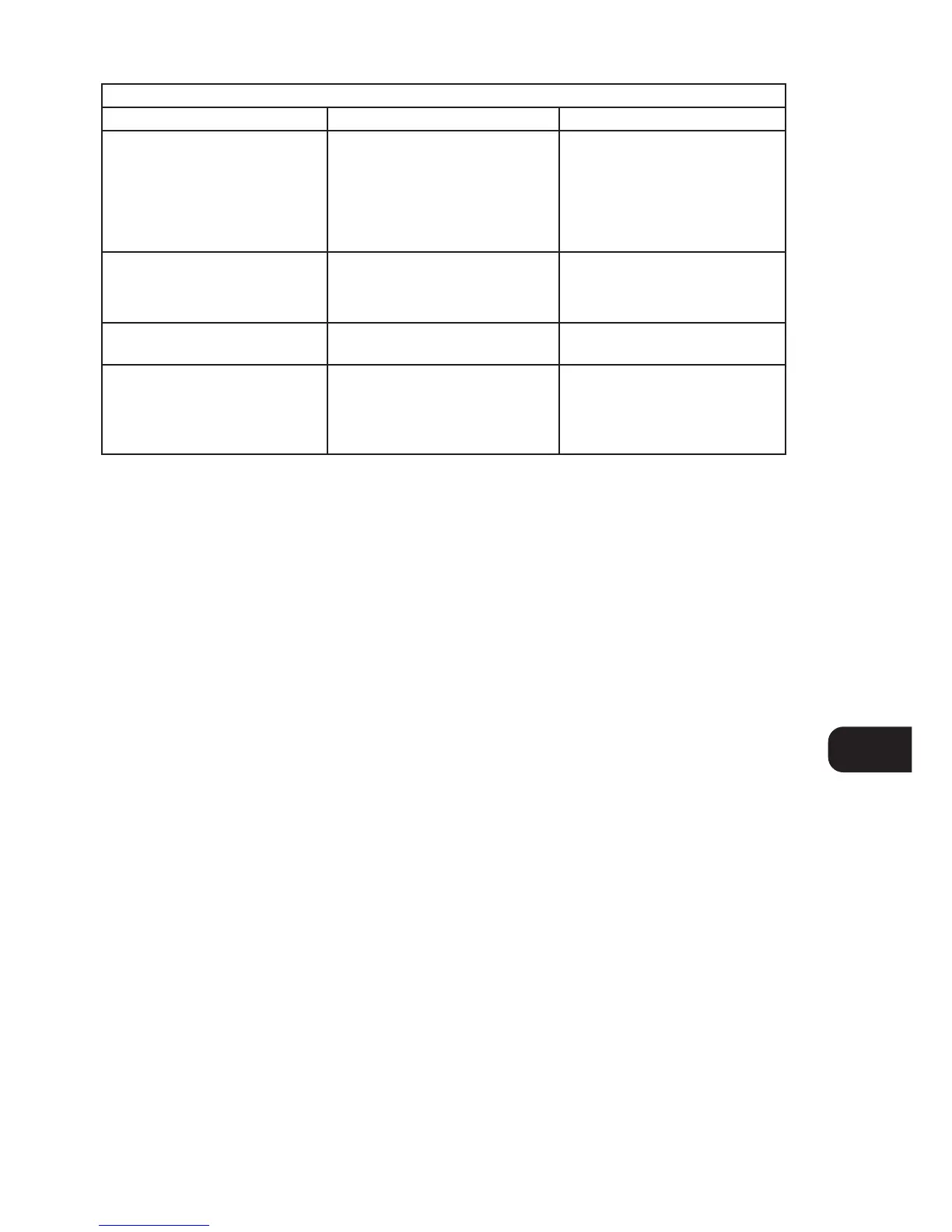
NO SOUND • Power AC lead unplugged or power not
switched on
• Tape 2 Monitor selected
• Mute on
• Rear Pre-out/Main-in amp links not
fitted
• Headphones inserted
• Check if AC lead is plugged in and
power switched on
• De-select Tape 2 Monitor mode
• Switch off Mute
• Fit links
• Disconnect headphones
Problem Cause Solution
NO SOUND ONE CHANNEL • Balance control not centered
• Speaker not properly connected or
damaged
• Input lead disconnected or damaged
• Center Balance control
• Check connections and speakers
• Check leads and connections
WEAK BASS / DIFFUSE STEREO IMAGE • Speakers wired out of phase • Check connections to all speakers in
the system
REMOTE CONTROL HANDSET
NOT WORKING
• Batteries flat, or incorrectly inserted
• IR transmitter or receiver windows
obstructed
• IR receiver in direct sun or very bright
ambient light
• Check or replace batteries
• Remove obstruction
• Place unit away from direct sun, reduce
amount of ambient light


 To Next Page