ENGLISH
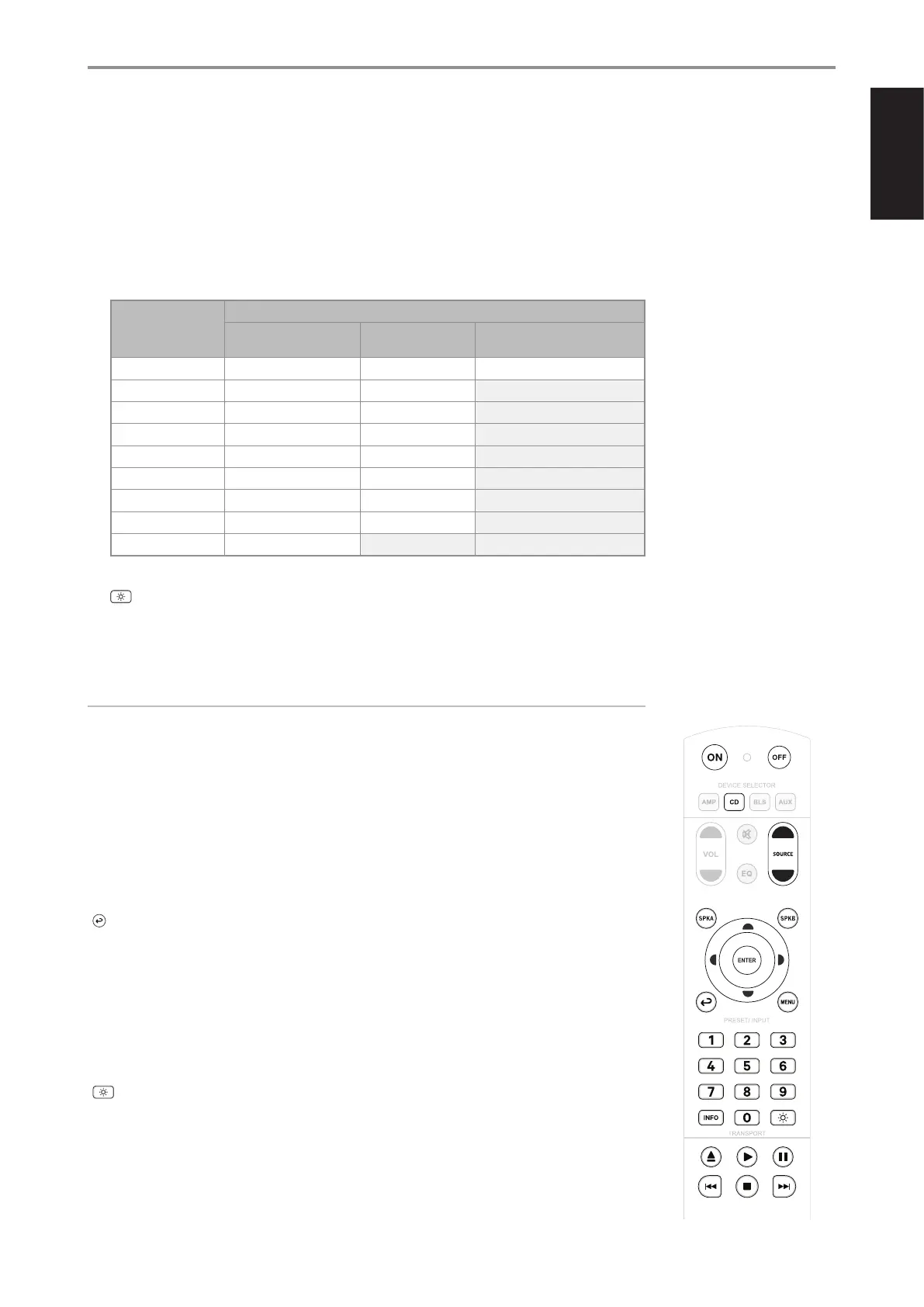
• Referring to below table, Optical 2 and Phono Sources were disabled under “MDC2 BluOS D Installed with
some Sources disabled” column.
With Optical 2 and Phono Sources disabled, the Source Input Selector button allocations will shift to show only
enabled Sources. Coaxial 1 will now move up or be assigned to “2”, Coaxial 2 shifted to “3”, Line 1 to “4” and so
on.
• It is your prerogative which Sources to disable with the expectation that the Source Input Selector buttons will
be re-assigned accordingly.
SR 10 CONTROL
BUTTON
(AMP MODE)
CORRESPONDING SOURCE
C 389 Default Settings
MDC2 BluOS D
Installed
MDC2 BluOS D Installed with
some Sources disabled
1 Optical 1 Optical 1 Optical 1
2 Optical 2 Optical 2 Coaxial 1
3 Coaxial 1 Coaxial 1 Coaxial 2
4 Coaxial 2 Coaxial 2 Line 1
5 Phono Phono Line 2
6 Line 1 Line 1 HDMI eARC
7 Line 2 Line 2 BluOS
8 HDMI eARC HDMI eARC Unassigned
9 Bluetooth BluOS Unassigned
10 : Toggle to vary brightness level of the front panel display - brighter, normal or dimmer.
11 With optional MDC2 BluOS D installed and while at BluOS Source, select
9 : Skip back to the beginning of current song
: : Skip forward to the next song
NOTE
Applicable only if optional MDC2 BluOS D is installed.
CD PLAYER CONTROL (applicable to most NAD CD Players): Select CD among the DEVICE SELECTOR buttons to
gain access to the following applicable control buttons. Check the owner’s manual of your applicable NAD CD Player
for control button compatibility.
ON/OFF: Press ON to switch CD player from Standby to operating mode. Press OFF to switch to Standby mode.
SOURCE [D/F]: Press and hold to fast forward/reverse playback search
SPK A: Select CD as the active source
SPK B: Select USB as the active source
: Select Optical as the active source
MENU: Toggle to select desired SRC mode
NUMERIC BUTTONS (1-9, 0): Use the numeric buttons to directly key-in and select track number of desired song
D/F: Select through folders
A/S: Select through files
ENTER: Select desired folder or file
INFO: Show playback time and other display information
: Reduce, turn off or restore display brightness
k: Open/close disc tray
u: Start or pause playback
j: Pause playback temporarily
9: Skip back to the beginning of current song
0: Skip forward to the next song
g: Stop playback
IDENTIFICATION OF CONTROLS
SR 10 REMOTE CONTROL
11


 To Next Page