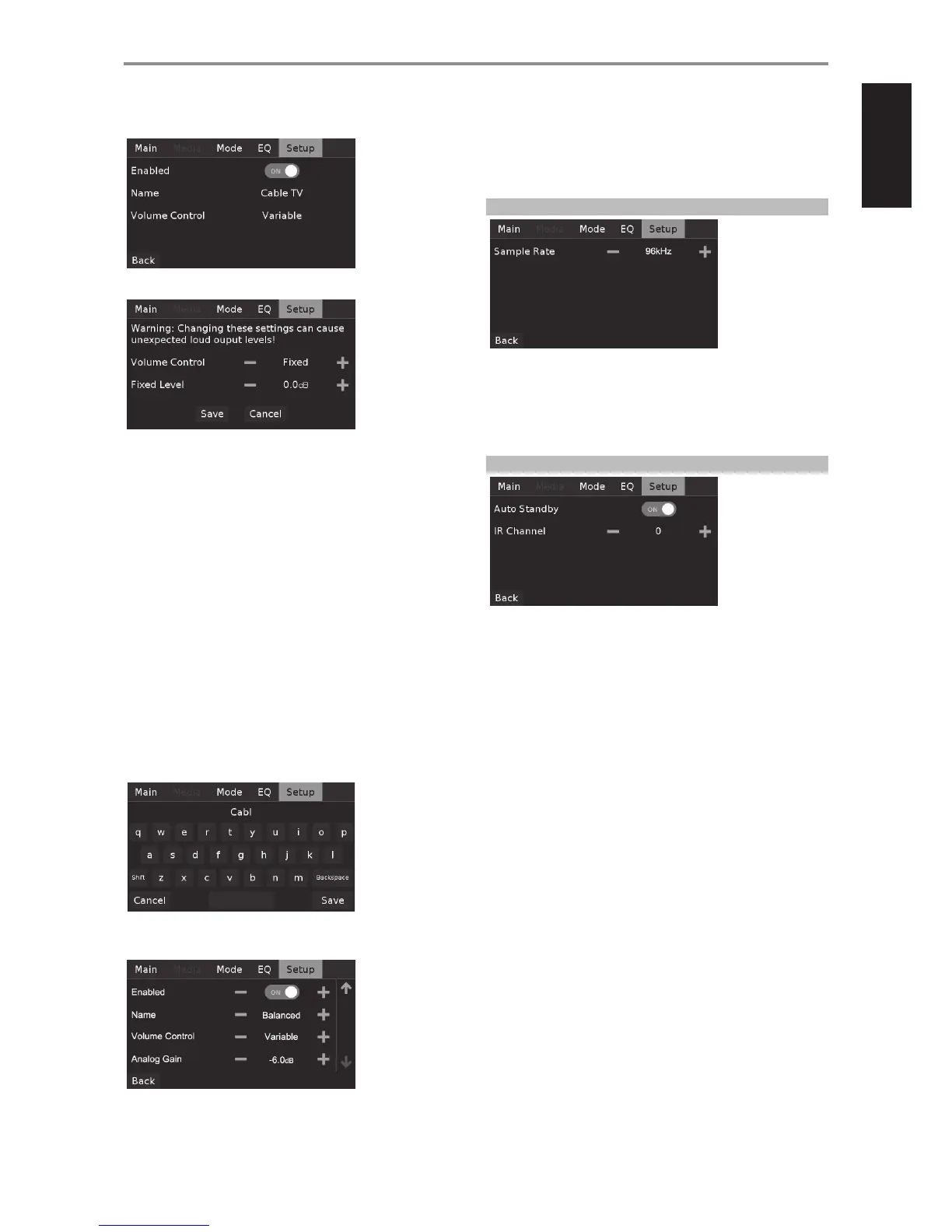
When a Slot line item is selected, the following menu options will manifest.
Enabled: Source input can be enabled (ON) or disabled (OFF).
VOLUME CONTROL
The M12 VOLUME control function is dependent upon the “Volume
Control” menu setting. Volume control can either be set to “Fixed” or
“Variable”. Select “Save” to store selected “Volume Control” and “Fixed Level”
or “Variable” settings.
Fixed
If “Volume Control” is set to “Fixed”, audio output level is xed and the
M12’s volume control is bypassed.
• Set “Fixed Level” to desired preset dB level. Audio output is xed
to the selected level after saving the setting. Audio output level
through ANALOG AUDIO OUTPUT will not change when using the
Volume control or HTRM 2’s [VOL R/T].
• At “Fixed Level” setting, the volume control or HTRM 2’s [VOL R/T]
will have no eect and eectively disabled.
Variable
• When set to “Variable”, audio output level through ANALOG AUDIO
OUTPUT is directly adjustable using the volume control or HTRM 2’s
[VOL R/T].
Name: Source input name. Selecting this line item will lead to the menu
keyboard where one can type the preferred name for the current source.
If the “BALANCED” input is selected, additional menu options are included
as below.
Analog Gain: -12dB to 12dB. Gain adjustment allows all sources to play
back at the same volume level so you don’t need to adjust the volume
every time a new source is selected. It is generally preferable to reduce the
level of the loudest source rather than making louder the softer sources.
DIGITAL OUTPUT
SAMPLE RATE 48 kHz, 96 kHz, 192 kHz
Select the user’s preference for sample rate of the A/D Converter. Higher
sampling rates allow for anti-aliasing lters to take eect further outside
the audible frequency range and are generally considered to sound better,
especially in the high frequencies.
CONTROL SETUP
AUTO STANDBY
Allows the option of the M12 going to standby mode after 30 minutes of
inactivity or remain at operating mode regardless of any source activities.
ON: M12 will automatically go to standby mode if there are no user
interface interaction and no active source within 30 minutes.
OFF: M12 remains at operating mode even if there is no user interface
interaction and no active source within 30 minutes. This is the default
setting.
OPERATION
USING THE M12
13



 To Next Page