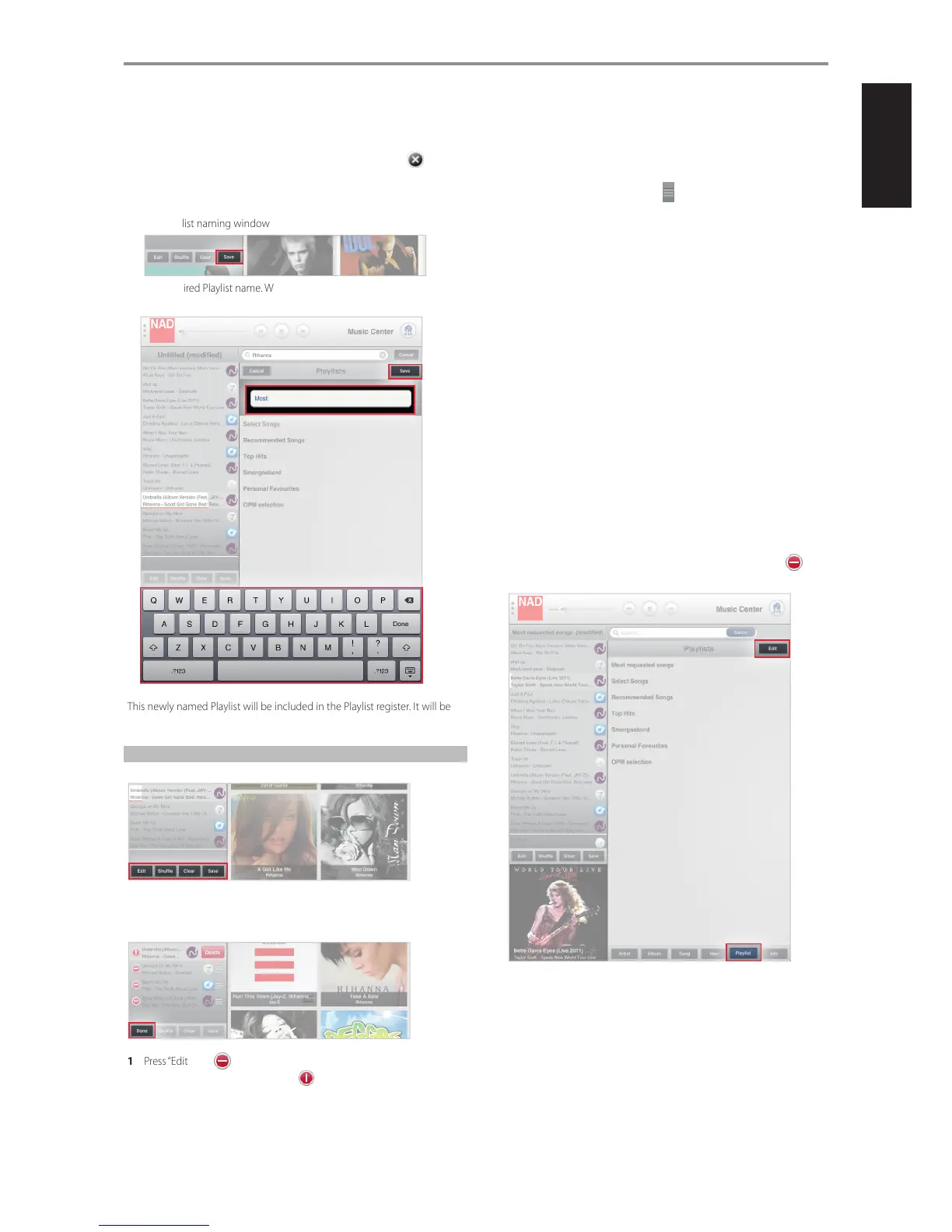
A playlist can be created by the following easy steps.
1 Select desired songs by picking through the Album, Song or Artist list
of your music Library or your music service provider. Select on the
upper right corner to close out the album.
2 Each selected song will be reected in the current playlist.
3 After completing your playlist, press “Save” and the on-screen keyboard
and playlist naming window will appear.
4 Type desired Playlist name. When done, press “Save” on the upper right
corner to complete the naming process.
This newly named Playlist will be included in the Playlist register. It will be
recalled along with other saved Playlists when “Playlist” tab is selected.
MANAGING YOUR PLAYLIST
A current Playlist can be managed by selecting any of the following options
EDIT
Delete songs from the current playlist.
1 Press “Edit” and will precede each song.
2 Select desired song to be deleted. and a “Delete” box will appear
on the same row as the selected song.
3 Select “Delete” to conrm removal of the song from the list. Repeat the
same for other desired songs to be deleted.
4 Once you complete all the songs you want deleted, select “Done” to exit
edit mode.
While at Edit mode, the order of the songs can be rearranged according
to your preference. Press and hold the on the right side of the desired
song you like to relocate. Then drag and drop said song to the desired
location in the playlist.
SHUFFLE
Playback in random order the songs in the current playback list only.
CLEAR
Songs in the current playlist are all cleared out. From the “Clear playlist”
window that will pop-up, select “Yes” to clear the current playlist or “No” to
retain the current playlist
SAVE
Group current list of songs into one Playlist and create a name for the
collection.
1 Press “Save” during playback and the on-screen keyboard and playlist
naming window will appear.
2 Type desired Playlist name.
3 When done, press “Save” on the upper right corner to complete the
naming process.
DELETING A PLAYLIST
A Playlist can be deleted from the Playlist register by the following steps.
1 Select “Playlist” and the Playlist register appears. Press “Edit” and will
precede each Playlist.
OPERATION
19


 To Next Page