CONFIGURE NETWORK SHARES
Connect your digital music les stored in your PC, MAC or NAS and stream
them through your M50 for easy access and listening.
Find, add or enter share name manually. Current music shares can also be
removed by clearing (unchecking) the check box of the desired network
share name.
When entering a share name manually, specify the Universal Naming
Convention (UNC) path where the shared folder is located. Computer name
and password will be required if applicable.
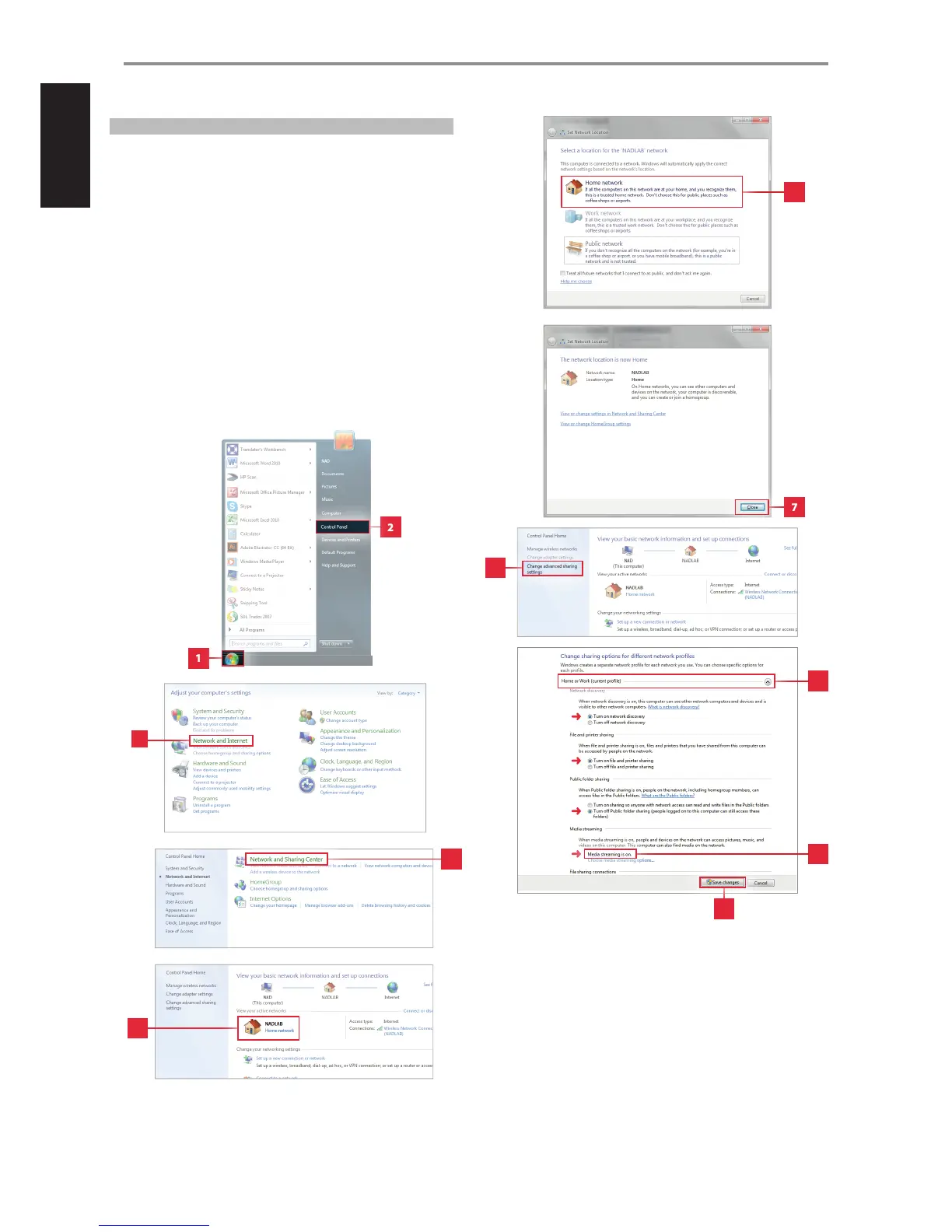
Below is a sample illustration of le sharing using Windows 7. Select
the items indicated and follow the steps in the order they are arranged
or numbered. The method shown below is about the same for other
operating systems except for the method of le sharing. Check the
procedure on How to Share File for your specic operating system.
WINDOWS 7 FILE SHARING
OPERATION
1
2
11
3
4
5
6
7
8
9
10
24


 To Next Page