ENCODER SETTING
Set up the default le format when ripping your music CDs.
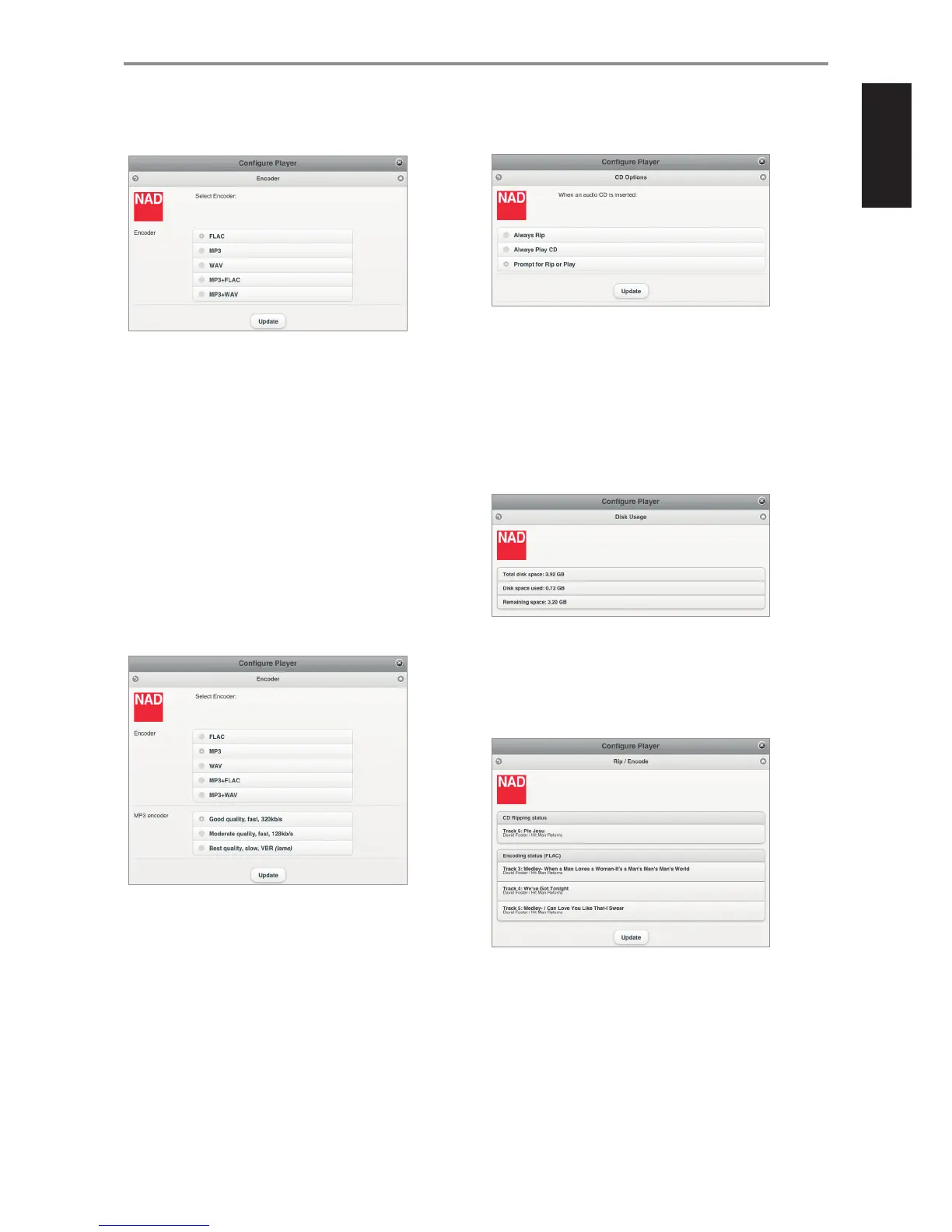
ENCODER
Set the audio format the ripped audio le will be encoded.
FLAC (default format): High quality compression designed specically
for CD backup purposes. Files are ripped at FLAC level 5 balancing
compression and rip speed at full CD lossless levels of 44.1 kHz/16bits.
MP3: Standard audio compression designed to keep bandwidth low
with little degradation. Files are ripped at 320kbps, the highest level of
sound quality available to MP3 format.
WAV: Audio le type generally used for applications that require high
quality audio such as CDs. Files are uncompressed, and therefore take
up some disk space. Because WAV les are uncompressed, they contain
more data and produce better, more subtle and more detailed sounds.
MP3+FLAC: Audio le is encoded in both MP3 and FLAC format.
MP3+WAV: Audio le is encoded in both MP3 and WAV format.
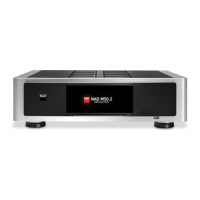
MP3 ENCODER
“MP3 encoder” section will be included in the “Encoder” menu window if
the selected encoder format option is MP3, MP3+FLAC or MP3+WAV.
Good quality, fast, 320kb/s or Moderate quality, fast, 128 kb/s: The
choice for MP3 encoder setting is a matter of preference. As a guideline,
greater bit rates generally mean better sound quality and a closer
representation of the original sound.
Best quality, slow, VBR (lame): VBR stands for “Variable Bit Rate” while LAME
is acronym for”LAMEAin’t anMP3Encoder”. With VBR MP3, the encoder
automatically detects which bit rate is most appropriate for the sound being
encoded. This means that when there is little sound to be heard, the encoder
employs a lower bit rate. On the other hand, if there is very complex sound
to be heard, the encoder uses a much higher bit rate to attain better sound
reproduction. LAME’s default VBR method tests theactualoutput quality to
ensure the desired quality level is always achieved.
Select “Update” to save your selected encoder setting.
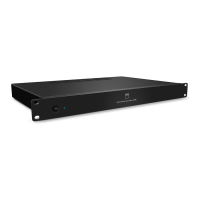
RIP/PLAY OPTIONS
Set default setting when an audio disc is inserted.
Always Rip: Loaded audio disc will be directly ripped to the connected
M52 or USB mass storage device.
Always Play CD: Playback loaded audio CD. If loaded disc contains
music les, select “Audio Disc” or “Data Disc” from the “Local Sources”
menu to browse content of loaded disc. Select le to playback.
Prompt for Rip or Play: A Player notication will pop-up giving the
user two choices - Rip or Play the loaded disc.
DISK USAGE
Display current information of the connected M52 or USB mass storage
device’s total disk space, used space and total remaining disk space.
RIP/ENCODE STATUS
Display progress of les being copied o the loaded CD. The current
encoder status is also shown. Select “Update” to refresh information
shown. The ripping process will be completed automatically and a Player
Notication will be briey shown indicating that the Rip/Encode process is
completed already.
IMPORTANT NOTES ABOUT CD RIPPING
• For ripping of multiple CDs, insert the next disc as soon as the current
disc is ejected. It is not necessary to wait for the encoding to be
completed before the next disc is inserted.
• Only Audio CDs can be ripped into the M52. It will not rip Blu-ray, DVD,
DVD-Audio, HD-DVD or other types of Optical Disc format.
• CD ripping can be stopped at any time by selecting “Eject CD”.
EJECT CD
Manually eject loaded disc if there are issues like the CD won’t eject or
cannot be encoded.
OPERATION
23


 To Next Page