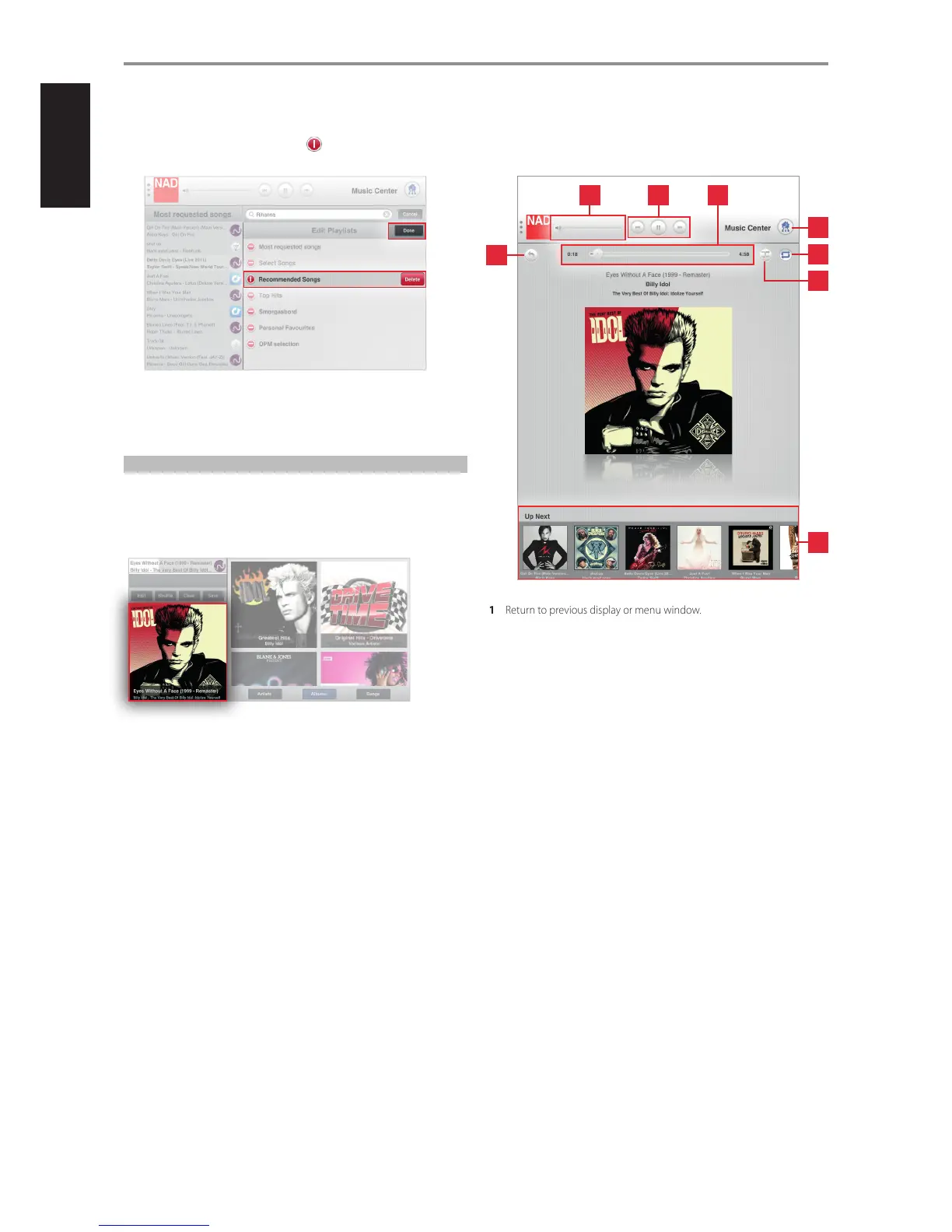
2 Select desired Playlist to be deleted. and a “Delete” box will appear
on the same row as the selected Playlist.
3 Select “Delete” to conrm removal of the desired Playlist. Repeat the
same for other Playlists to be deleted.
4 Once you complete all the Playlists you want deleted, select “Done” to
exit edit mode.
PLAYBACK DISPLAY OF CURRENT SONG
When a particular song from either your library or music provider is being
played back, a thumbnail of the album is shown on the lower left corner of
the screen display
Select the thumbnail.
Upon selection, the thumbnail will be maximized into a full screen display.
In this full screen view, the following features, functions or information are
available.
1 Return to previous display or menu window.
2 Slide to the right to increase volume level
Slide to the left to decrease volume level
3 Play or pause current song
Skip backward to previous song
Skip forward to next song
4 Slide to the left to scan backward
Slide to the right to scan forward
Song elapsed time
Total playback time of current song
5 Show all devices in the network
6 Repeat playback of current song
Repeat all songs in the playlist
Repeat o
7 Random playback
8 Scroll through thumbnail images of the playlist.
Select thumbnail image of desired song for immediate playback.
OPERATION
1
42 3
5
6
7
8
20


 To Next Page