SETTINGS
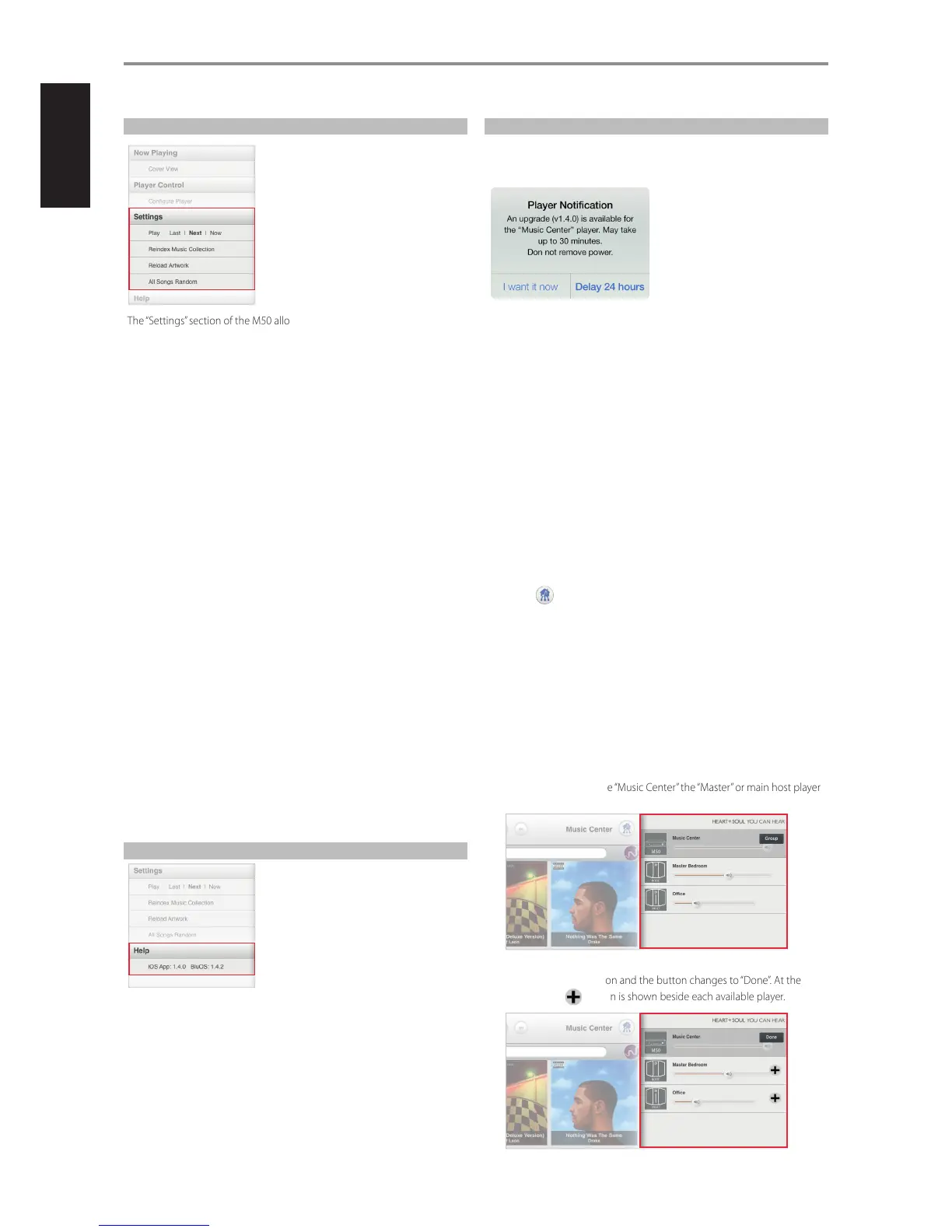
The “Settings” section of the M50 allows you to customize its default
settings. The following are the parameters you can setup or initiate.
PL AY
Set the location of the song to be added in a playlist.
Last: Place song to be added at the end of the current playlist.
Next: Insert added song right after the current song being played back.
Now: Insert added song right after the current song being played back,
stops the current song and immediately playback the added song.
REINDEX MUSIC COLLECTION
Whenever songs are added to your library, reindex your NAD device so that
it can properly locate and identify these new songs.
How long will it take to reindex your Music Library? It will depend upon its
size and network connection (wired or wireless). For wireless connection, it
is 500 songs per minute; for wired connection, 1000 songs per minute.
During the indexing, “Indexing phase x – xxx tracks processed” is displayed.
“Reindex music collection” will re-appear once the indexing is completed.
RELOAD ARTWORK
Activate “Reload Artwork” if some of your Albums’ artwork went missing
after re-indexing.
ALL SONGS RANDOM
Re-arrange in random order all songs in your Library and then start or
continue playback. Select again “All Songs Random” to randomly re-arrange
once more your songs.
At random mode, “Shue” in the playlist is highlighted. Select “Shue” to
exit random play and resume normal playback.
HELP
i0S APP: X.X.X BluOS: X.X.X
List the iOS App version and the operating software release version of your
M50.
PLAYER NOTIFICATION
Your M50 is automatically notied if a new software upgrade is released. A
“Player notication” window willpop-up prompting you to select either “I
want it now” or “Delay 24 hours”.
• I want it now: Initiate installation of the latest upgrade software.
Installation of software update will proceed automatically.
• Delay 24 hours: Opt not to install latest software update and allow
receipt of the same notication again after 24 hours.
CONFIGURING YOUR SYSTEM
If you have multiple NAD digital music players like the M50 in the same
network, you can control them separately. Each player on your network is
an independent device working in conjunction with your system.
As a complete music system, they for the most part work together. Rarely
does each device need to be congured individually as playlists, music
sources and music subscription services are replicated to each device when
congured. Playback however is controlled individually or in groups.
From a multiple device setup, select the player (device) to playback using
the following step.
1 Select and available players in your network are displayed.
2 Select the player you wish to control and all the App controls will switch
to the selected player.
ORGANIZING YOUR PLAYERS
Multiple devices in dierent locations are like putting players in dierent
Rooms. You can organize these players into one group or conversely
remove a player in a group by initiating the following steps.
1 Select from the Player Screen the player (“Music Center” in this example)
you wish to control.
2 The selected player will be highlighted and a “Group” button is shown
beside it. This makes the “Music Center” the “Master” or main host player
of the group.
3 Select the “Group” button and the button changes to “Done”. At the
same time, a button is shown beside each available player.
OPERATION
26
ENGLISH FRANÇAIS ESPAÑOL ITALIANO DEUTSCH NEDERLANDS SVENSKA РУССКИЙ


 To Next Page