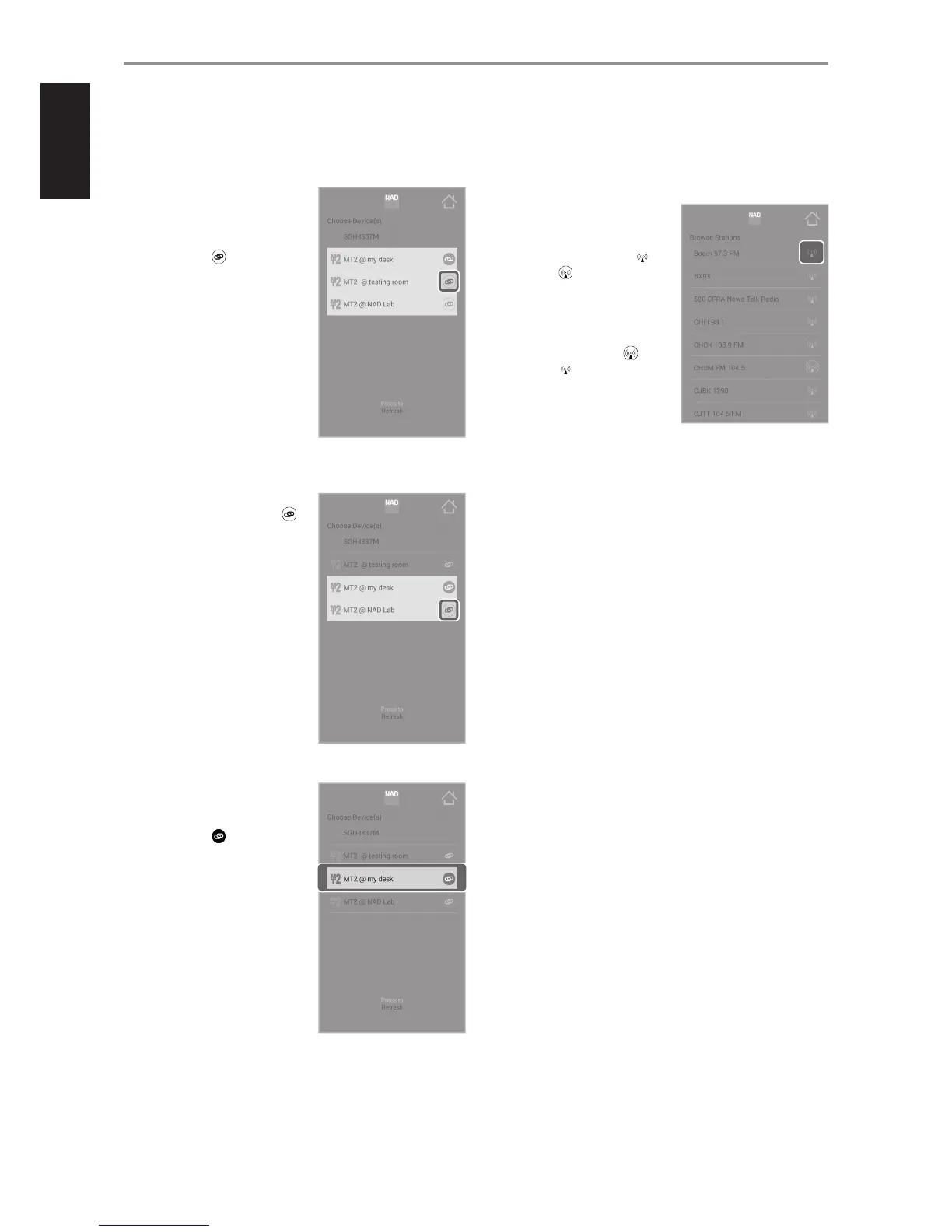
UNGROUPING MEDIA TUNER DEVICES
A group of media tuner devices can be ungrouped or disengaged by the
following procedure.
1 From the grouped list, ungroup
one by one the Secondary
players rst. Disengage “MT2 @
testing room” by pressing the
corresponding .
2 Next, disengage “MT2 @ NAD Lab”
by pressing the corresponding .
3 The Primary media player
“MT2 @ my desk” is the last one
left. Disengage by pressing
corresponding .
ADD RADIO STATION TO FAVORITES
From any browsing station menu, one can pick a radio station from the list
to be included in the “Favorites” folder. Add or remove a radio station in the
Favorites folder as shown below.
1 Tap to save and include “BOOM
97.3 FM” in the Favorites list.
Upon selection, “Station added
to Favorites” is briey shown.
changes to .
2 To remove “CHUM FM 104.5”
from the “Favorites” list, press and
hold until “Station removed from
Favorites” is briey shown.
changes to .
OPERATION
14


 To Next Page