NAD MEDIA TUNER APP
A NAD Media Tuner app can be downloaded at the iTunes app Store or Google Play Store. Use the
app for Media Tuner playability control functions and conguration of other features.
IMPORTANT NOTE
Unless otherwise specied, NAD Media Tuner app descriptions, screenshots or illustrations in this
manual are with reference to the use of an Android device. Similar NAD Media Tuner app features
are applicable for iOS devices.
MEDIA TUNER APP NAVIGATION
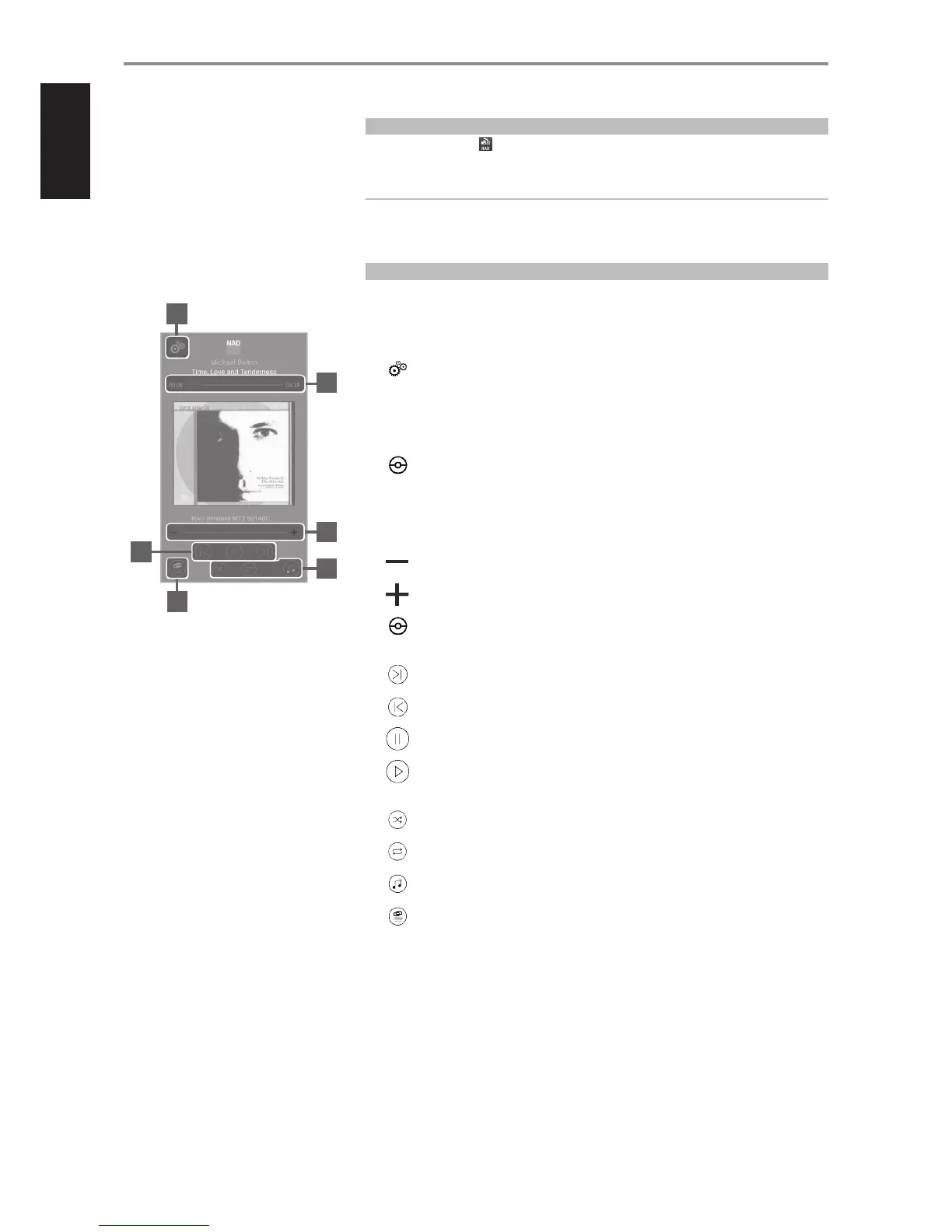
The following are sample screenshots of NAD Media Tuner app. Navigate through the app by selecting
corresponding icons or highlighted sections.
HOME SCREEN
1
Device Settings: Congure the settings of MT2 such as customizing the device’s name and
conguring WiFi connection.
2 Applicable only when the Source is an audio le. Not applicable for other sources like Spotify and
Radio.
Slide to the left to scan back through current song.
Slide to the right to scan forward through current song.
00:05 Example of elapsed playback time of current song.
04:18 Example of total playback time of current song.
3 Tap to incrementally decrease volume level.
Tap to incrementally increase volume level.
Increase volume level by sweeping to the right and decrease by sweeping to the left.
4
Skip forward to the next song, station or applicable media.
Skip back to the previous song, station or applicable media.
Pause playback.
Start or resume playback.
5
Random playback.
Repeat playback – song, album or folder.
Choose media source of device.
6
Show devices in the network.
Choose device to stream.
Group selected devices.
OPERATION
1
2
3
5
4
6
8


 To Next Page