LIBRARY
The AVR 3 can store a dierent library of default NAD codes for each of its DEVICE SELECTOR “pages.”
If the original default library does not control your NAD CD player, DVD player, or other component,
follow the procedure below to change the library code. Refer as well to the table below for a list
applicable NAD Library Codes with their corresponding NAD models.
LOAD ANOTHER LIBRARY CODE
Example: Load NAD DVD Player T 517 library codes to AVR 3’s “DVD” device.
1 Press and hold [DVD] in the DEVICE SELECTOR section of AVR 3.
2 While holding down the device button (DVD), press “2” and “2” using AVR 3’s numeric buttons. “22”
is the corresponding library code for T 517.
3 Press [ENTER] while still holding down the device button (DVD). The DVD device selector will ash
once to indicate that the library input is successful. Both the device selector button (DVD) and
[ENTER] can now be released.
RESET THE AVR 3 TO ITS DEFAULT SETTINGS
The AVR 3 can be restored to its factory settings, including default libraries, by the following
procedures
1 Press and hold [ON] and [DELETE/CLEAR] buttons for about 10 seconds until the AMP device
button lights up.
2 Within two seconds of the AMP device button lighting up, release both buttons. If the reset mode
is successful, the [DVD] device button will ash twice.
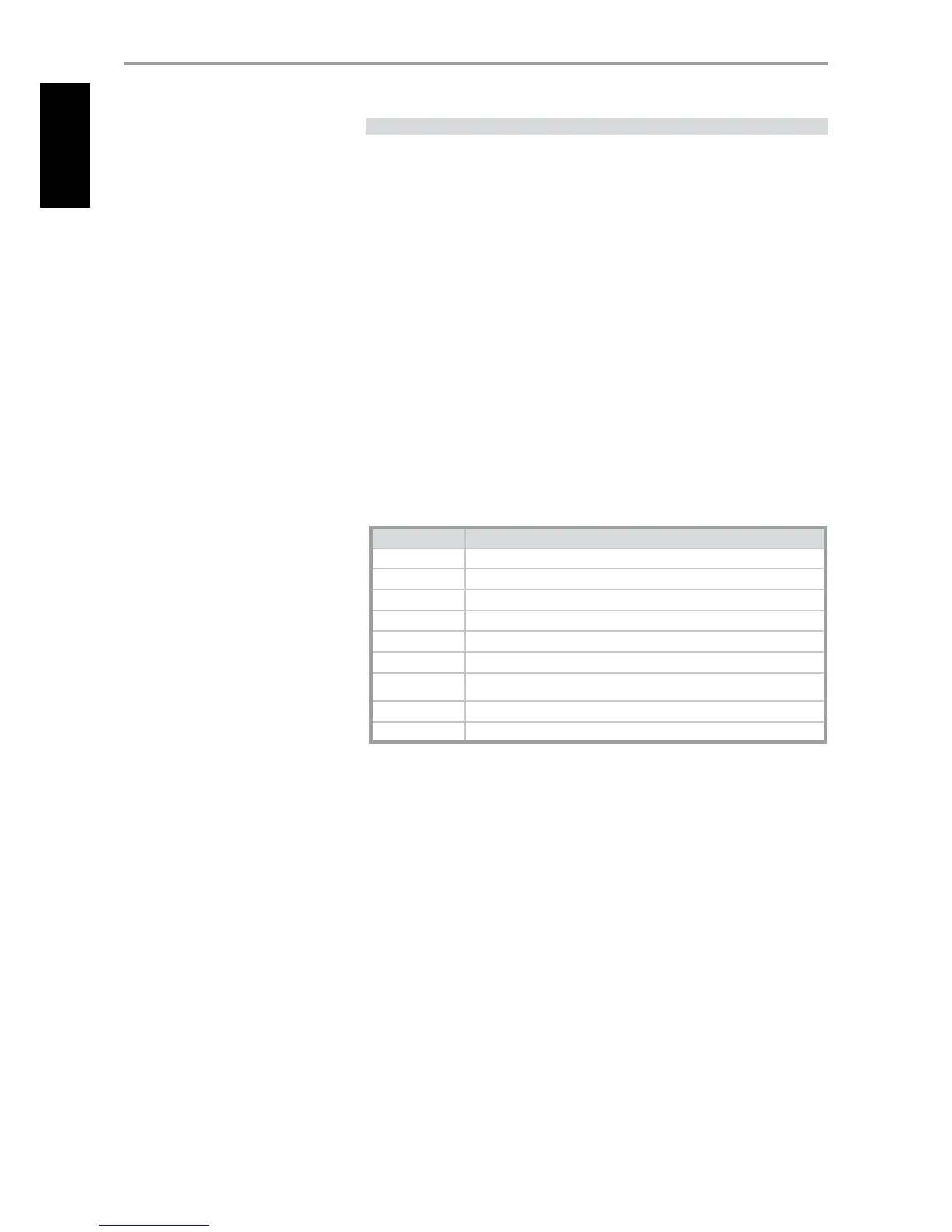
TABLE OF LIBRARY CODES APPLICABLE TO AVR 3 REMOTE CONTROL
LIBRARY CODE NAD PRODUCT DESCRIPTION
11 Zone 2
20 Default library for “DVD” page; C 515BEE, C 545BEE, C 565BEE
21 T 535, T 585, M55, DVD section of L 54, VISO TWO, VISO FIVE
22 T 513, T 514, T 515, T 517
23 T 587
31 IPD 2
40
D
efault librar
y for “TUN” page (for T 737 built-in tuner);
Tuner section of C 725BEE, T 175, T 747, T 755, T 765, T 775, T 785
41 C 422, C 425
42 C 445
IDENTIFICATION OF CONTROLS
REMOTE CONTROL


 To Next Page