LISTENING TO AM/FM RADIO
The T 737’s internal AM/FM tuner oers very high quality sound from radio
broadcasts. The reception and sound quality will always be dependent to a
degree however on the type of antenna(s) used as well as proximity to the
broadcast origin, geography and weather conditions.
ABOUT ANTENNAS
Connect the supplied lead-type FM antenna to the FM antenna input. Extend
the lead. Experiment freely with your antenna placement and orientation until
you get the clearest sound and lowest background noise. Fix the antenna in
the desired position by using thumb tacks, push pins or any suitable means. In
areas of poor FM reception, an exterior FM antenna can improve performance
dramatically. If radio listening is important to you, consider consulting an
antenna installation professional to optimize your system.
The AM loop antenna supplied with the T 737 (or a suitable replacement)
is required for AM reception. Open the clip terminal lever; insert the wire
making sure to match the color-coded (white and black) ends of the
wire to that of the terminal and close the lever ensuring that the lever
locks the wire in place. Testing dierent positions for the antenna may
improve reception; vertical orientation will usually produce the best results.
Antenna proximity to large metal objects (appliances, radiators) may impair
reception, as will attempts to lengthen the wire to the loop.
The supplied AM “loop” antenna will usually provide adequate reception.
However, an exterior AM antenna can be used to improve reception.
Consult an antenna professional for more information.
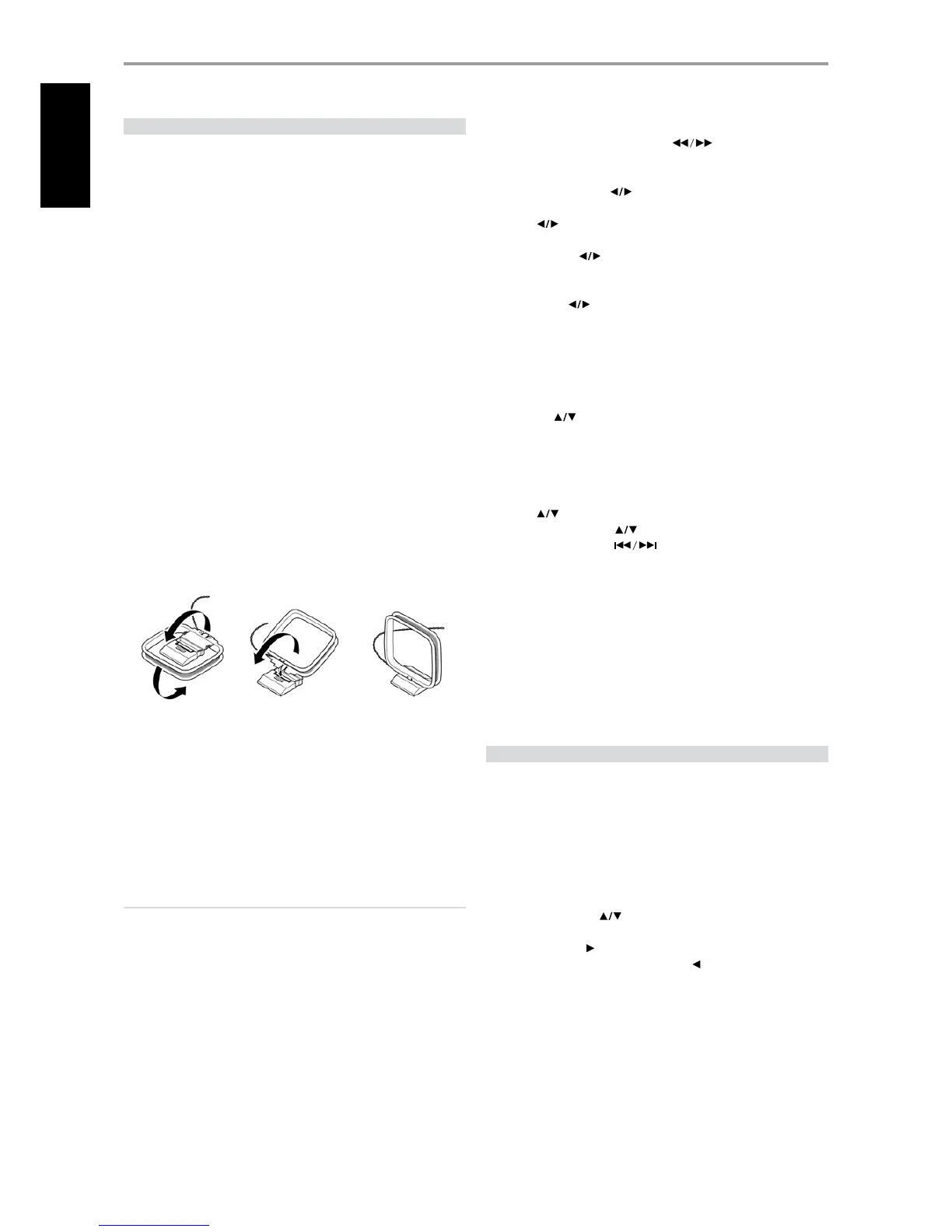
ASSEMBLING THE LOOP ANTENNA
1 Rotate the outer frame of the antenna.
2 Insert the bottom edge of the outer frame into the groove on the
stand.
3 Extend the antenna cord.
SELECTING A TUNER BAND
Press the [AM/FM/DB] button on the AVR 3 while at AMP or TUNER device
selector page. Each subsequent press of either button will toggle you
through AM, FM and XM (or DAB) band. Stop (release button) at your
desired tuner band.
IMPORTANT NOTICE
Navigating or accessing AM or FM functions can be undertaken by
using either the AVR 3 remote control or the front panel buttons. Unless
otherwise specically stated, if the control button or icon button being
referred to is available on the AVR 3 remote control and front panel,
then the reference to said button is applicable to both the AVR 3 remote
control and front panel.
TUNING AM/FM STATIONS
Upon selecting AM or FM band, use [TUNE ] on the AVR 3 – toggle in
to perform slow manual search, press and hold to automatically search.
The front panel or AVR 3’s [ ] buttons can also be used to tune for
stations.
1 Press [ ] on the front panel momentarily to step up or down
between AM or FM frequencies.
2 Press and hold [ ] for more than 2 seconds to search up or down
- the T 737’s tuner will stop at the next suciently strong signal it
encounters.
3 Pressing the [ ] during the search process will stop the search.
SETTING RADIO PRESETS AM/FM/XM
The T 737 can store up to 30 FM, 30 AM and 40 XM stations for immediate
recall.
1 To store a radio preset, rst tune the desired frequency (see above),
then press AVR 3’s [MEMORY] key.
2 Press the [ ] on the front panel or AVR 3 to select a Preset number
to be assigned.
3 Then, press the [MEMORY] key once again to save the station to the
particular Preset number and displaying “P_ _” (the two blank spaces will
correspond to the preset stored number that could be from “01” to the
maximum of “30” or “40”, depending upon the current band) on the VFD.
4 Press [ ] on the front panel or AVR 3 to step up or down between
presets. Press and hold [ ] to “scroll” continuously up or down. The
AVR 3 remote’s [ PRESET ] keys work similarly.
CHOOSING THE TUNER MODE
The AVR 3’s [TUNER MODE] key is a dual-purpose control. Toggle [TUNER
MODE] toggle to switch between FM Stereo mode or FM Mono. In the
normal position, “FM STEREO ON”, only the stations with a strong signal can
be listened to, and the noise between stations is muted.
Pressing the [TUNER MODE] button again (“FM STEREO OFF”) allows distant
and potentially noisy stations to be received. Noise is reduced if the FM
station signal level is less than the FM Stereo threshold (since mono FM is
inherently less noise-prone) though at the sacrice of the stereo eect.
ABOUT USER NAMES
You can assign an eight character “User Name” to each radio preset, which
will show in the front-panel readout whenever that preset is recalled.
ENTERING USER NAMES
To name a radio preset “NEWS”, follow the procedure as below. The buttons
referred below are
1 Recall the desired radio preset.
2 Then, press and hold [INFO] on the AVR 3 until the display shows a
ashing cursor point.
3 Use the front panel [ ] buttons to select the rst character of the
name (“N” from the alphabetical list).
4 Press front panel [ ] button to select the character and correspondingly
move forward to the next position. (Press [ ] to go back to the previous
character). Repeat this process for each character in sequence.
5 Press the [MEMORY] key again to store the User Name and exit the text-
entry mode.
OPERATION
USING THE T 737 LISTENING TO AM/FM/XM RADIO


 To Next Page