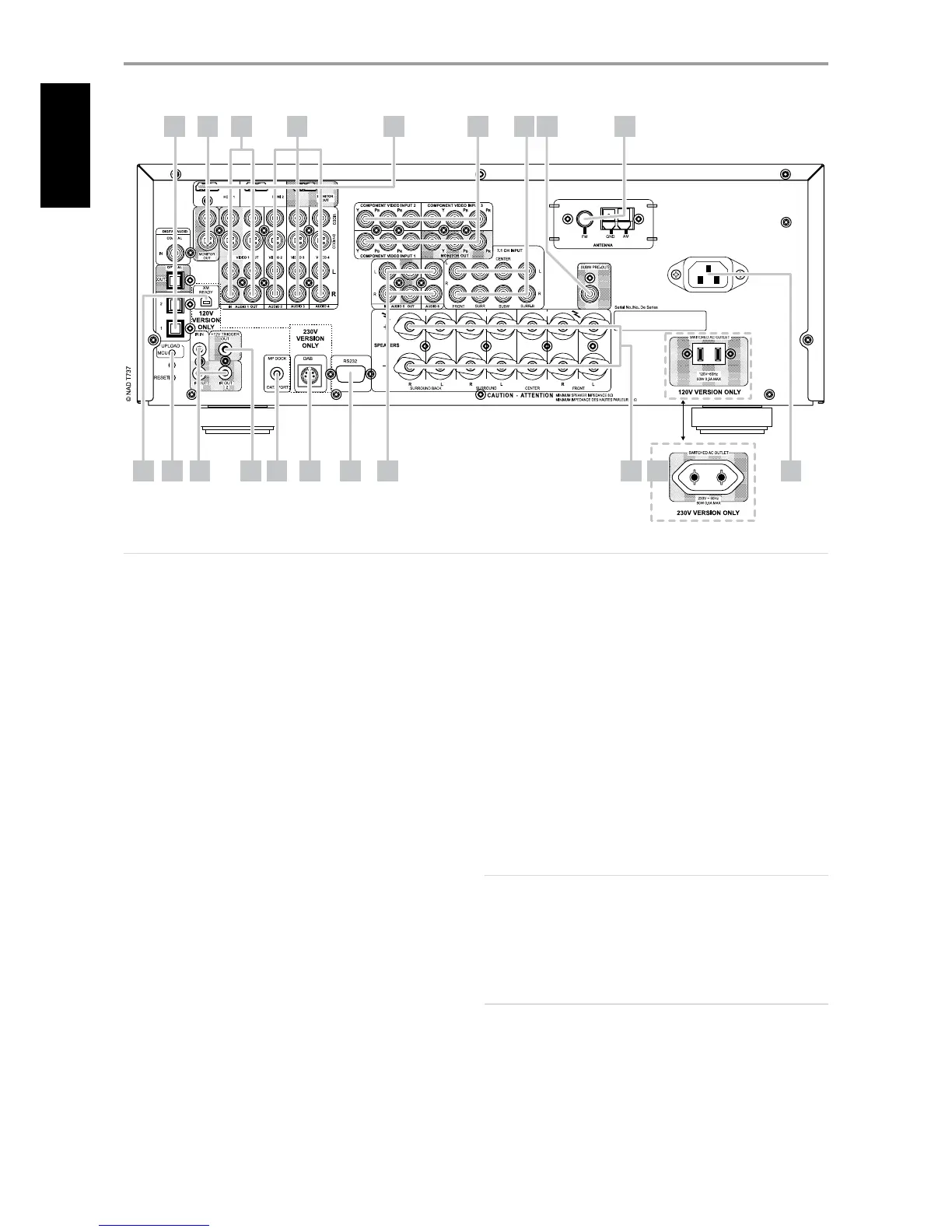
1 DIGITAL AUDIO IN/OUT (COAXIAL IN, OPTICAL 1-2): Connect
to the corresponding optical or coaxial S/PDIF-format digital output
of sources such as CD or DVD players, HDTV or satellite tuners and
other components. Coaxial and Optical digital input association is
congurable via the Source Setup item of the Setup Menu OSD.
DIGITAL AUDIO OUT (OPTICAL): Connect the optical digital OUT port to
the corresponding S/PDIF digital input of a compatible device such as CD
recorders, receivers, computer soundcard or other digital processors.
2 MONITOR (S-VIDEO, VIDEO): Connect to video input of the monitor/
television using quality dual-RCA and/or S-Video cables designed for
video signals. In general, the S-Video connection is superior and should
be used if your TV/monitor provides the corresponding input.
3 AUDIO 1 IN/OUT, VIDEO/S-VIDEO 1 IN/OUT: Connect the T 737’s
AUDIO 1 OUT/VIDEO 1 OUT/S-VIDEO 1 OUT jacks to the analog
audio/video input of a recording component such as a cassette deck,
DVD recorder or to an outboard audio/video processor. Connect the
T 737’s AUDIO 1 IN/VIDEO 1 IN/S-VIDEO 1 IN jacks to the component’s
corresponding output.
The signal present at these AUDIO 1 OUT/VIDEO 1 OUT/S-VIDEO 1 OUT
jacks are determined by the source last selected via the front panel SOURCE
buttons or the AVR 3’s input select buttons. There will be no output at
AUDIO 1 OUT/VIDEO 1 OUT/S-VIDEO 1 OUT port when Source 1 is the
selected source input. This prevents feedback through the recording
component thereby preventing possible damage to your speakers.
4 AUDIO 2 IN/VIDEO/S-VIDEO 2 IN, AUDIO 3 IN/VIDEO/S-VIDEO 3
IN, AUDIO 4/VIDEO/S-VIDEO 4 IN: These comprise the T 737’s other
principal inputs. Connect these S-Video, composite video, and analog
stereo audio input ports to the corresponding output ports of source
components such as DVD players and HDTV/satellite tuners. Refer also
to “AUDIO 1 IN/OUT, VIDEO/S-VIDEO 1 IN/OUT” discussion above.
AUDIO 4 IN and S-VIDEO IN 4 are also the assigned default ports for the
audio/video output of the separately sold NAD IPD (NAD Dock for iPod)
1, NAD IPD 2 and later variants.
5 HDMI (HDMI 1-2, HDMI MONITOR OUT): Connect HDMI inputs to
the HDMI OUT connectors of source components such as DVD player,
BD player or HDTV satellite/cable box. Connect the HDMI Monitor OUT
to a HDTV or projector with HDMI input.
NOTE
The HDMI ports support transmission of video signals only. For HDMI
audio signal, connect your HDMI source component’s S/PDIF-format
digital output signal to the applicable T 737 digital audio input ports.
You can then correspondingly assign this HDMI digital audio input as
your particular HDMI 1 or HDMI 2 digital audio source via the Source
Setup item of the Setup Menu OSD.
WARNING
Before connecting and disconnecting any HDMI cables, both the T 737
and the ancillary source must be powered OFF and unplugged from the
AC outlet. Failure to observe this practice may cause permanent damage
to all equipment connected via HDMI sockets.
IDENTIFICATION OF CONTROLS
REAR PANEL
ATTENTION!
Please make sure that the T 737 is powered o or unplugged before making any connections. It is also advisable to power down or unplug all associated
components while making or breaking any signal or AC power connections.
1 2 3 4 5 6 7 8 9
15 16 181713121110 14 2019


 To Next Page