W415-0931 / A / 11.04.10
10
5.0 OPERATING INSTRUCTIONS
Once the appliance has been plugged in to a grounded electrical outlet, it is ready to operate.
NOTE: Ensure the house circuit breakers for the power supply are turned on. In the event of a power
failure, both the fl ame and function will remain turned off when the power is restored.
The main power switch is located on the top right hand side of the appliance.
The "|" indicates ON and "O" indicates OFF. Push the switch to "|" to turn on the appliance.
5.1 MAIN POWER SWITCH
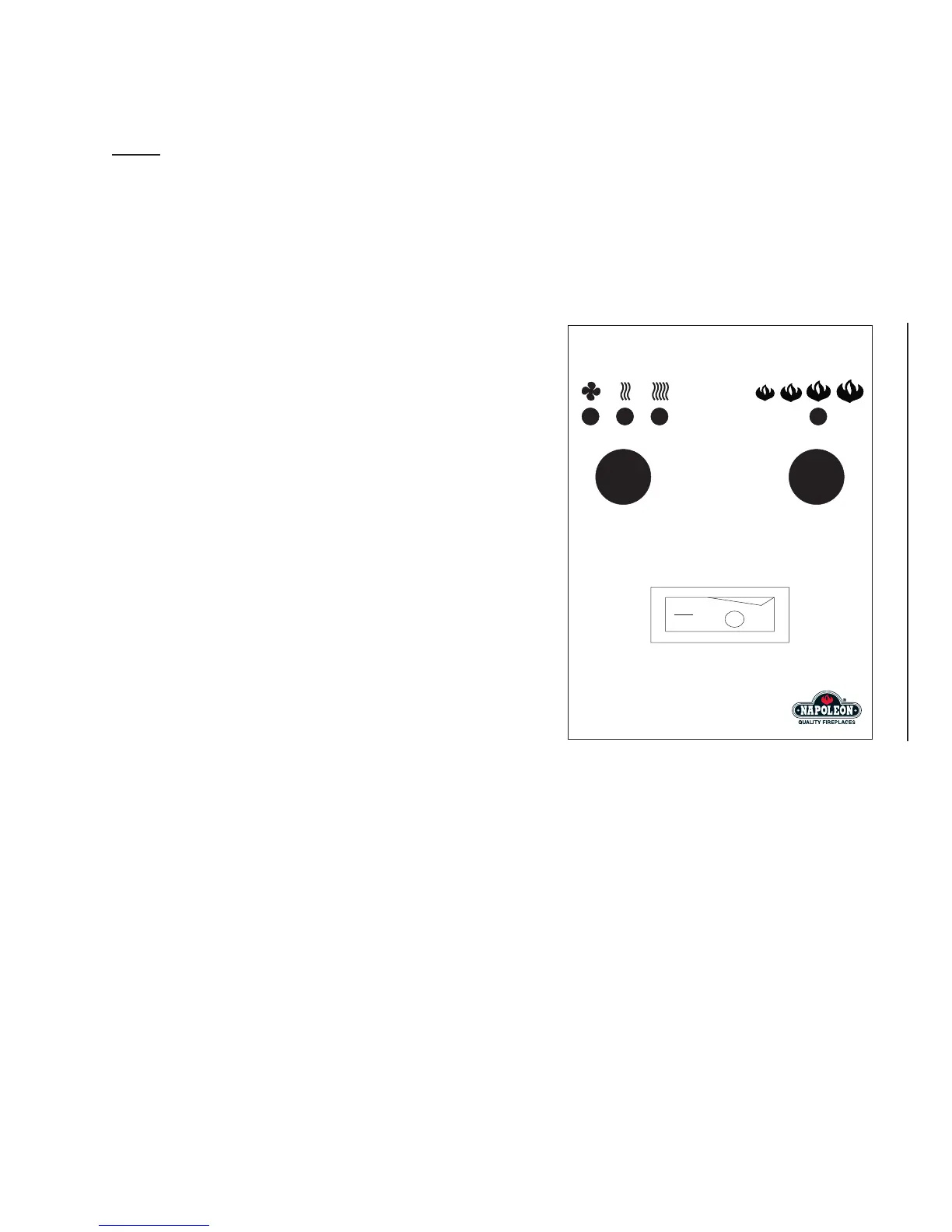
5.2 OPERATING BY CONTROL PANEL
A. Make certain the appliance's main power switch is at the
ON position.
B. To activate the heater, press the function button. Press
and release the function button to cycle through the
settings:
• Press the function button once to turn on the fan only.
• Twice to turn on the fan and the 750W heater.
• Three times to turn on the fan and the 1500W heater.
• Four times to turn both the fan and heater off.
C. To adjust the fl ame height and ember bed brightness,
press the fl ame button. There are four brightness levels
to cycle through and an off setting.
D. To turn off the appliance, switch the main power switch to
OFF.




 To Next Page