Copying
40
2
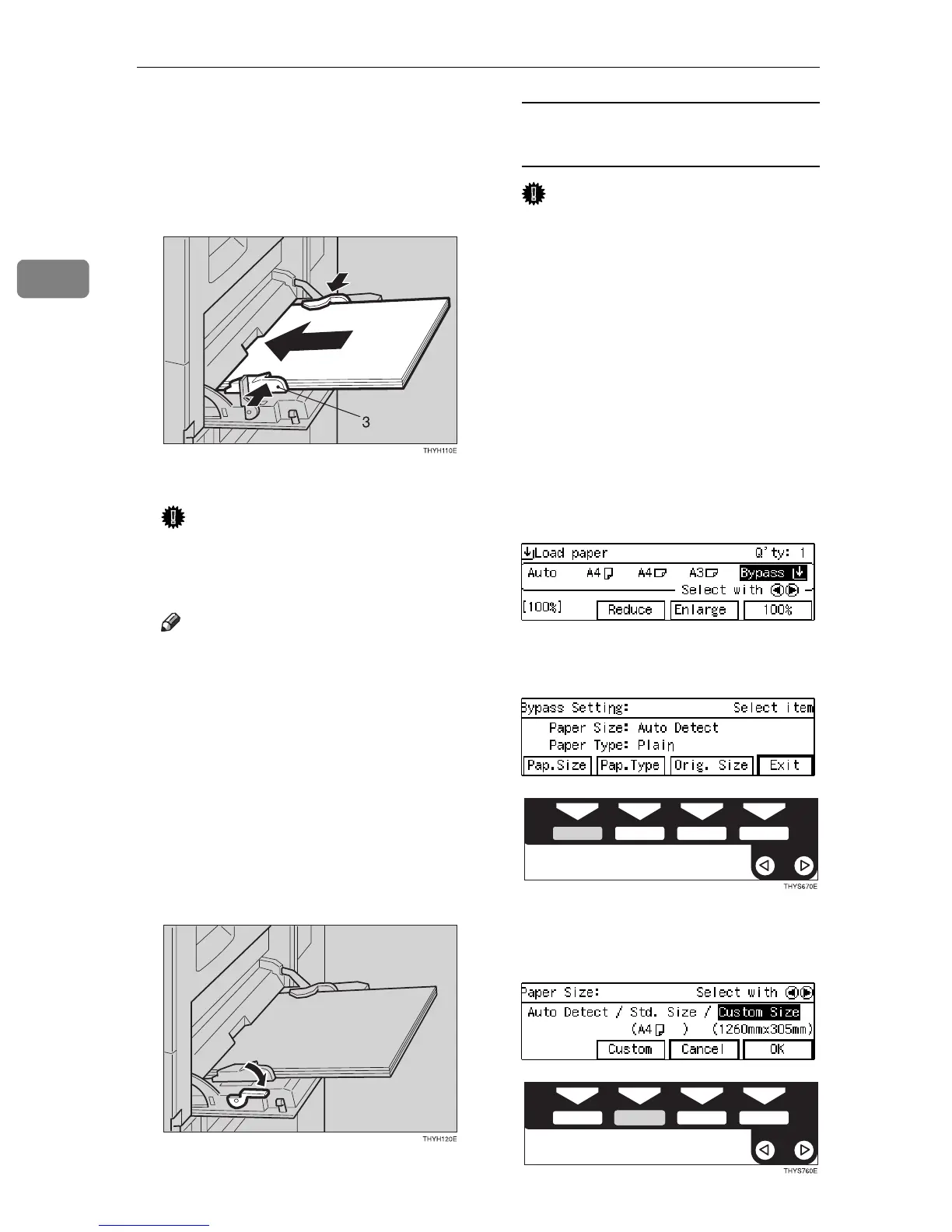
C Lightly insert the copy paper face
down until it stops. Adjust the
guides to copy paper size.
The k indicator on the display is
automatically selected.
3: Paper guide
Important
❒ If the guides are not flush with
the copy paper, a skew image or
paper misfeeds might occur.
Note
❒ Do not stack paper over the lim-
it mark; otherwise a skew image
or paper misfeeds might occur.
❒ Fan paper to get air between the
sheets and avoid a multi-sheet
feed.
❒ When you set a OHP transpar-
encies, make sure that its front
and back faces are properly po-
sitioned.
D Lower the paper hold lever.
When copying onto custom size
copy paper
Important
❒ You should specify the size of
copy paper to avoid paper mis-
feeds.
❒ If you select Standard or Cus-
tom as the Paper Size setting,
these functions will remain in
effect even after Auto Clear or
pressing the {
Clear Modes
} key.
You can alter this behavior by
changing “12. Reset Bypass
Set”. See ⇒ P.80 “1. General Fea-
tures
3
/
4
”
A Make sure the
[
Bypass
]
is se-
lected.
B Press the {
{{
{
#
}
}}
} key.
C Press the
[
Pap. Size
]
key.
D Select
[
Custom Size
]
with the
0
00
01
11
1 keys. Then press the
[
Cus-
tom
]
key.



 To Next Page