Copying
44
2
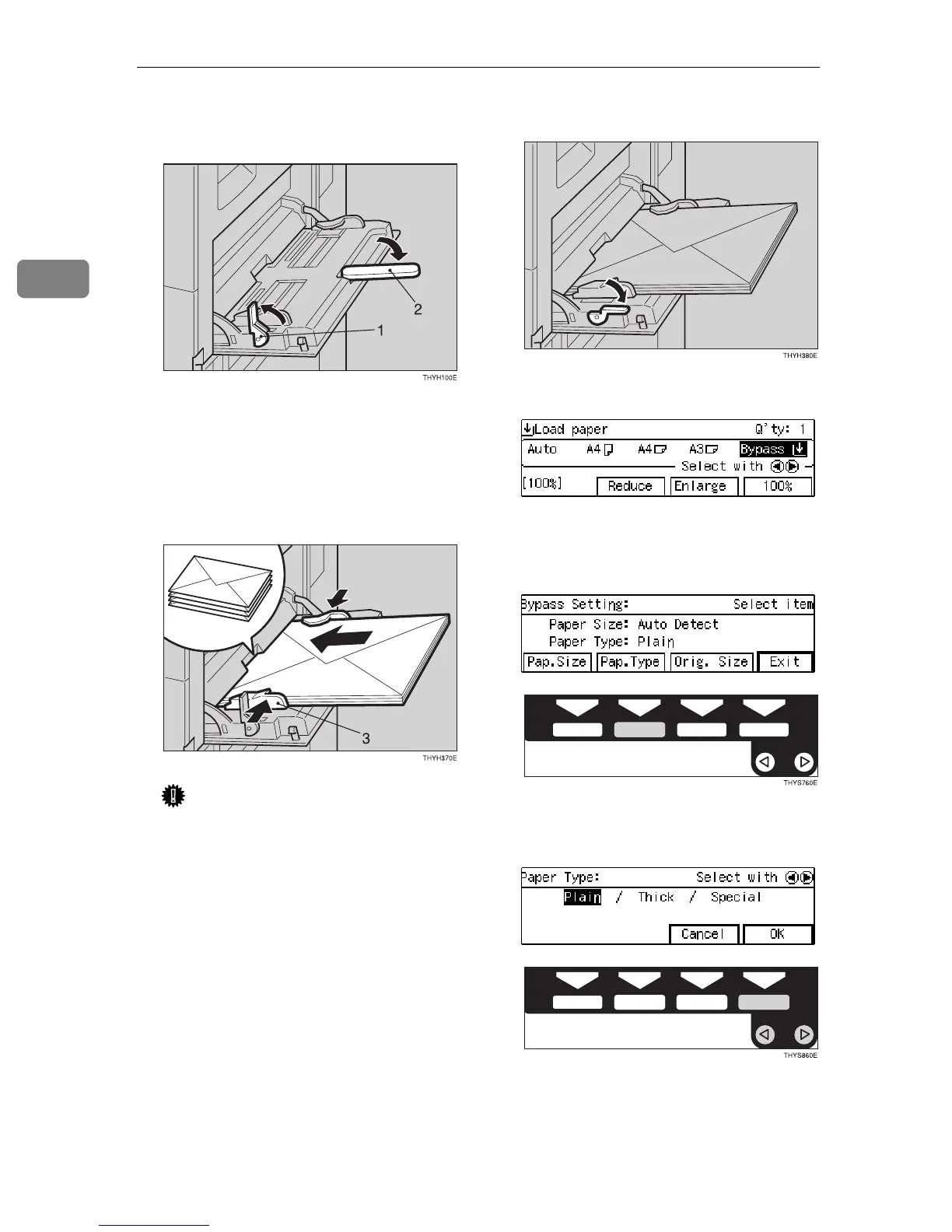
B Lift the paper hold lever. Then
swing out the extender.
1: Paper hold lever
2: Extender
C Lightly insert the envelopes face
down and the sides of the flaps on
the right as shown below.
Important
❒ Make sure that the envelope
flap are securely folded down,
and that there is no air inside
the envelopes.
❒ You can load up to 10 envelopes
(72 – 90g/m
2
, 19 – 24 lb). Do not
stack envelope over the limit
mark, otherwise a skew image
or paper misfeeds might occur.
D Lower the paper hold lever.
E Make sure the
[
Bypass
]
is selected.
F Press the {
{{
{
#
}
}}
} key.
G Press the
[
Pap.Type
]
key.
H Select
[
Thick
]
with the 0
00
01
11
1 keys.
Then press the
[
OK
]
key.



 To Next Page