Copying from the Bypass Tray
45
2
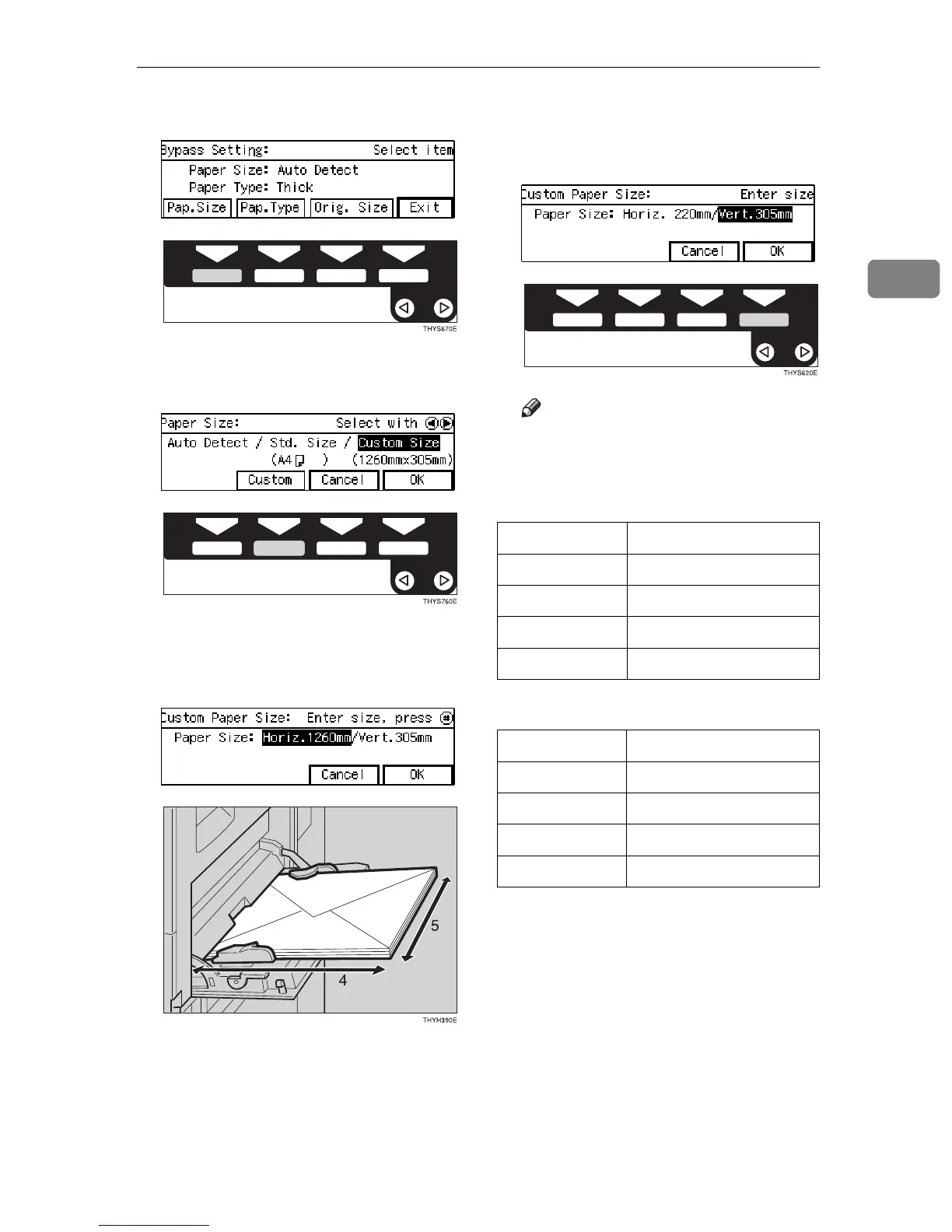
I Press the [
Pap.Size
] key.
J Select [
Custom Size
] with the 0
00
01
11
1
keys. Then press the [
Custom
] key.
K Enter the horizontal size of the
envelope with the {
{{
{
Number
}
}}
} keys,
then press the {
{{
{
#
}
}}
} key.
4: Horizontal
5: Vertical
L Enter the vertical size of the enve-
lope with the {
{{
{
Number
}
}}
} keys, then
press the [
OK
] key.
Note
❒ You have to enter the size as fol-
lows:
❖
❖❖
❖
Metric version
❖
❖❖
❖
Inch version
❒ To change the number entered,
press the {
Clear/Stop
} key and
enter the new number.
❒ When you specify the paper
size, ! appears on the display
to indicate bypass tray copying.
Horizontal
×
Vertical
Com #10 Env 241.3
×
104.8mm
C6 Env 162
×
114mm
DL Env 220
×
110mm
Monarch Env 190.5
×
98.4mm
Horizontal
×
Vertical
Com #10 Env 9.5"
×
4.2"
C6 Env 6.4"
×
4.5"
DL Env 8.7"
×
4.4"
Monarch Env 7.5"
×
3.9"



 To Next Page