• start the motor.
9. Use and programming
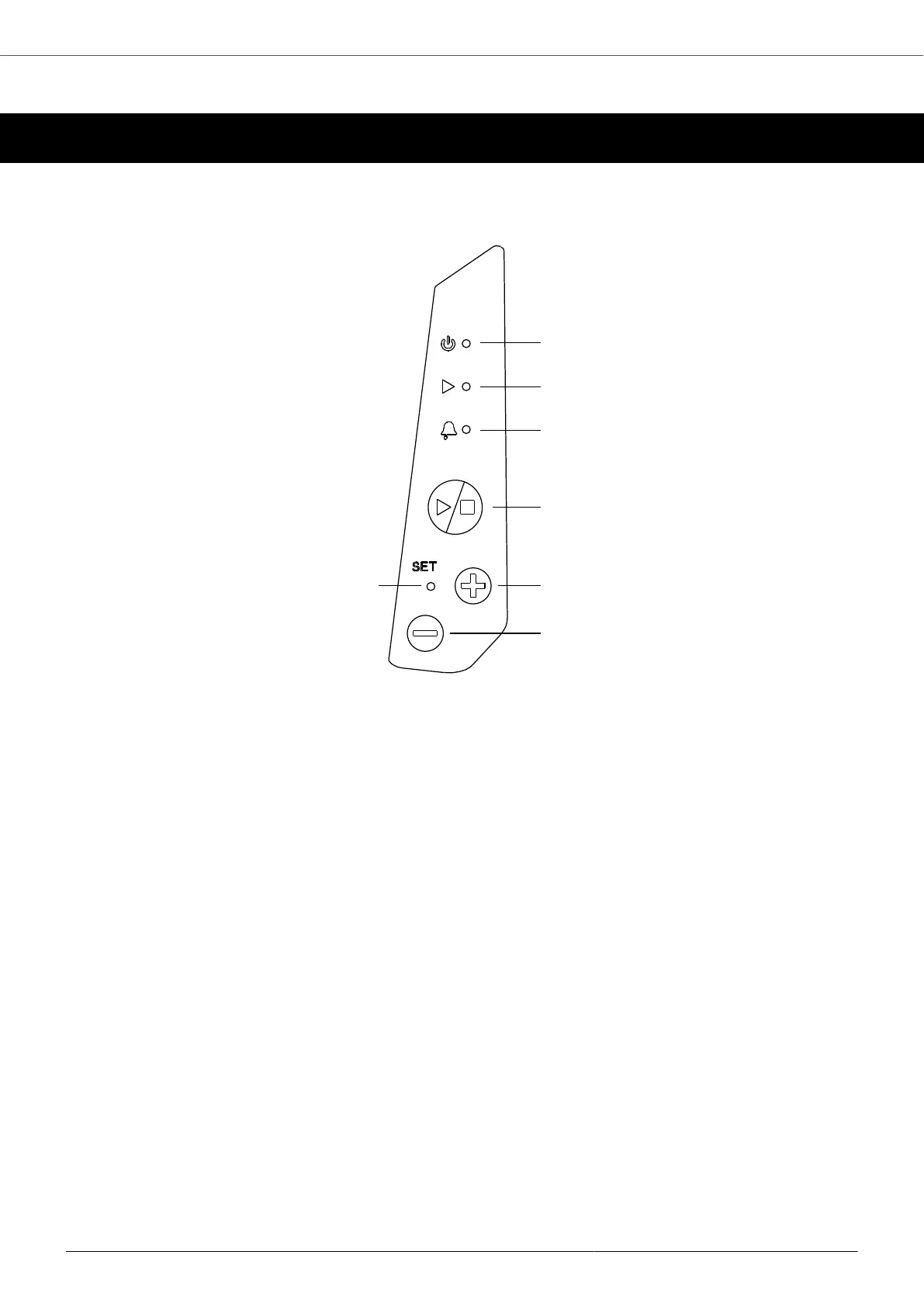
9.1. Keyboard (version without display)
1. Red LED ON: the unit is powered with the correct power supply voltage.
FLASHING red led: undervoltage.
2. Green LED ON: motor running. Green led OFF: motor stopped. When the unit is in "constant value" control
mode, the green LED flashes with a greater frequency the closer the measured value is to the set value. If the
measured value is the same as the set value, the green LED is constantly on.
3. The yellow LED flashes with a variable frequency according to the type of alarm. See the chapter on alarms.
4. Starting and stopping the engine. If the unit is in an alarm state, it is possible to try to reset the alarm by
pressing the key twice.
5. +: parameter scrolling / parameter editing
Use the + key to increase the set value or frequency. In order to allow the set value to be edited, it is necessary
to hold down the + or - button for more than 5 seconds until the set value to be edited starts flashing. To confirm
the set value, simply wait 5 seconds or press the START/STOP button.
6. -: parameter scrolling / parameter editing
Use the - key to decrease the set value or frequency. In order to allow the set value to be edited, it is necessary
to hold down the + or - button for more than 5 seconds until the set value to be edited starts flashing. To confirm
the set value, simply wait 5 seconds or press the START/STOP button.
7. Green LED is ON when it is possible to change the set value (constant value mode) or the set frequency (fixed
frequency mode). Press and hold the Up key or the Down key for more than 5 seconds in order to allow the
set adjustment. If the SET led is off, it is not possible to change the set value. When two or more units are
in COMBO mode, the SET LED flashes only in correspondence with the master unit. In this way it is possible
to understand which unit in the group is the master and act on it to start or stop the system. The green LED
flashes quickly when the unit is connected to a smartphone for control via the App.
MIDA
29



 To Next Page