In some cases, however, it may be necessary to increase (in case of frequency oscillations) or to lower (in case of
overcurrent or igbt trip alarms) the "FOC dynamic" setting in the motor parameters menu (default password 002)
according to the following table:
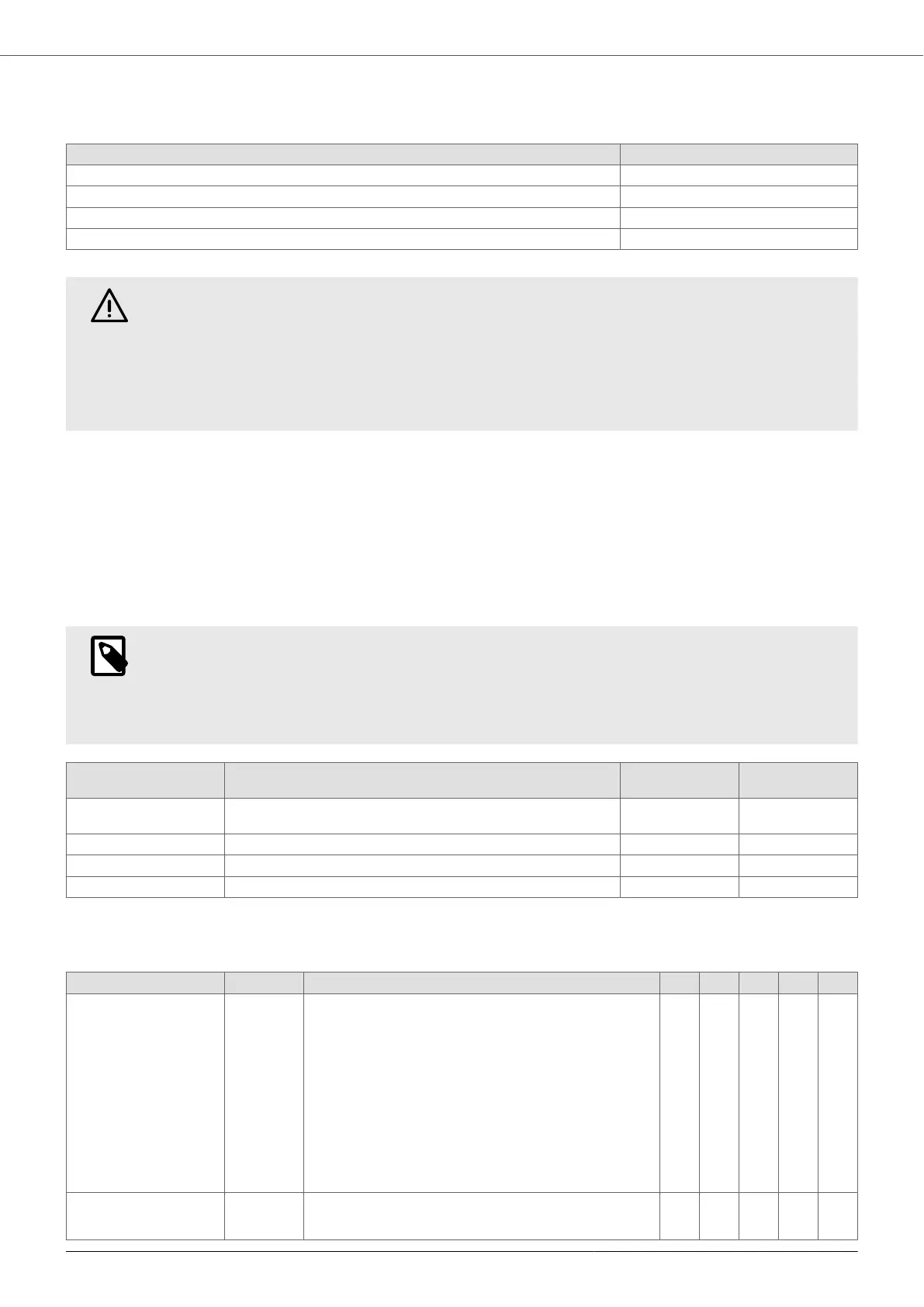
Configuration FOC dynamics
Motor cables shorter than 100 m and no filter between inverter and motor. 200
Motor cables shorter than 100 m and a dV/dt filter between the inverter and the motor. 150
Motor cables longer than 100 m and a dV/dt filter between the inverter and the motor. 100
Presence of a sine filter between the inverter and the motor. 50 or 40 or less
WARNING
The incorrect configuration of the FOC dynamics may cause:
• Speed oscillations if the FOC dynamics is too slow.
• Overcurrent or igbt trip alarms if the FOC dynamics is too fast.
Intervene promptly by appropriately adjusting the "FOC Dynamics" parameter if the conditions listed
above are present. Failure to act may lead to damages to the inverter, the motor and the system.
9.6. Menu
Access to the menus is password-protected at two levels:
• Installer level: Allows editing the parameters related to pump operation in the hydraulic system on which it is
installed. Password 1, default 001.
• Advanced level: Allows editing the parameters that so critical that they may compromise the life of the device,
the pump, and the system if they are set incorrectly. Password 2, default 002.
Within each menu, it is possible to change the relative access password.
NOTE
When an incorrect password is entered to access both the installer and advanced level, the parame-
ters can only be displayed but not edited.
In case of loss of the password, contact the technical support service to obtain the universal pass-
word.
Menu Description Level Default
password
Control parameters Menu of parameters for controlling the pump in the hydraulic system in
which it is installed.
Installer 001
Motor parameters Menu of parameters for motor control Advanced 002
IN/OUT parameters Menu of parameters for analog and digital inputs and outputs Installer 001
Connectivity parameters Menu of parameters for connectivity and external communication. Installer 001
9.7. Control parameters
Parameter Default Description 1 2 3 4 5
Control mode
1. Constant value
2. Fix speed
3. Constant value 2 set
4. Fix speed 2 values
5. External speed
Constant
value
The following control modes can be selected:
1. Constant value: the device varies the speed of the pump in
such a way as to keep the set value constant regardless of
water consumption.
2. Fix speed: the device powers the pump at the set frequen-
cy.
3. Constant value 2 set: two desired values can be selected
by opening or closing digital input 2.
4. Fix speed 2 values: two desired frequency values can be
selected by opening or closing digital input 2.
5. External speed: it is possible to control the motor frequen-
cy through an analog signal connected to analog input 4.
x x x x x
Control mode aux
XXXXXXXX
Constant
value
Operate on digital input 4 to switch from the main control mode
to the auxiliary control mode and vice versa.
x x x x x
MIDA
33



 To Next Page