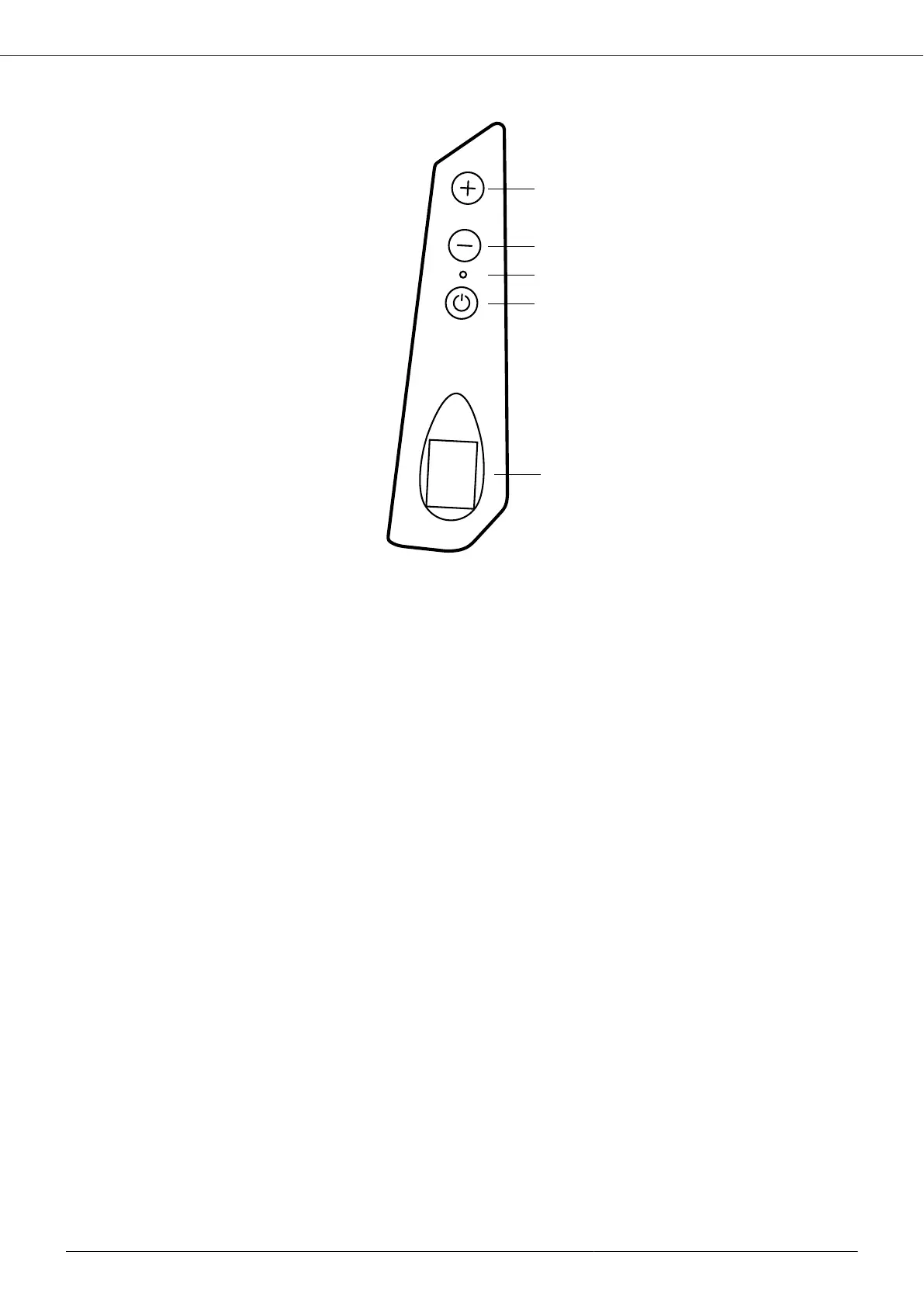
9.2. Keyboard and display
1. +: parameter scrolling / parameter editing
Use the + key to increase the set value or frequency. In order to allow the set value to be edited, it is necessary
to hold down the + or - button for more than 5 seconds until the set value to be edited starts flashing. To confirm
the set value, simply wait 5 seconds or press the START/STOP button.
2. -: parameter scrolling / parameter editing
Use the - key to decrease the set value or frequency. In order to allow the set value to be edited, it is necessary
to hold down the + or - button for more than 5 seconds until the set value to be edited starts flashing. To confirm
the set value, simply wait 5 seconds or press the START/STOP button.
3. Signaling LEDs:
• RED on: the device is powered with the correct supply voltage and is in stand-by.
• GREEN: motor running.
• YELLOW flashing: alarm condition.
4. START / STOP: motor start / stop
5. DISPLAY
Keep the START / STOP key pressed down for at least 5 seconds to activate the START/STOP key lock function
through which it is only possible to scroll and view the operating parameters, using the + and - keys; this does not
allow starting or stopping the motor. Press the START/STOP button again for at least 5 seconds to deactivate the
lock.
Keep the + and - keys pressed for at least 5 seconds to reverse the display.
9.3. Control via App
The device can be controlled using a smartphone or tablet equipped with Bluetooth BTLE connectivity and with the
App Nastec NOW installed. The App is available for Android and iOS and may be downloaded, free of charge, from
the respective online stores.
Through the application it is possible to:
• Monitor multiple operating parameters simultaneously.
• Obtain energy consumption statistics and check alarm history.
• Run reports with the possibility of adding notes, images and send them by e-mail or store them in the digital
archive.
• Create schedules, save them in the archive, copy them to other devices, and share them among multiple users
• Control a device remotely, via Wi-Fi or GSM, using a smartphone placed nearby as a modem.
MIDA
30



 To Next Page