28
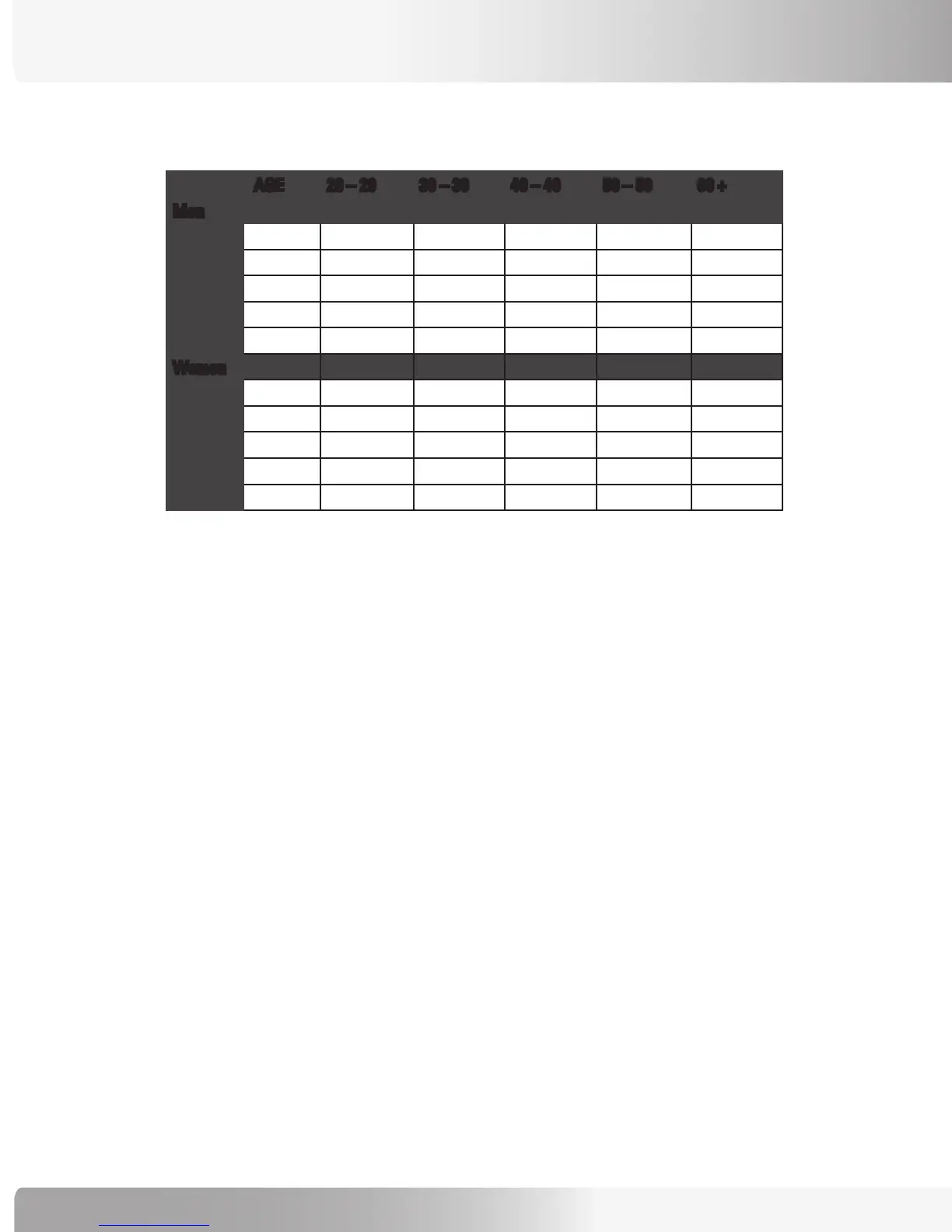
Fitness Rating Norms (VO2max)
AGE 20 – 29 30 – 39 40 – 49 50 – 59 60 +
Men
High 51.4 + 50.4 + 48.2 + 45.3 + 42.5 +
Good 51.3 – 46.8 50.3 – 44.6 48.1 – 41.8 45.2 – 38.5 42.4 – 35.3
Average 46.7 – 42.5 44.5 – 41.0 41.7 – 38.1 38.4 – 35.2 35.2 – 31.8
Fair 42.4 – 39.5 40.9 – 37.4 38.0 – 35.1 35.1 – 32.3 31.7 – 28.7
Low 39.4 or less 37.3 or less 35.0 or less 32.2 or less 28.6 or less
Women
High 44.2 + 41.0 + 39.5 + 35.2 + 35.2 +
Good 44.1 – 38.1 40.9 – 36.7 39.4 – 33.8 35.1 – 30.9 35.1 – 29.4
Average 38.0 – 35.2 36.6 – 33.8 33.7 – 30.9 30.8 – 28.2 29.3 – 25.8
Fair 35.1 – 32.3 33.7 – 30.5 30.8 – 28.3 28.1 – 25.5 25.7 – 23.8
Low 32.2 or less 30.4 or less 28.2 or less 25.4 or less 23.7 or less
1 The American College of Sports Medicine, Guidelines for Exercise Testing and Prescription, 6th Edition, Lippincott WIlliams
& WIlkins, Philidelphia, PA, 2000, p. 77.
Calorie Goal
The Calorie Goal program allows the user to define a target number of calories to burn during their
workout.
To use the Calorie Goal Program:
1. Press the MORE WORKOUTS key. Then use the Level UP or DOWN keys to scroll through the
program options. When the console displays “CALORIE GOAL”, press [ENTER] to accept.
2. The console will then display “ENTER WEIGHT – LBS” (or “ENTER WEIGHT – KG” if in Metric mode).
Enter your weight using the numeric keypad and press [ENTER). Or, press [ENTER] to accept the
default value.
3. The console will display “ENTER LEVEL”. Enter the desired intensity level using the numeric keypad
and press [ENTER]. Or, press [ENTER] to accept the default value.
4. The console will then display “ENTER CALORIES”. Enter the desired calorie value using the numeric
keypad and press [ENTER]. Or, press [ENTER] to accept the default value.
5. The console will display “ENJOY WORKOUT” and the timer will begin.
CALORIE GOAL PROGRAM


 To Next Page