Confidential and proprietary information of NCRVoyix Corporation.
Unauthorized use, reproduction and/or distribution is strictly prohibited.
13
Installing the Tri-Light/Lane Light with IPCamera
Assembly
To install the new Tri-Light/Lane Light with IPCamera Assembly, follow these steps:
Note
Ensure that the NCR Customer Helpdesk is informed when the Tri-Light/Lane
Light with IPCamera is installed in the store.
1. Do the following:
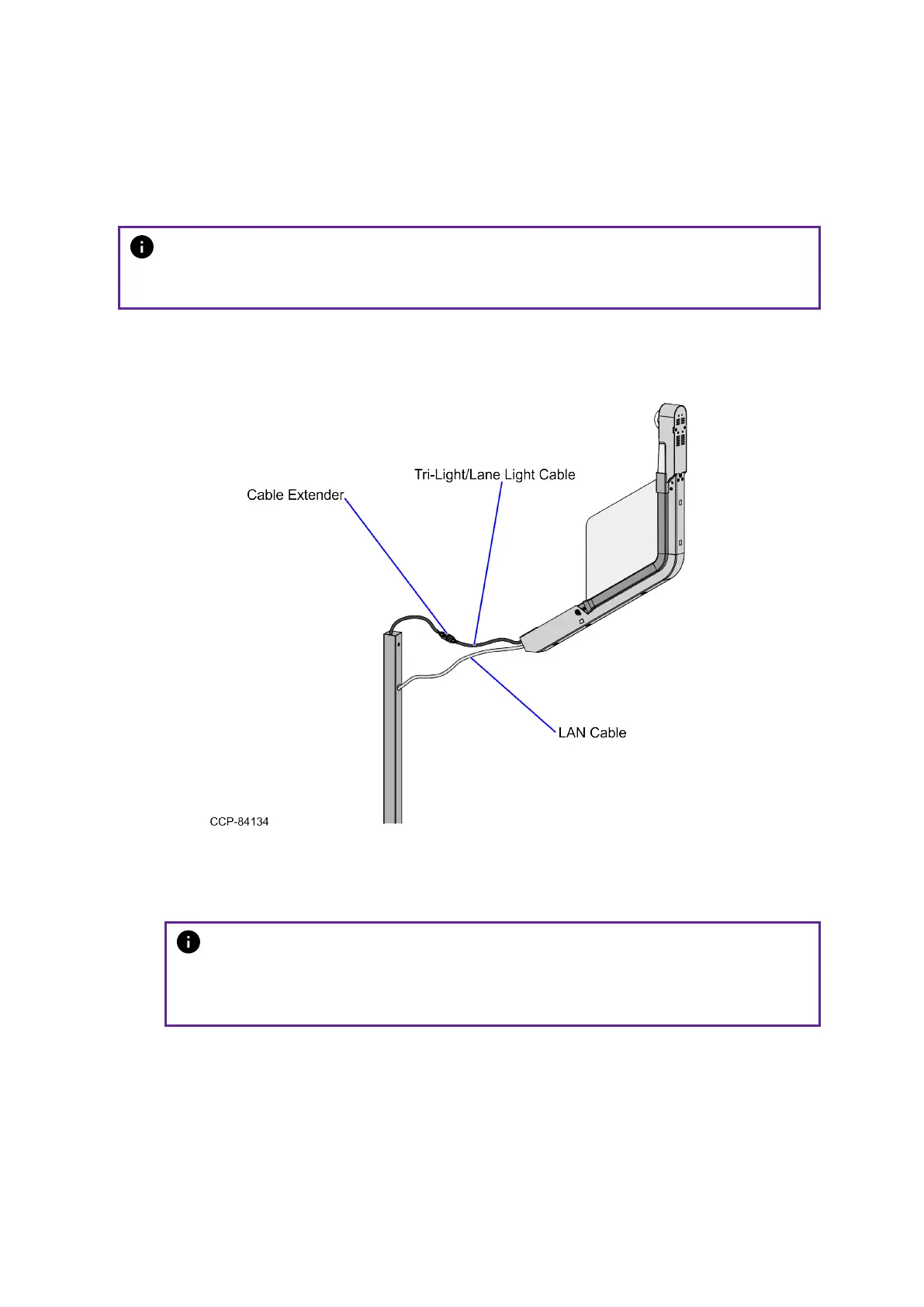
a. Route the LANCable into the Tri-Light/Lane Light Pole.
b. Connect the Tri-Light/Lane Light Cable to the cable extender.
2. Orient the Tri-Light/Lane Light Assembly so that the Lane Light faces the front of the
unit.
3. Insert the Tri-Light/Lane Light Assembly into the Tri-Light/Lane Light Pole.
Note
Ensure the pole holes are aligned and that the LAN Cable and the Tri-
Light/Lane Light Cable do not intertwine when installing the Tri-Light/Lane
Light assembly to the Tri-Light/Lane Light Pole.


 To Next Page