2
,
Be sure to turn the phone off before inserting/removing the SIM card. If not, damage to the SIM card can occur.
Inserting a SIM card
☛
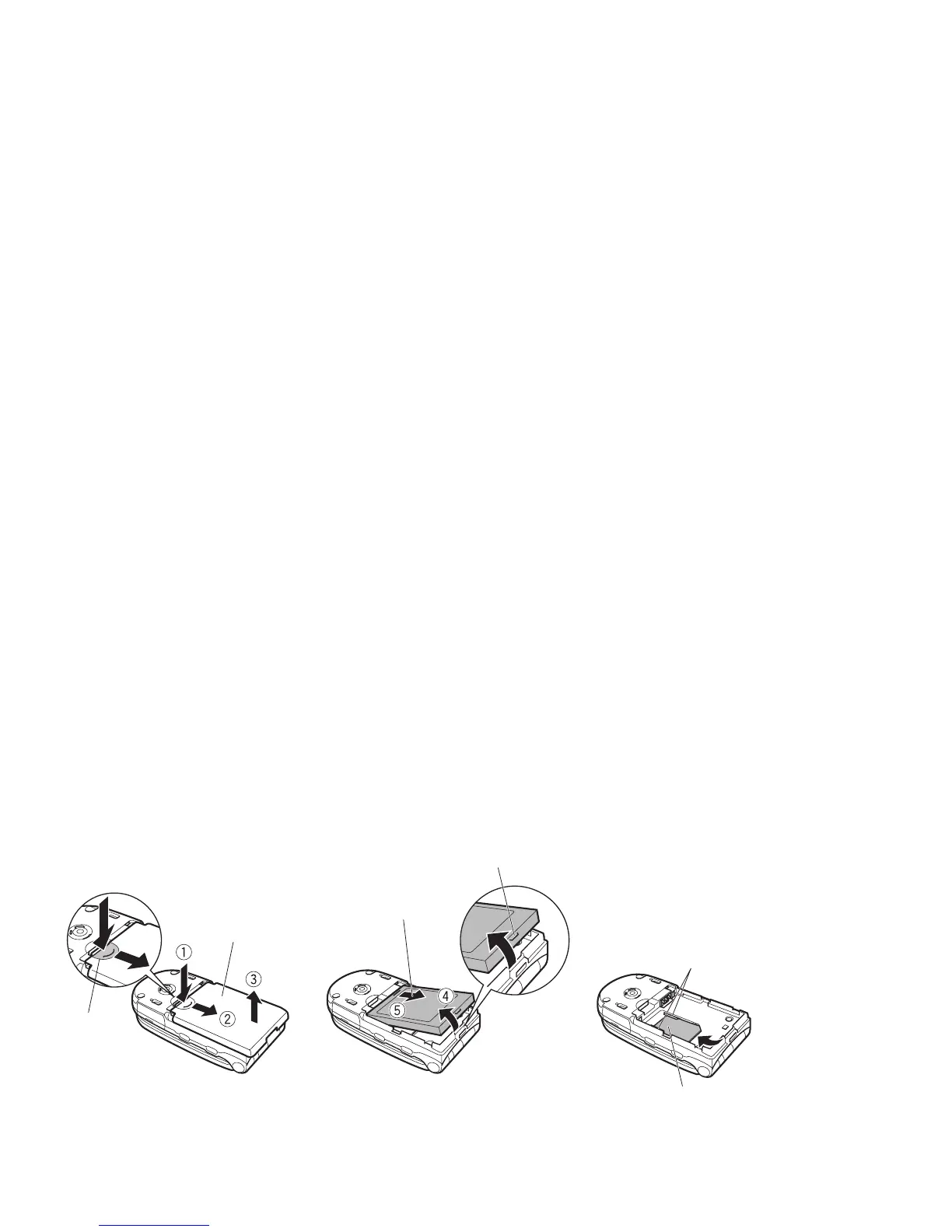
While pressing down the area (A) of the rear cover, especially the place indicated by the arrow ➀, slide the rear cover in the direction of arrow ➁
with your finger tip. Then, lift the cover up in the direction of arrow ➂ to remove it.
☛
Lift the knobs of the battery pack up in the direction of arrow ➃. Then slide the battery pack out in the direction of arrow ➄.
☛
Insert the SIM card sliding it under the holders of the both sides. Slide the SIM card until it locks.
,
Do not scratch the phone body or the rear cover with your finger nail, when removing the rear cover.
,
Do not press too firmly on the rear cover and the phone body. The use of excessive force could damage the rear cover and the phone body.
,
If the SIM card is not fully inserted when the battery is replaced, damage to the SIM card can occur.
,
Do not scratch the holders of the both sides when inserting or removing a SIM card.
2
If the SIM card is already fitted, see “Start-up” on page 3.
Removing a SIM card
☛
With the battery removed, remove the SIM card sliding it lightly.
Finger tab
Battery
Holder
SIM card
Rear cover
(A)



 To Next Page