EasyManua.ls Logo

NEC PC-8201A - Page 153

NEC PC-8201A
219 pages
Print Icon
To Next Page IconTo Next Page
To Previous Page IconTo Previous Page
Loading...
Chapter
7
If
you
get
the
Memory
full”
message,
you
will
have
to
create
some
space
in
the
RAM
by
moving
or
deleting
(KILL)
some
of
your
files
if
you
want
to
complete
the
editing
of
your
document.
TAB
KEY
FUNCTION:
Used
to
arrange
columns
in
a
chart
or
table.
DESCRIPTION:
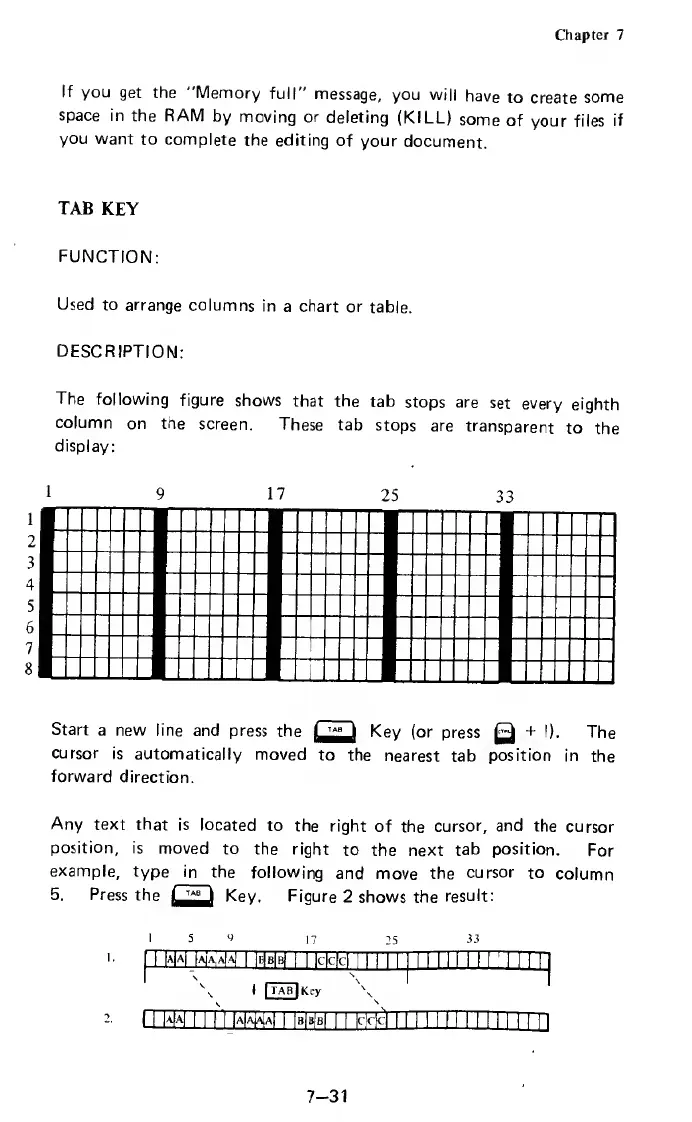
The
following
figure
shows
that
the
tab
stops
are
set
every
eighth
column
on
the
screen.
These
tab
stops
are
transparent
to
the
display:
9
17
25
33
Start
a
new
line
and
press
the
Key
(or
press
Q
+
I).
The
cursor
is
automatically
moved
to
the
nearest
tab
position
in
the
forward
direction.
Any
text
that
is
located
to
the
right
of
the
cursor,
and
the
cursor
position,
is
moved
to
the
right
to
the
next
tab
position.
For
example,
type
in
the
following
and
move
the
cursor
to
column
5.
Press
the
Key.
Figure
2
shows
the
result:
I
5
V
17
25
33
insBiraiiBimsssiiiiii
1
i
^
\
\
1
|
TAB
1
Key
\
11
m
a
i
i
11
D
*EEE
i
mm
1i
EElI
i
i
i
i
i
i
1
i
i
i
i
i
i
i
n
7-31

Related product manuals