EasyManua.ls Logo

NEC PC-8201A - Cursor Operations

NEC PC-8201A
219 pages
Print Icon
To Next Page IconTo Next Page
To Previous Page IconTo Previous Page
Loading...
Chapter
7
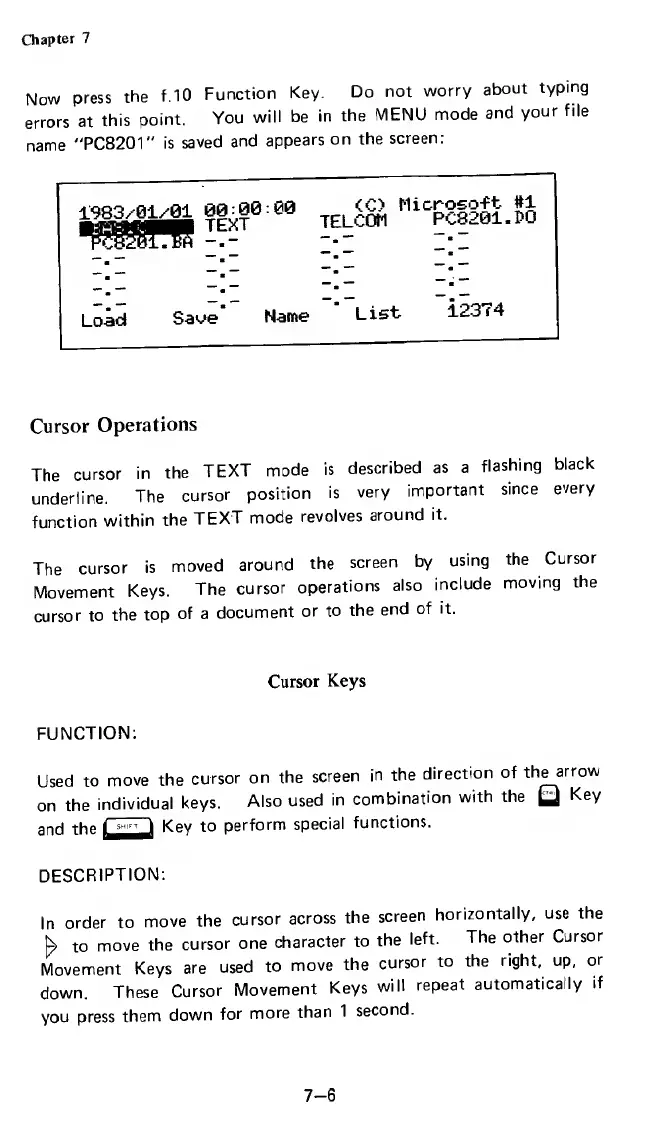
Now
press
the
f.10
Function
Key.
Do
not
worry
about
typing
errors
at
this
point.
You
will
be
in
the
MENU
mode
and
your
file
name
"PC8201"
is
saved
and
appears
on
the
screen:
1983y_01z01
00-00
00
TELCOM
MiC
PC8201.?O
Load
Save
Name
List
12374
Cursor
Operations
The
cursor
in
the
TEXT
mode
is
described
as
a
flashing
black
underline.
The
cursor
position
is
very
important
since
every
function
within
the
TEXT
mode
revolves
around
it.
The
cursor
is
moved
around
the
screen
by
using
the
Cursor
Movement
Keys.
The
cursor
operations
also
include
moving
the
cursor
to
the
top
of
a
document
or
to
the
end
of
it.
Cursor
Keys
FUNCTION:
Used
to
move
the
cursor
on
the
screen
in
the
direction
of
the
arrow
on
the
individual
keys.
Also
used
in
combination
with
the
Key
and
the
Key
to
perform
special
functions.
DESCRIPTION:
In
order
to
move
the
cursor
across
the
screen
horizontally,
use
the
h
to
move
the
cursor
one
character
to
the
left.
The
other
Cursor
Movement
Keys
are
used
to
move
the
cursor
to
the
right,
up,
or
down.
These
Cursor
Movement
Keys
will
repeat
automatically
if
you
press
them
down
for
more
than
1
second.
7-6

Related product manuals