EasyManua.ls Logo

NEC PC-8201A - Screen Description; Overview

NEC PC-8201A
219 pages
Print Icon
To Next Page IconTo Next Page
To Previous Page IconTo Previous Page
Loading...
CHAPTER
3
FEATURES
AND
FUNCTIONS
OF
PC-8201
Overview
The
layout
of
the
screen
and
keyboard
are
described
in
this
chapter,
along
with
explanations
for
all
of
the
Special
Keys
on
the
keyboard
of
the
PC-8201.
You
will
need
to
review
this
information,
since
there
are
variations
of
the
layout
and
functions
of
keys
from
that
on
an
ordinary
typewriter.
Screen
Description
When
the
electrical
power
of
the
PC-8201
is
turned
ON,
the
LCD
screen
will
look
like
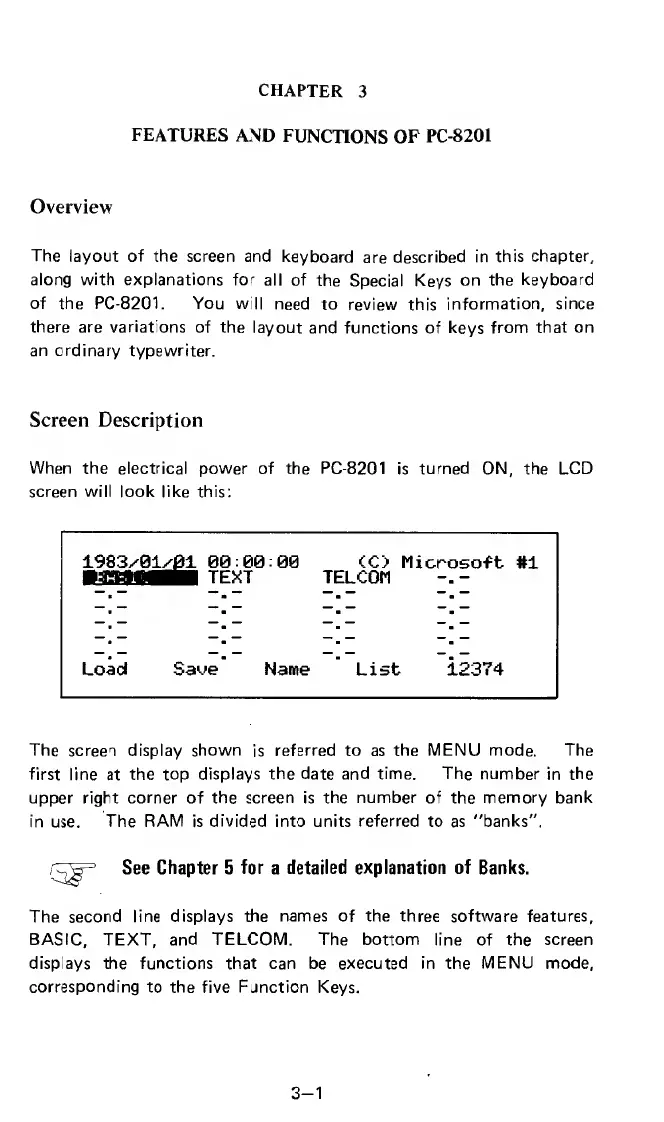
this:
1983x
01/01
00:00:00
CO
Microsoft
#1
.agat^a
text
telcom
Load
Saue
Name
List
12374
The
screen
display
shown
is
referred
to
as
the
MENU
mode.
The
first
line
at
the
top
displays
the
date
and
time.
The
number
in
the
upper
right
corner
of
the
screen
is
the
number
of
the
memory
bank
in
use.
The
RAM
is
divided
into
units
referred
to
as
"banks",
OjP
See
Chapter
5
for
a
detailed
explanation
of
Banks.
The
second
line
displays
the
names
of
the
three
software
features,
BASIC,
TEXT,
and
TELCOM.
The
bottom
line
of
the
screen
displays
the
functions
that
can
be
executed
in
the
MENU
mode,
corresponding
to
the
five
Function
Keys.
3-1

Related product manuals