EasyManua.ls Logo

NEC PC-8201A - Power on and OFF.1-13

NEC PC-8201A
219 pages
Print Icon
To Next Page IconTo Next Page
To Previous Page IconTo Previous Page
Loading...
Chapter
Power
ON
and
OFF
To
turn
power
on,
simply
move
the
power
switch
to
the
ON
position,
after
making
sure
that
the
Back
Up
Power
switch
is
also
ON.
Move
the
regular
power
switch
to
the
OFF
position
to
turn
the
unit
off:
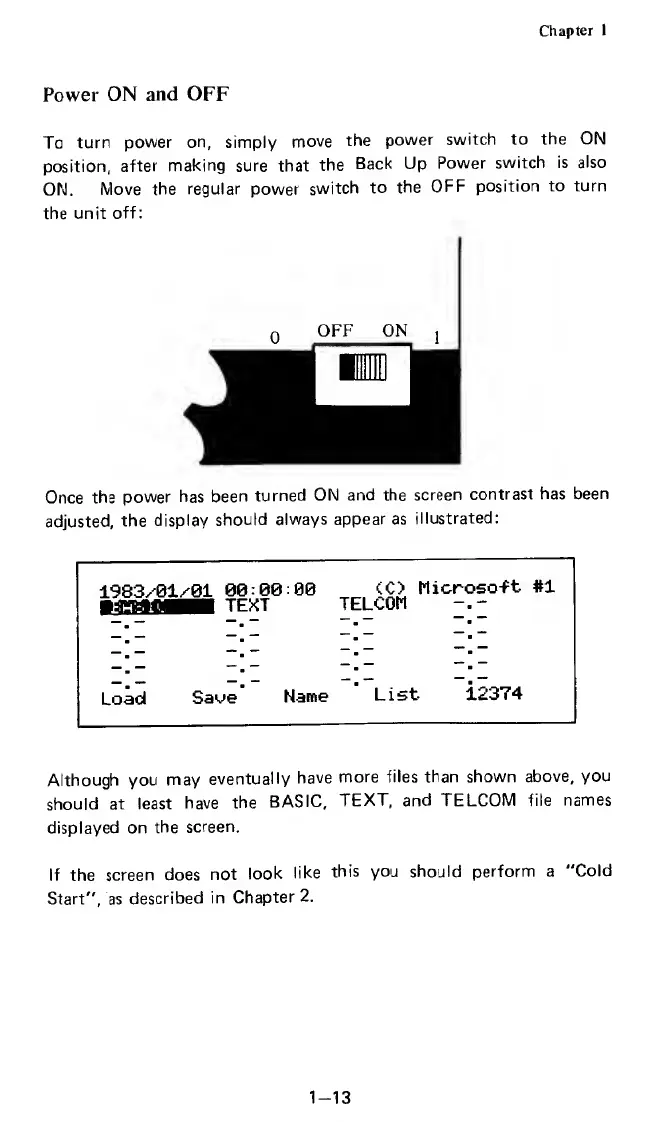
Once
the
power
has
been
turned
ON
and
the
screen
contrast
has
been
adjusted,
the
display
should
always
appear
as
illustrated:
1983/01/01
00:00:00
<C>
Microso-Ft
#1
-
TEXT
TELCOM
Load
Saoe
Name
List
12374
Although
you
may
eventually
have
more
files
than
shown
above,
you
should
at
least
have
the
BASIC,
TEXT,
and
TELCOM
file
names
displayed
on
the
screen.
If
the
screen
does
not
look
like
this
you
should
perform
a
"Cold
Start",
as
described
in
Chapter
2.
1-13

Related product manuals