EasyManua.ls Logo

NEC PC-8201A - Page 27

NEC PC-8201A
219 pages
Print Icon
To Next Page IconTo Next Page
To Previous Page IconTo Previous Page
Loading...
Chapter
1
The
Protect
Switch
can
be
used
to
inhibit
data
from
being
entered
into
Bank
#2.
Bank
#
3
is
protected
by
a
protect
switch
located
on
the
RAM
Cartridge
(PC-8206).
It
is
recommended
that
impor¬
tant
files
be
saved
in
Banks
#2
and
#3,
since
Bank
#
1
is
unprotected.
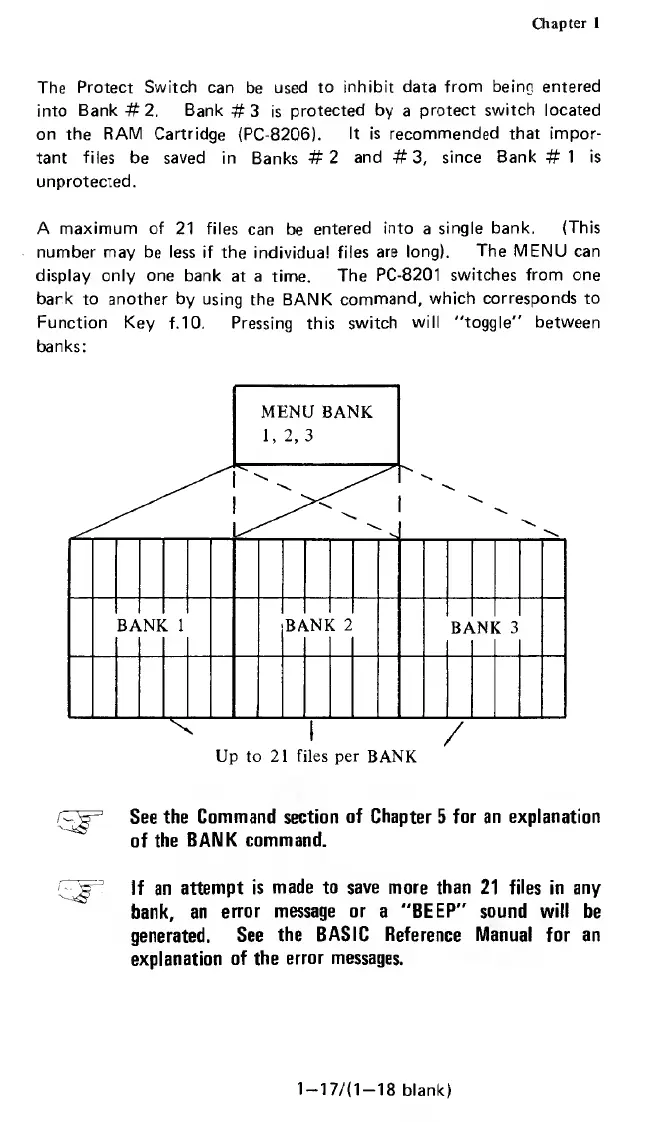
A
maximum
of
21
files
can
be
entered
into
a
single
bank.
(This
number
may
be
less
if
the
individual
files
are
long).
The
MENU
can
display
only
one
bank
at
a
time.
The
PC-8201
switches
from
one
bank
to
another
by
using
the
BANK
command,
which
corresponds
to
Function
Key
f.
10.
Pressing
this
switch
will
“toggle"
between
banks:
/FJF
See
the
Command
section
of
Chapter
5
for
an
explanation
of
the
BANK
command.
{
^
'
If
an
attempt
is
made
to
save
more
than
21
files
in
any
bank,
an
error
message
or
a
"BEEP"
sound
will
be
generated.
See
the
BASIC
Reference
Manual
for
an
explanation
of
the
error
messages.
1-17/(1-18
blank)

Related product manuals