EasyManua.ls Logo

NEC PC-8201A - Page 77

NEC PC-8201A
219 pages
Print Icon
To Next Page IconTo Next Page
To Previous Page IconTo Previous Page
Loading...
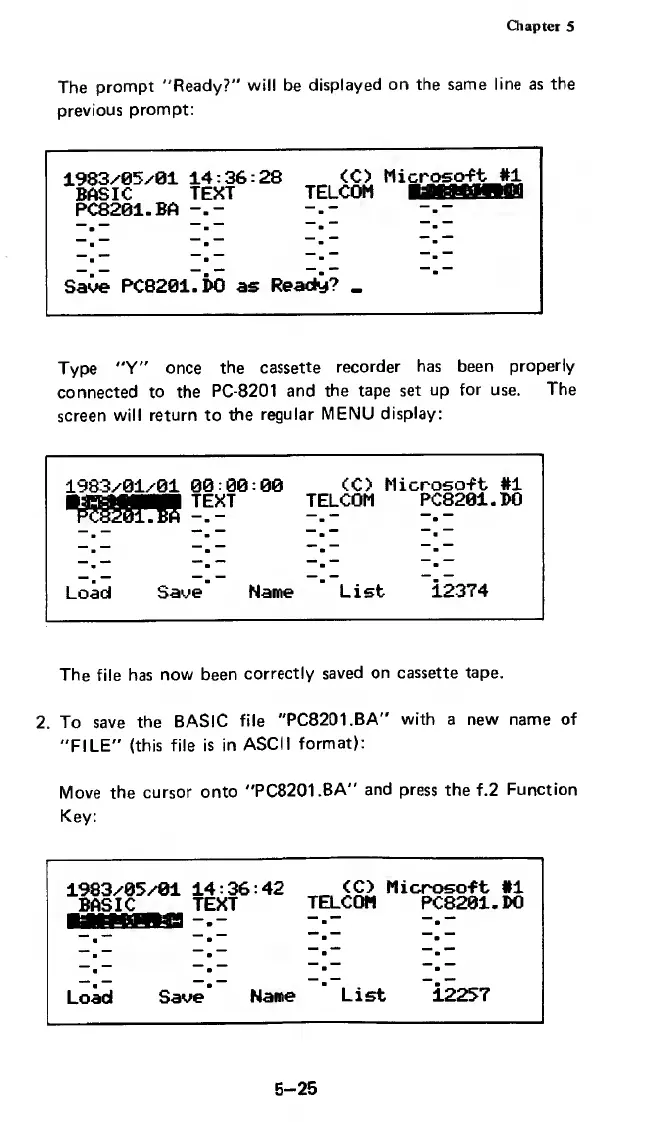
Chapter
5
The
prompt
"Ready?"
will
be
displayed
on
the
same
line
as
the
previous
prompt:
1983/05/01
14:36:28
<C>
Mic
rosoft
#1
BASIC
TEXT
TELCOM
MfWWISl
PC8201.BA
Save
PC8201.
i>0
as
Ready?
_
Type
"Y"
once
the
cassette
recorder
has
been
properly
connected
to
the
PC-8201
and
the
tape
set
up
for
use.
The
screen
will
return
to
the
regular
MENU
display:
1983/01/01
00:00:00
<C>
Microsoft
#1
xHMMpBf
text
PC8201.BA
TELCOM
PC8201.
BO
Load
Save
Name
List
i2374
The
file
has
now
been
correctly
saved
on
cassette
tape.
2.
To
save
the
BASIC
file
"PC8201.BA"
with
a
new
name
of
"FILE"
(this
file
is
in
ASCII
format):
Move
the
cursor
onto
"PC8201.BA"
and
press
the
f.2
Function
Key:
1983/05/01
14:36:42
<C>
Microsoft
#1
BASIC
TEXT
TELCOM
PC8201.DO
Load
Save
Name
List
12257
5-25

Related product manuals