E-4
Rear View/ Terminal Board
AC IN
RGB 3
(
Digital RGB
)
SPEAKERS MUST
HAVE MORE THAN
7WATT RATING
IMPEDANCE 6 OHM
RIGHT LEFT
VIDEO 1
VIDEO 2
REMOTE
CONTROL
RGB 1
L
(
MONO
)
L
(
MONO
)
G/Y
/VIDEO 3
HD
VD
R
R
Y
L
(
MONO
)
R
EXTERNAL
CONTROL
CONTROL
LOCK
ON /OFF
R/C
R
/P
R
B/C
B
/P
B
C
B
/P
B
C
R
/P
R
AUDIO 2 DVD1 /HD1AUDIO 3 AUDIO 1RGB2/ DVD2/HD2
SPEAKERS MUST
HAVE MORE THAN
7WATT RATING
IMPEDANCE 6 OHM
RIGHT LEFT
AC IN
RGB 3
(
Digital RGB
)
VIDEO 1
VIDEO 2
REMOTE
CONTROL
RGB 1
L
(
MONO
)
L
(
MONO
)
G/Y
/VIDEO 3
HD
VD
R
R
Y
L
(
MONO
)
R
EXTERNAL
CONTROL
AUDIO 2 DVD1/HD1AUDIO 3 AUDIO 1RGB2/DVD2/HD2
AB C
D
E
F
G
K
H
J
I
CONTROL
LOCK
ON /OFF
R/CR/PR
B/CB/PB
CB/PB
CR/PR
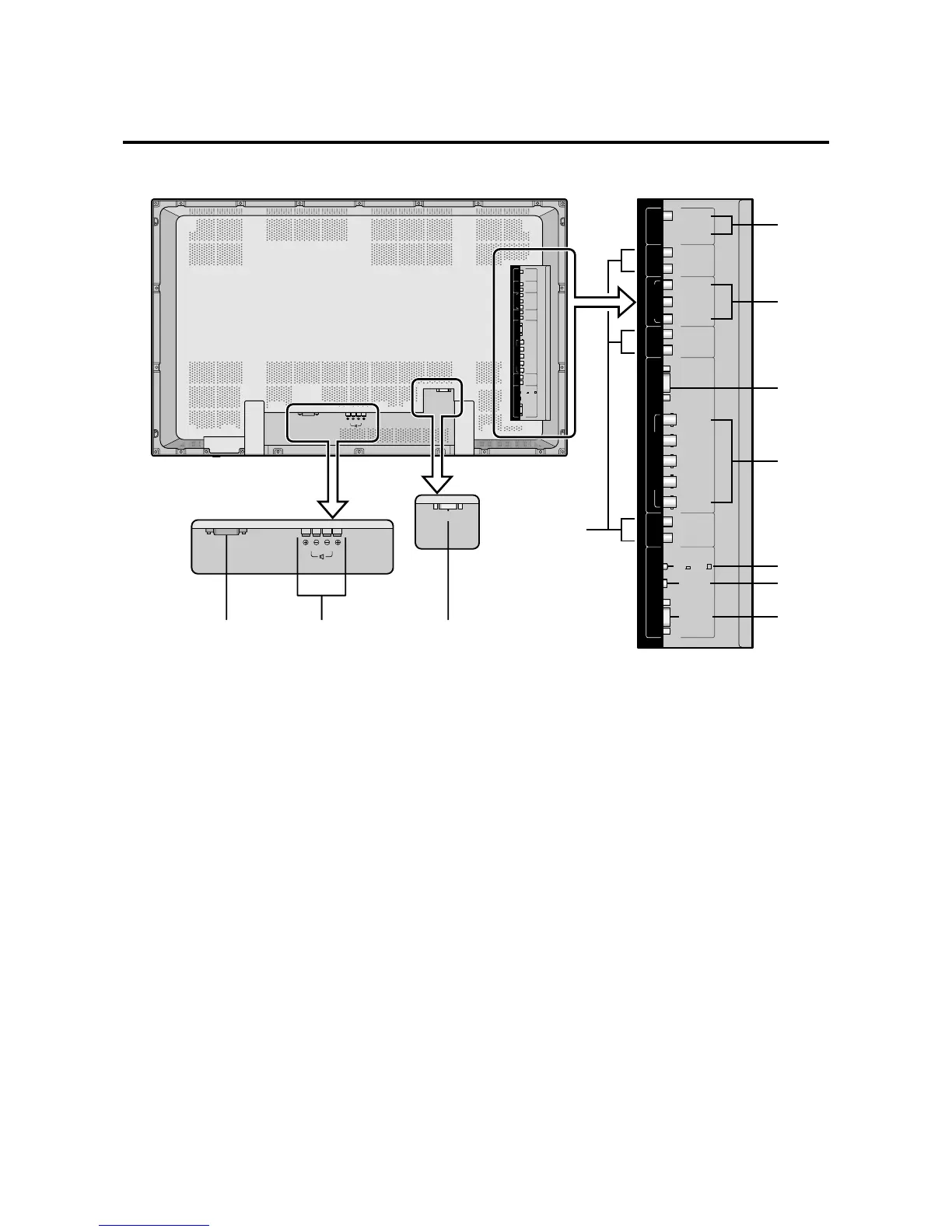
A AC IN
Connect the included power cord here.
B EXT SPEAKER L and R
Connect speakers here. Maintain the correct polarity.
C RGB3
(DVI 29pin)
Inputs a digital RGB signal (TMDS).
D VIDEO1, 2
Connect VCR’s, DVD’s or Laser Discs, etc. here.
E AUDIO1, AUDIO2, AUDIO3
These are audio input terminals.
The input is selectable. Set which video image to allot
them to on the menu screen.
F DVD1 / HD1
Connect DVD’s, High Definition or Laser Discs, etc.
here.
G RGB1
Inputs the analog RGB signal of personal computer,
etc.
H RGB2/ DVD2/ HD2
RGB2: Inputs the analog RGB signal, and the
syncronization signal.
DVD2/ HD2: Connect DVD’s, High Definition or
Laser Discs, etc. here.
VIDEO3: Connect VCR’s, DVD’s or Laser
Discs, etc. here.
I CONTROL LOCK
When “CONTROL LOCK” is set “ON”, the buttons
on the set’s control panel do not function.
J REMOTE CONTROL
Connect the supplied remote cable here.
K EXTERNAL CONTROL
This terminal is used when power ON/OFF, input
selection and AUDIO MUTE and other controls are
operated externally (by external control). See also page
E-39 for external control.




 To Next Page