System Overview 1-3
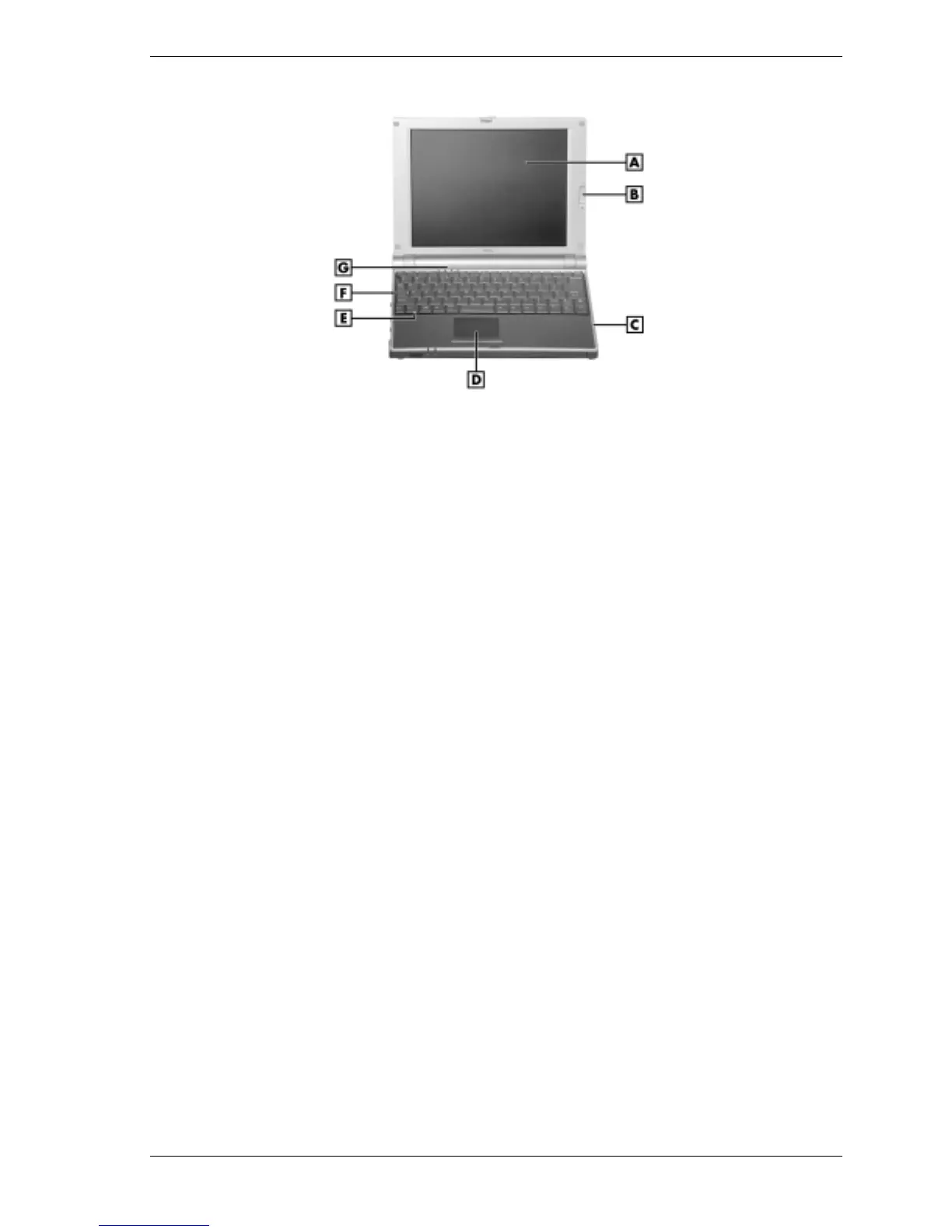
NEC Versa DayLite transflective notebook
A – LCD Panel E – Speaker
B – LCD Backlight On/Off Switch F – Keyboard
C – Microphone G – Operating Status LEDs
D – NEC VersaGlide Touchpad
!
LCD Panel — Provides a high-resolution display for sharp visuals on the notebook.
— Adjust the LCD panel by tilting it up or down.
— Adjust the LCD panel brightness by pressing the
Fn-F8
and
Fn-F9
functions keys.
!
LCD Panel Backlight On/Off Switch (NEC Versa DayLite transflective notebook only)
— Provides backlighting to the reflective LCD panel.
— Switch up position is on, down position is off.
!
Microphone — Allows recording of monophonic sound directly into the notebook hard
drive.
!
NEC VersaGlide Touchpad — Move a fingertip over the VersaGlide Touchpad to control
the position of the mouse pointer. Use the selection buttons below the VersaGlide Touchpad
to select menu items.
!
Speaker — Provides mono sound for the notebook when speakers are not plugged into the
speaker jack.
!
Keyboard — 86 keys with a country-specific QWERTY-key layout.
!
Operating Status LEDs — Informs user of the notebook's current operating status. See the
following figure and list for each icon's meaning.



 To Next Page