4-2 System Boards
This chapter includes information on the five circuit boards used in the notebook.
Mini PCI Board
The Mini PCI LAN/modem board is located under the top cover assembly. The board is
mounted on the communications board. The Mini PCI board connectors include
communications board cable connector J1, a modem cable connector, and a LAN cable
connector.
Power Switch Board
The power switch board (G7EZAB) is located under the top cover assembly. The board is
mounted on the right side of the notebook, between the hard drive bay and the side of the base.
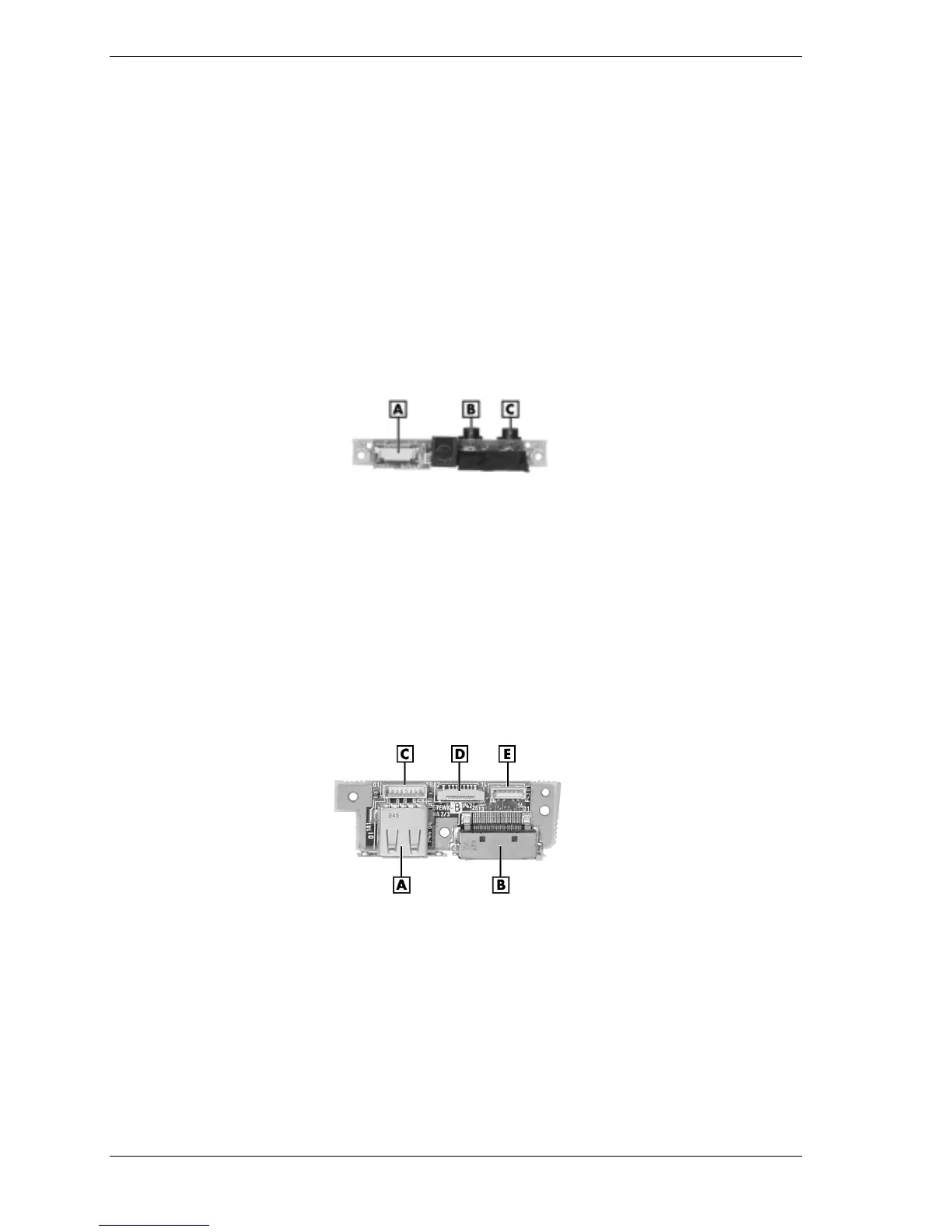
The following figure shows the board and its connectors and ports.
Power switch board
A – Main Board Cable Connector P51 C – Headphone Jack P53
B – Microphone Jack P52
USB Connector Board
The USB connector board (G7EWK A 2/3) is located under the top cover assembly. The board
is mounted on the left side of the notebook. The following figure shows the board and its
connectors and ports.
USB connector board
A – USB Port D – Cable Connector P42
B – Parallel Port E – Mini PCI Board Cable Connector P43
C – Main Board Cable Connector P41



 To Next Page