P2595EN01
08 - 2007
P r o g r a m m I n g m e n u
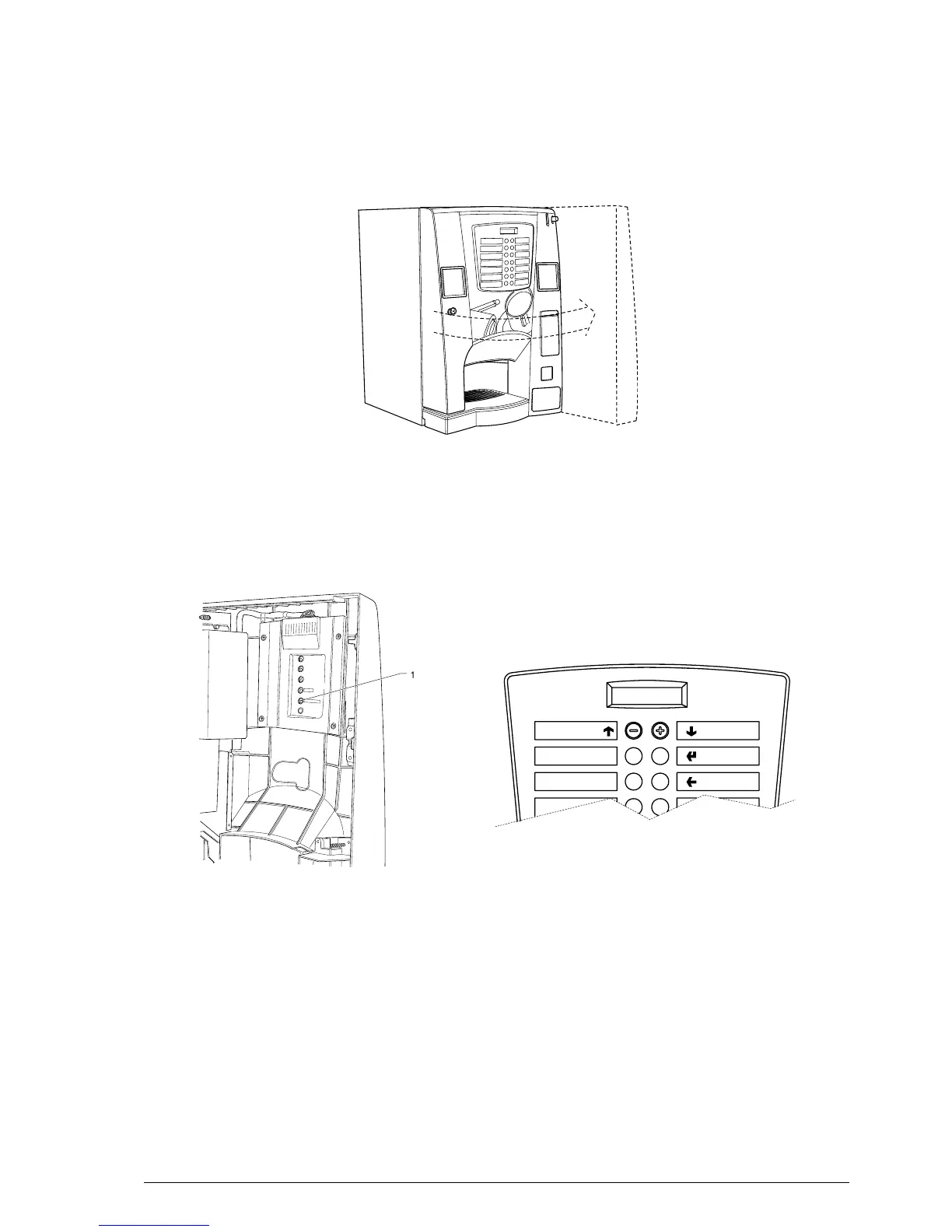
In order to access the programming menu, open the front door of the vending machine, switch on the machine
and insert the yellow key supplied in the relevant slot located on the left-hand side of the machine.
Press the programming access button as shown in the gure:
The machine goes into "Filler Menu" mode.
The buttons shown in the gure are used for surng through the dierent menus:
Scrolling buttons UP “
”and DOWN “
”
The UP and DOWN scrolling buttons are used for moving from one programming menu item to the next one,
located in the same level, and at the same time change the status or the numeric value of the corresponding
functions.
”
The conrm / enter button is used for moving to the lower level or for conrming a value after being entered or
changed.
”
The exit button is used for returning to the higher level or for exiting a change eld of a function. When reach-
ing the highest level in the menu, this button is pressed for going from the Technician menu into the Filler menu
and vice versa..
C


 To Next Page