27
Align the pick up position: Click to enter the visual lock interface, select the center as best location, it
automatically generate the XY coordinates after confirmation.
Feed Value: Set the forward value of each feeder, default value is 4(Unit:mm),but for special components,
0402,should correct to 2
Feed speed: The feeder forwarding speed(Normally default value is ok, no need to chang
Needle Test: Press to test.
Needle X, Needle Y:the coordinate of Needle
Needle Position: Align the needle position, it will generate XY coordinates
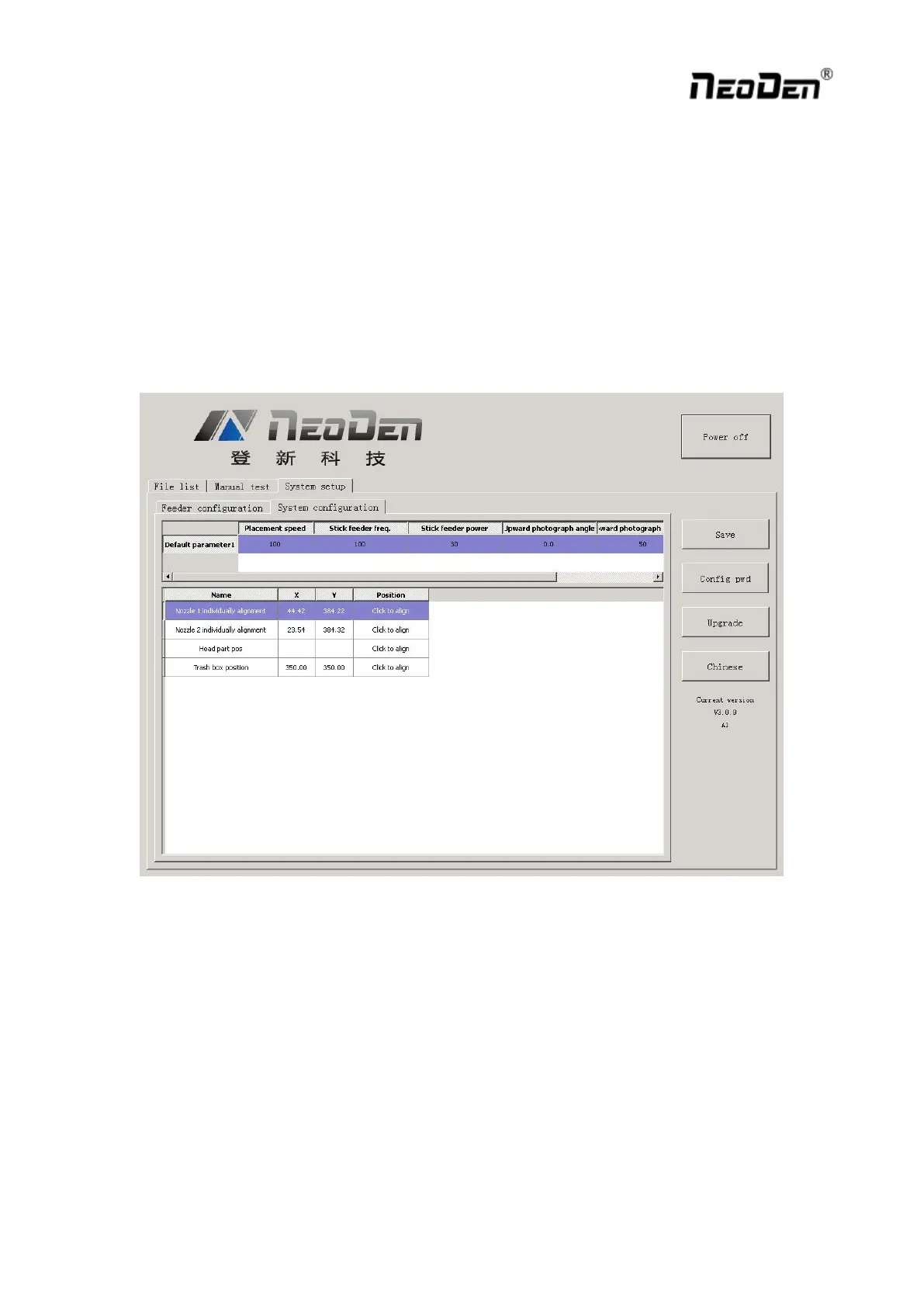
2.4.2. System Configuration
Function: Setting of Nozzle Alignment
(Note:This page has been locked to avoid any misoperation.It will be active only after enter password.)
2.4.2.1. Default Parameter 1 Setting
Placement Speed: Normal Placement speed of whole working file, the actual mounting speed is subject to the
speed in feeder setting)
Vibration feeder Frequency: Setting frequency of vibration feeder, higher value can ensure chip come out
from tube more stable
Vibration feeder Strength: For small chip, it will jump out easily if set high value. For big chip, it is difficult
to come out if set low value.


 To Next Page