28
Upward Photograph Angle: If find all chip have same angle problem during the placement, can adjust value
here(Temporary can't use)
Upward Photograph Exposure: Adjust the brightness of the up-looking camera
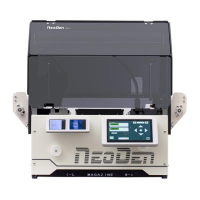
2.4.2.2. Nozzle Alignment
Find the” Align” button of each nozzle, click “Align” and choose nozzle center pos and then click “Lens rotation”,
up-looking camera will shine for many times, finally “Save “ the values. Also you can use the mouse to adjust the
cross-line to the center of each nozzle by manual.
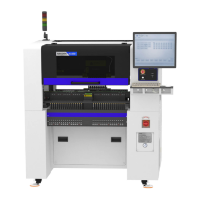
2.4.2.3. Nozzle 1 and Camera Relative Position


 To Next Page