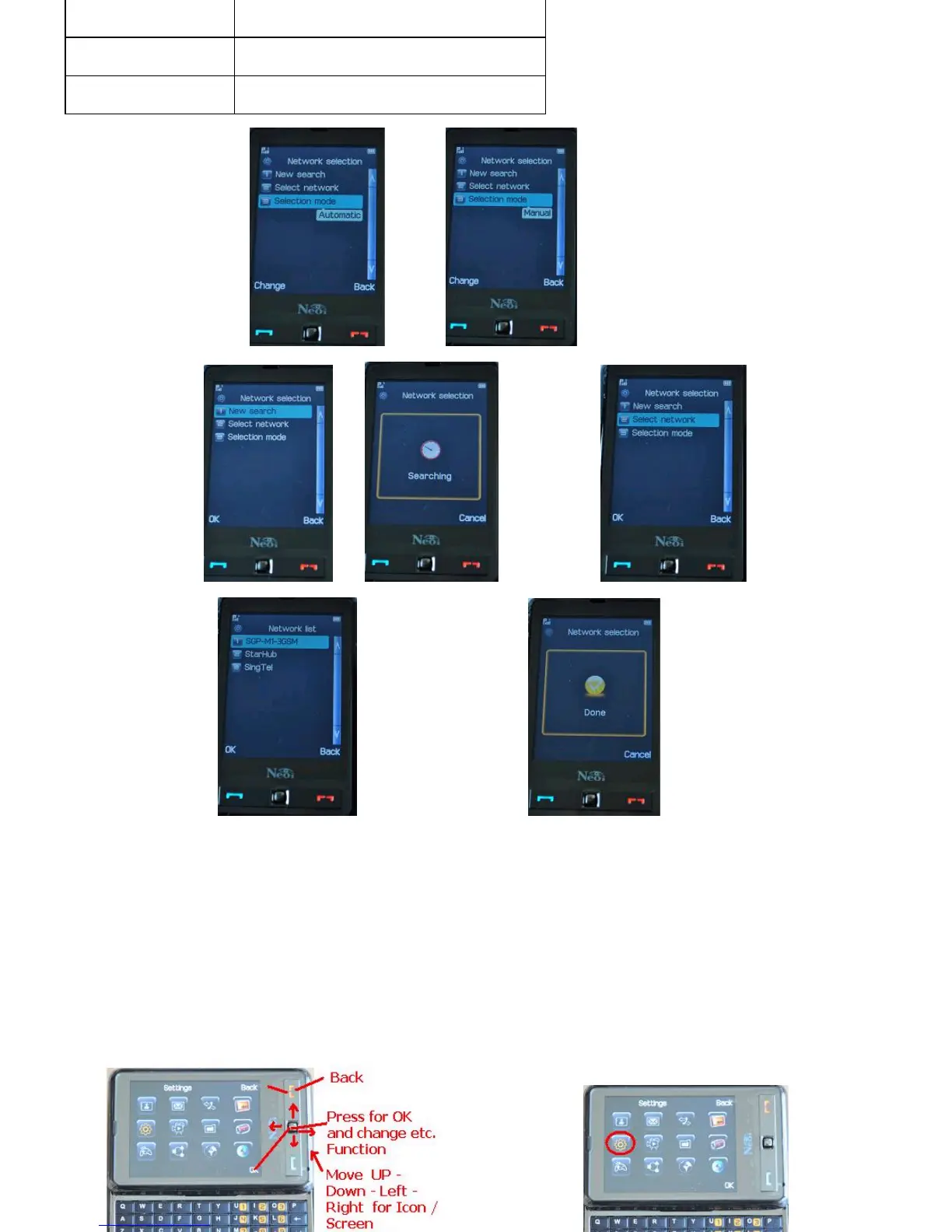
>CHANGE> >GO TO NEW SEARCH>
>OK> >Select Network>
>NetworkList>
> Select the proper Network>
Note: The Network Search shall be done with a valid GSM Card, or in some countries can also use the preferred Network SIM
Card to validate operations, this depends on the Operators terms and Roaming agreements. Some Operators do not allow set
upofPhonesthathavenotbeencontractedwiththeirNetwork,inthatcasetheentireNetworkSelectionSetuphastobedone
with a Valid GSM Card ( could be in roaming mode from a foreign Operator).
Neoi907NetworkSettingsandOperationwithoutTouchPanel
Neoi 907 Settings
Network Set Up Manual
( see also Main Manual for Network settings of 3G Carriers, 3
rd
Class Carriers, Prepaid Card Carriers, which
need to be selected manually first and saved to the Neoi Network List)
Network
Selection
Search for the network in Automatic or
Manual mode.
Referred
Network
Set the preferred network.
GPRS
Select
“
Always
”
or
“
Connect when
needed
”
.
907 Soft Button explanation



 To Next Page