Networksettings
Error Message : Invalid SIM Card. If You receive this message, then the SIM Card Operator You are trying to use, was not prior validated by NEOI.
There are more then 10,000 GSM and 3G Operators globally, and being a GLOBAL FASHION-FON , Neoi cannot list all 10,000 Operators.
Note:
Some US and other countries Service Providers are extremely restrictive and want to force customers to buy only their contracted phones.
There are also may different 3G SIM cards i.e from AT&T
Call Only
Call and Data
Unlimited Call and Data
Pre-Paid
Pre-paid local
Pre-paid International
Restricted Data
Cards that are blocked for a specific Model only for security reasons, like the well known Blackberry, if the phone gets stolen, the Service
provider blocks the card so if it is unlocked all Data is destroyed.
Etc.SoIdonotknowwhatContractCardYouhave,whereYouboughtit.IfYouboughtitonashopon
the street, and not from AT&T
( or the carrier direct ) there are many more restrictions.
SIM Cards are registered with the Government, so that user can be located and followed.
Etc...
What they cannot restrict is roaming agreements with international carriers, so if you have for example a European ( like T-Mobile)
unrestricted roaming card, your phone will work in many places in USA ( or the world).
Now you can go to network selection and select the i.e. AT&T network, and manually force connection, , what again they cannot ( mostly )
deny,onlyifyouhavearestrictedpre
-paid card, then there could be more restrictions.
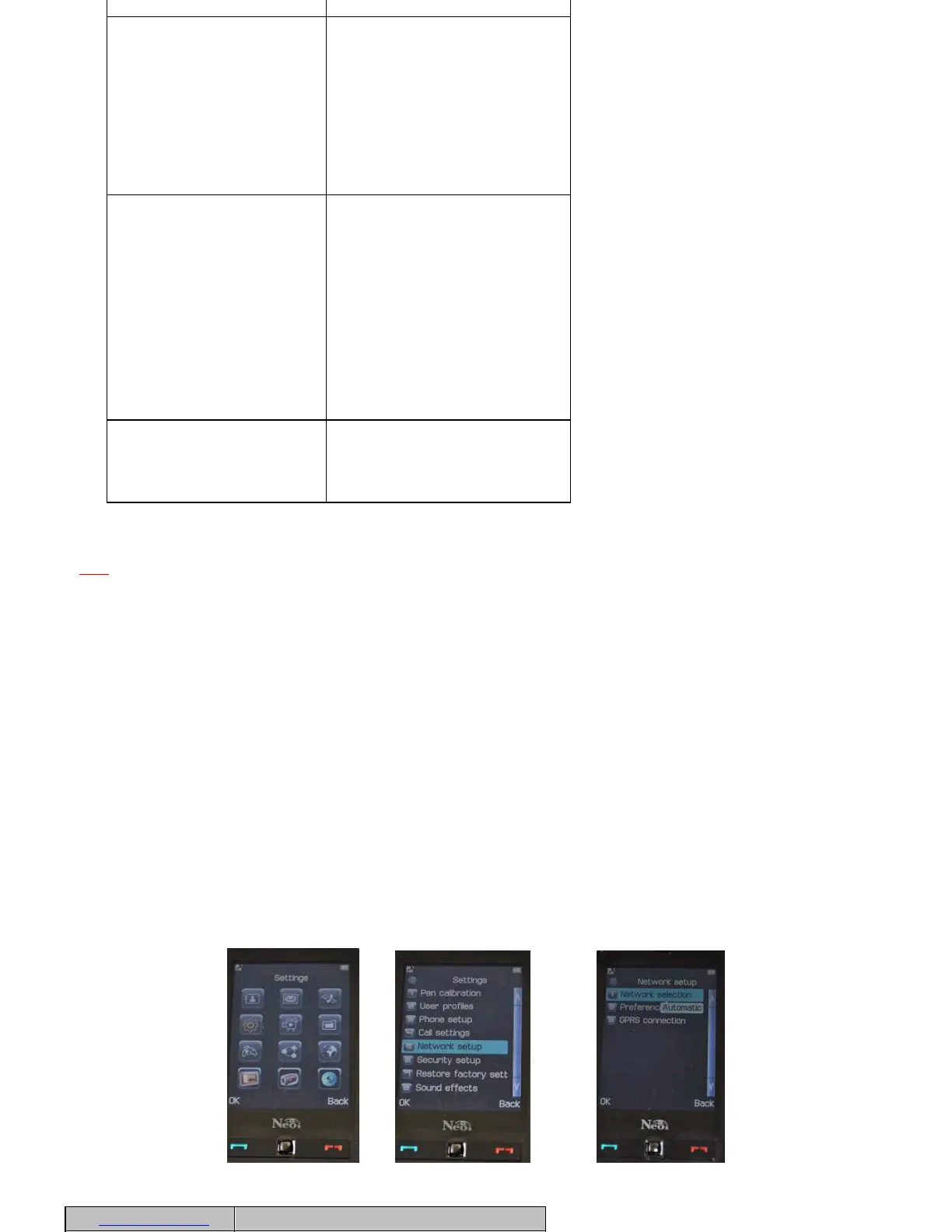
In that case a user has to validate and setup that specific Operator using the Neoi Manual Network Setting procedure. Please follow below steps
and the new Network will be set up easy.
Note: Many Operators sell pre-paid SIM Cards, or operators that are 3
rd
class and have a sub-license from a Class A operator, these SIM cards
MUST also be set up manually, as Neoi does not recognize these services automatically.
Menu > Settings > Network Setup
>OK>
>OK>>>OK
In this menu, you can set network parameters
call is not answered.
Close Group
Close group is a network
service for you to dial or
answer the calls from the
users in a group. For more
information, please consult
your network operator
service provider. If a group
has been defined, it will be
used for all dialed calls. If
no group has been defined,
the predefined list in the
network (a special group
list stored over network)
will be used.
IP Dialing
The device supports IP
dialing. Up to three groups
of IP numbers can be set.
Select an IP number, and
press left soft key to
enable or edit it.
On: The selected IP number
is used as the current IP
call number.
Edit: Input the IP number
and edit it.
If you select a number in
Contacts and press left soft
key to select IP Dialing, the
device will immediately add
the activated IP number to
the selected number and
call out.
Blacklist
Up to five numbers can be
set in Blacklist. If set, the
device will not respond and
prompt when there are calls
from the callers in the
blacklist.
Option
Description



 To Next Page