Different icons appear on the screen according to your selected functions and options.
Attention: Icons may vary, depending on model. Function and Setting is the same!
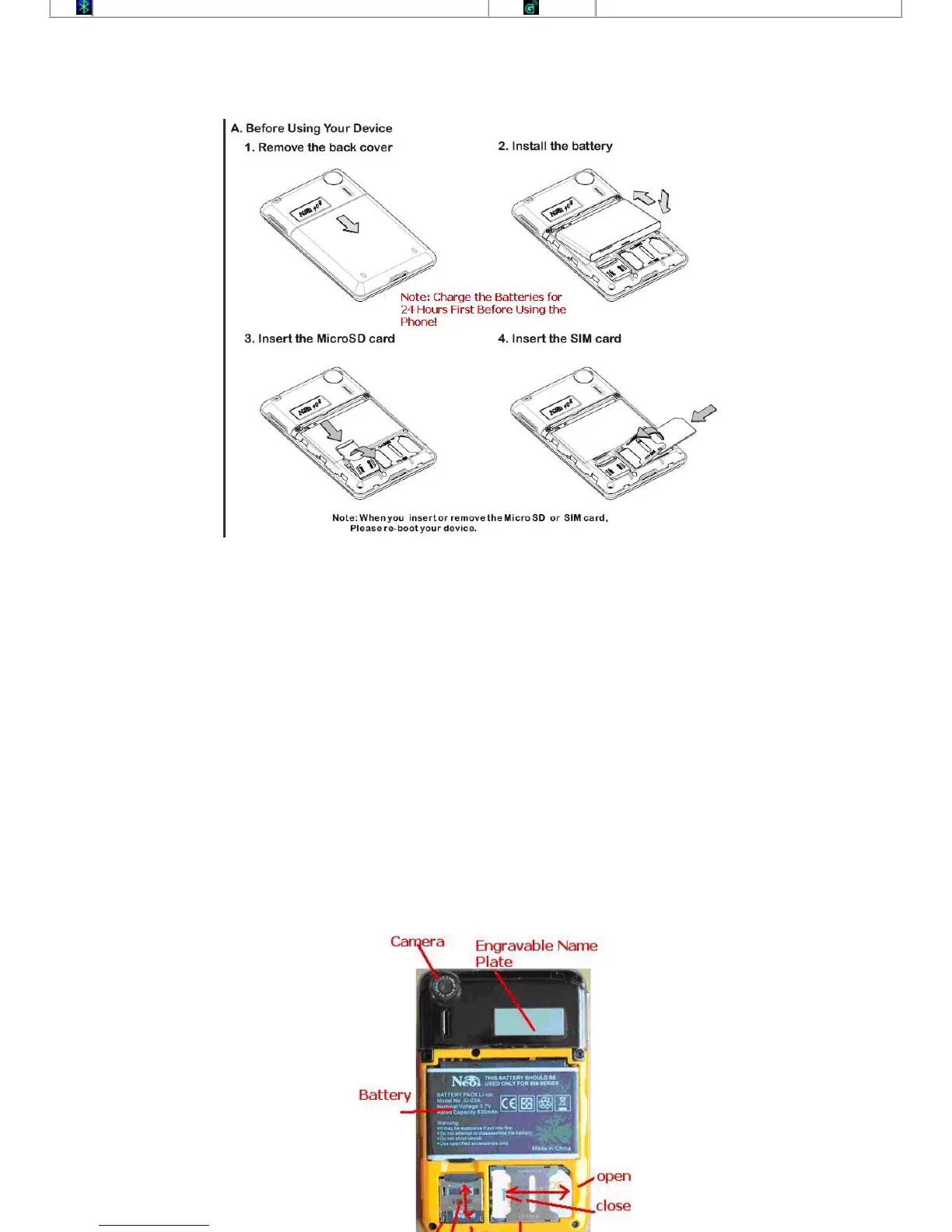
Setting up your Device
Note: Please charge Your Battereies BOTH 24 hours before first Usage, as for Security reasons, the Battereis
cannot
bechargedinnewphonesforsalesonboardAirlinesandinsecurityareas.IfyoudoNOTchargeyourBattereies
within 2 weeks from the buying date, the Batteries might get damaged and cannot charge anymore, in this case
the
Phone will send an error Message like " Over voltage" - " Loose Connection" - " charging error". Please note also
the
Warranty terms for Batteries and charger!
Getting Started
SIM Card
When you register as a subscriber with a network operator, you get a SIM (Subscriber Identity Module) card. If the SIM card you get
is about the same size as a credit card, remove edges and reserve the smaller part.
Note: This mobile phone supports 1.8v and 3v SIM card, while it doesn
’
t support 5v SIM card.
Without this SIM card, you can not make full use of your device.
Please use your SIM card with extreme care. Do not try to bend or press the SIM card. Try to not touch the metallic contacts. Do not
place the SIM card near electric or magnetic storage Medias. Keep it away from dust and water. If your SIM card is damaged, please
contact your network service provider.
Warning: Always switch your device off before removing the SIM card. Do not insert or remove the SIM card when the device is
connectedwithexternalpower.DoingsomaycauseyourdeviceandSIMcarddamage.
Inserting and Removing SIM Card
To insert SIM card
Switch off your device and unplug it from the charger.
Put your device upside down, slide the cover of the device and remove the battery.
Slide the SIM card into its holder. Make sure that the metallic contacts of the SIM card are facing down, and the cut off corner is
correctly aligned.
Bluetooth
GPRS Data Mode



 To Next Page