Slide the SIM card inwards to the end.
Insert the battery and slide the battery cover into place, leaving no gap with the device.
To remove SIM card
Switch off your device and un plug it from the charger.
Slide the cover of the device and remove the battery.
GentlyplaceyourfingerovertheSIMcardandpulltowardsthebackofyourphone.DOnotexertanyextrapressurewhileslidingouttheSIMcard.
Battery
Your device is powered by a rechargeable battery. The full performance of a new battery is archived only after two or three complete charge and
discharge
cycles (each recharge period should be about 12 to 16 hours, but not more than 24 hours). We recommend that you latest recharge the battery after
the
batteryrunsoutofpowerandthedeviceswitchesoffautomatically.
To archive the full performance of the battery, we recommend you fully discharge your battery once every month. To do this, you just need to let the
phone run of power and switch off automatically.
Inserting and Removing the Battery
To insert the battery
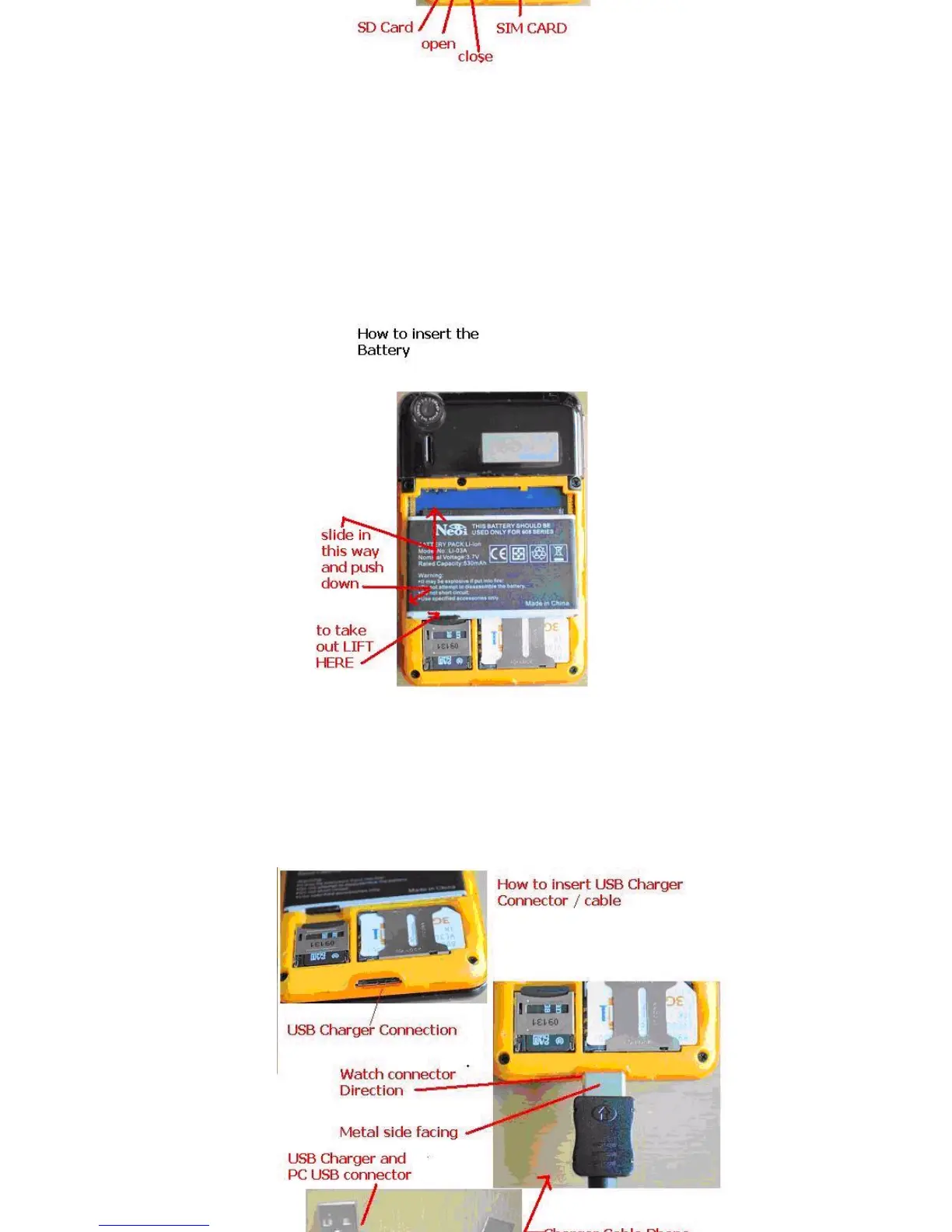
Placethebatterywithmetalcontactsfacedownandturnthebatteryatanangleofabout45°.
Insert the handles on the upper edge of the battery into the holder of the device..
Press the lower part of the battery until it clicks in place.
Slide on the battery cover
To remove the battery
Make sure that the device has been switched off and the charger or other equipment have been disconnected from the phone.
Place the phone facing down, and push away to remove the battery cover.
Pull the battery upwards from the bottom end of the phone. Once released, remove the battery.
To charge the battery
Make sure that the battery has been installed in the device.
Findthechargersocketatthebottomofthedevice.Itcanbeaccessedbyslidingthesmallcover.ThechargerandEarphonessocketarethesame.
Thisisthesmalleroneoutofthetwothatarepresentatthebottomofyourphone.Gentlyinserttheconnecterofthechargerintothissocket.
Please do not try to force it or use extra force or it may damage the connector.



 To Next Page