Chapter
OPERATOR INTERFACE
NEOFOLD HS
VERSION: NF.HS-07-03/2015-GB 4-2
Key Description Key Description
1
Green power led.
The led is on if the machine is on
and operating.
2
Paper eject key.
When this key is pressed the
relating led lights up until the paper
is completely ejected.
3
Free fold width 190 mm.
This key works in combination with
keys (
5) (6) (7)
4
Free fold width 210 mm.
This key works in combination with
keys (
5) (6) (7)
5
Free folding without adjustment
key.
Free fold without adjustment - this
key works in combination with keys
(
3) or (4) to define the width of the
fold.
6
Free folding with adjustment on
the left on the second-last
folding.
Free fold with adjustment on the
left on the second-last folding - this
key works in combination with keys
(
3) or (4) to define the width of
the fold.
7
Free folding with adjustment on the left on the second-last folding.
Free fold with adjustment on the left on the second-last folding - this key works in
combination with keys (
3) or (4) to define the width of the fold and can work with (8)
or (
9) or (10) to define the margin.
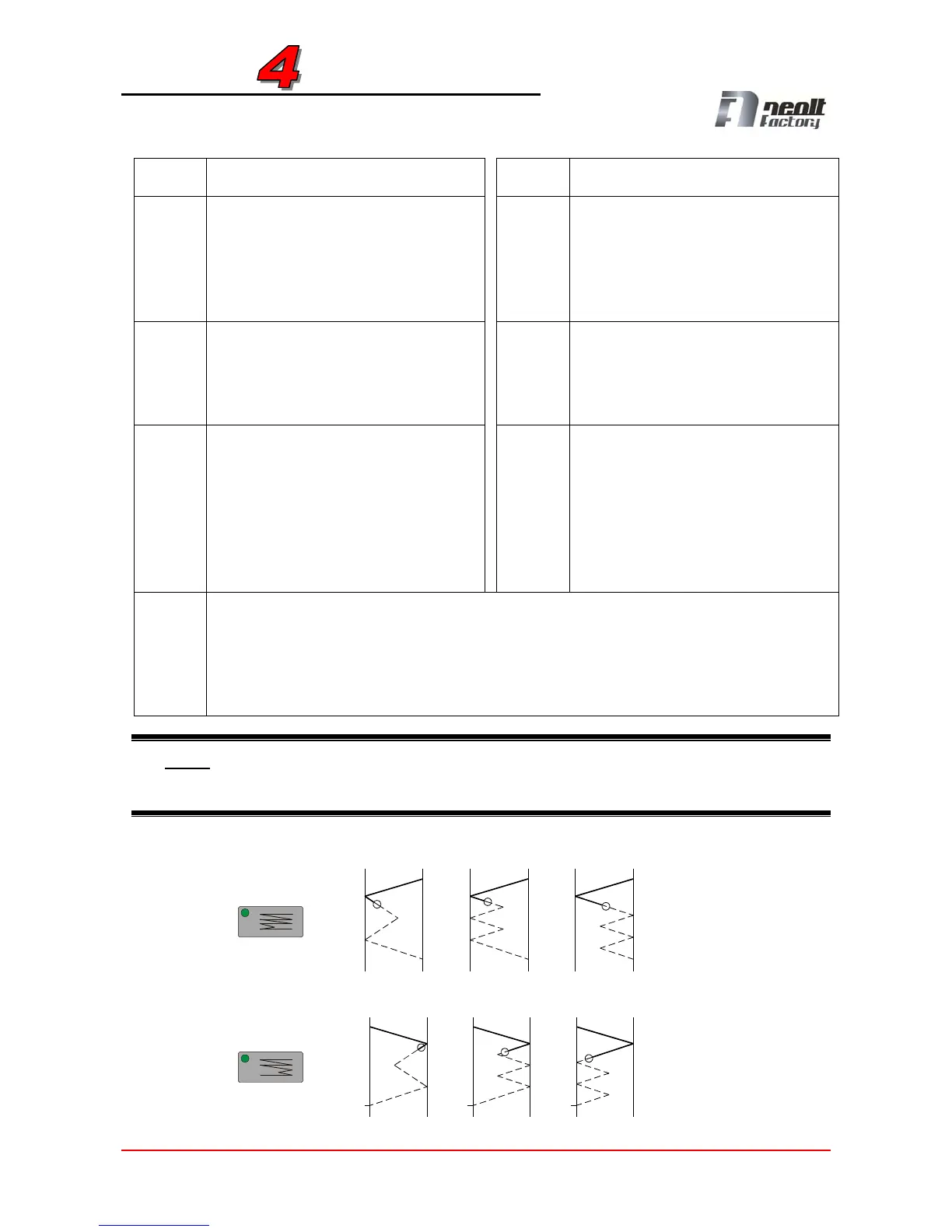
NOTE: When keys (6) or (7) are pressed in combination with keys (3) or (4) three different
folds can be made. The fold is the one indicated by letter A, but also the cases indicated by
letters B and C can take place!
A B C
A B C


 To Next Page