Chapter
USE
NEOFOLD HS
VERSION: NF.HS-07-03/2015-GB 6-7
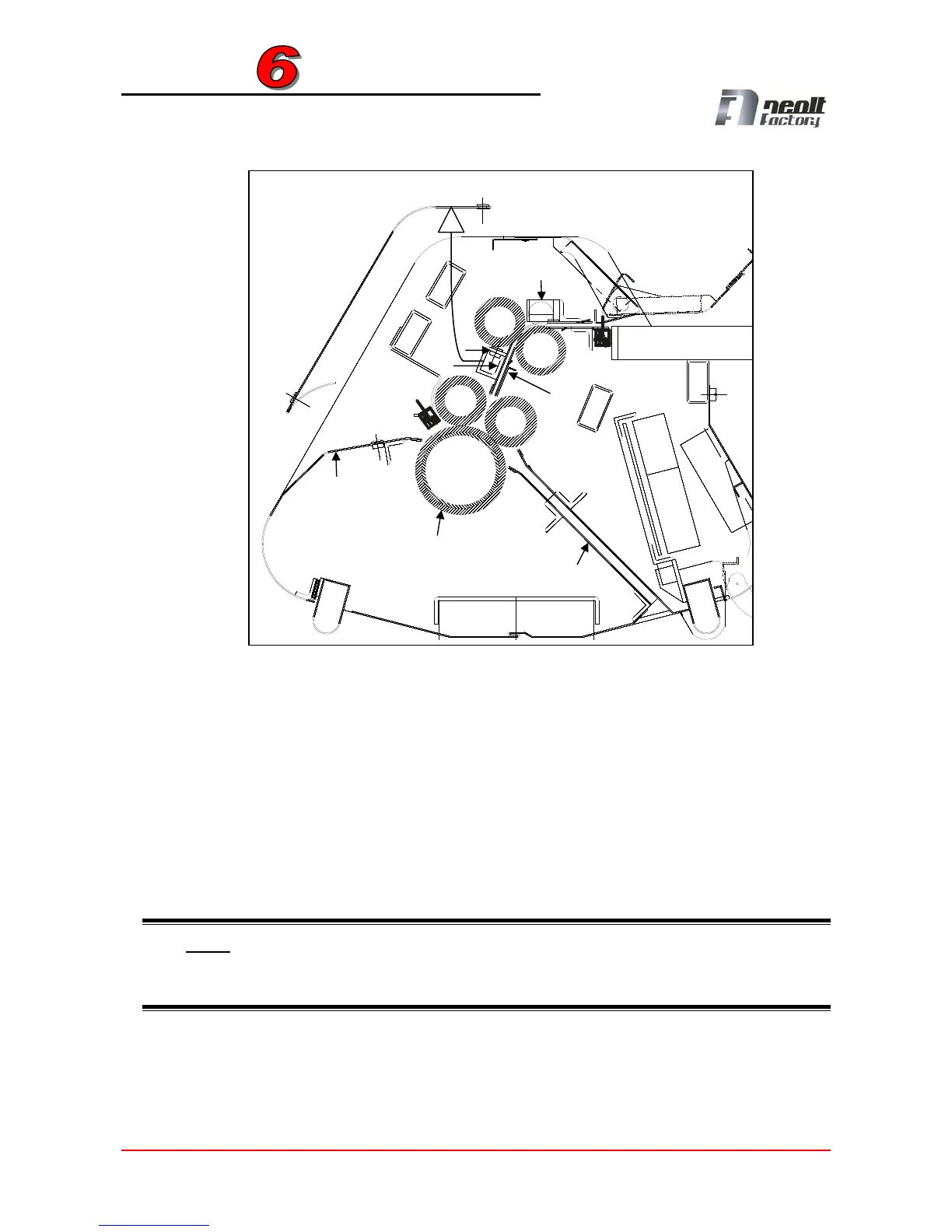
If you cannot remove the paper using the above-mentioned procedure, follow the
sequence below:
Open the upper panel (
C / Ca) removing the screws (C1), remove the feeding roller
(D) and rotate the conveyor (E) upward removing the three screws (E1-E2-E3).
Check the area and remove the residula paper by rotating counter-clockwise the main
roller (F). If the paper was ejected from the back, after openeing the back panel (G)
removing the screws (G1). The above-mentioned screws must be removed both on
the left side of the sheet folder and on the right. If the paper is jammed in the
conveyor (H) (front ejection) remove the residual paper using a tool with hook and puil
downward.
NOTE: After completing cleaning operations, close all open panels, power the machine
and press key (2) a couple of times to expel even the smallest paper fragments and start
a new folding cycle. For further problems contact technical assitance.
C
C1
H
Ca
F
E2
E
G1
G
D
E1
E3
C1


 To Next Page