Digital Video Recorder for Ness IQ-
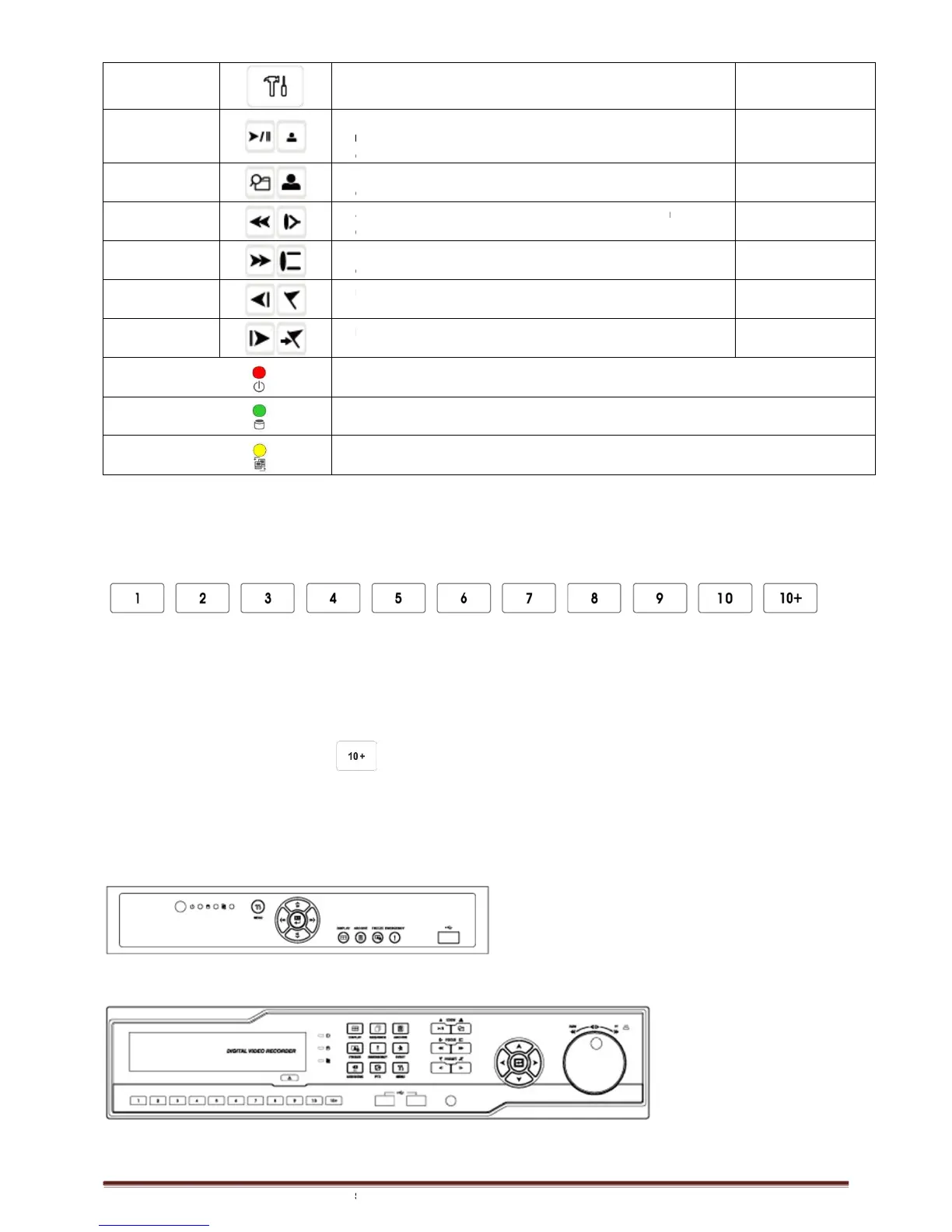
• Enter the Main Menu (Setup mode)
from the last one minute) •
• Video search mode on/off
Fast backward playback (changes up to x128 with each
Fast forward playback (changes up to x128 with each press)
• Frame backward playback
• Save Preset in PTZ mode
• Go to Preset in PTZ mode
• Light off: Stop recording
• Blink : Recording/Playback modes (HDD Access), Archive in operation
• Light off: failed to connect to Ethernet
• Blink: Connected to Ethernet
Camera Select Keys for 16 Channel
960H & 8 / 16 Channel SDI
Below shows how to select camera channel for 4/8/16channel DVR
shows how to select camera channel for 4 channel DVR
- Select Camera No. 1~4
Below shows how to select camera channel for 8 channel DVR
- Select Camera No. 1~8
Below shows how to select camera channel for 16hannel DVR
- Select Camera No. 11~16: press
2.3 Front Panel
4 / 8 Channel 960h and 4 Channel SDI
960H & 8 / 16 Channel SDI
• Enter the Main Menu (Setup mode)
mode: Instant playback (playback the recorded video
from the last one minute) •
Playback mode: 1X PLAY/PAUSE
• Video search mode on/off
Fast backward playback (changes up to x128 with each
Fast forward playback (changes up to x128 with each press)
• Frame backward playback
• Save Preset in PTZ mode
• Go to Preset in PTZ mode
• Light off: Stop recording
• Blink : Recording/Playback modes (HDD Access), Archive in operation
• Light off: failed to connect to Ethernet
• Blink: Connected to Ethernet
Camera Select Keys for 16 Channel
960H & 8 / 16 Channel SDI
960H & 8 / 16 Channel SDI
Below shows how to select camera channel for 4/8/16channel DVR
shows how to select camera channel for 4 channel DVR
Below shows how to select camera channel for 8 channel DVR
Below shows how to select camera channel for 16hannel DVR
key and use 1~6 direction key
960H & 8 / 16 Channel SDI
DVR (19” Rack Mount housing)
mode: Instant playback (playback the recorded video
Playback mode: 1X PLAY/PAUSE
Fast backward playback (changes up to x128 with each
Fast forward playback (changes up to x128 with each press)
• Blink : Recording/Playback modes (HDD Access), Archive in operation
960H & 8 / 16 Channel SDI



 To Next Page