Digital Video Recorder for Ness IQ-
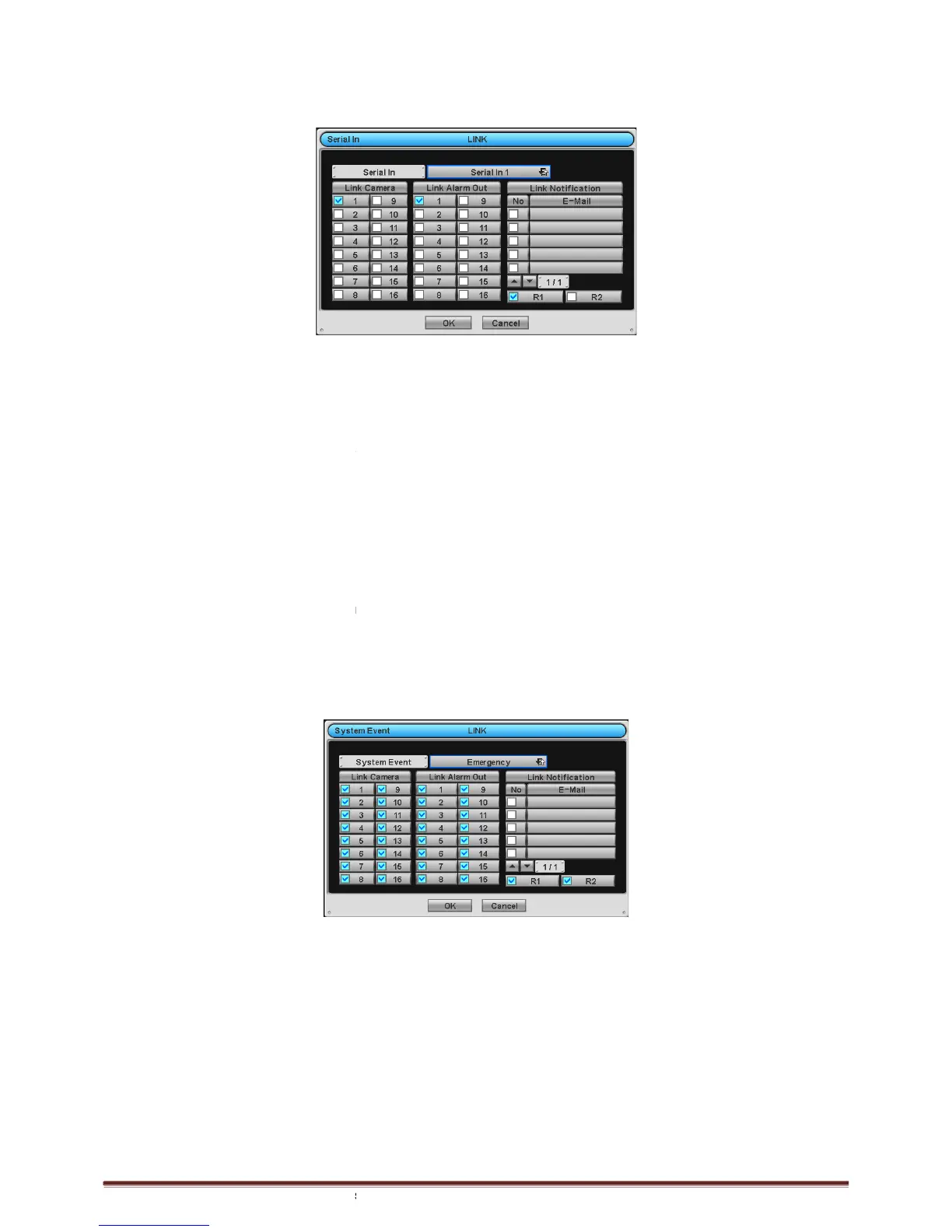
3.6.4 Serial In
Please click ( ) LINK>Serial In
and the following screen will appear.
Select cameras for recording while the
notification.
Link Notification displays E-
mail addresses registered in DEVICES>Network>Notification.
Please follow the setup procedures below.
Video Loss frame and select
② Select cameras for recording when
Select alarm outputs to be worked when
More than two alarm outputs can be set.
mail addresses for notification when
mail addresses can be set.
⑤ Repeat the above procedure for
to deactivate alert sounds from video loss. Apply to all channels.
Choose ‘OK’ to confirm the setting.
3.6.5 System Event
Please click (
)
LINK>System Event and the following screen will appear.
Select recording cameras and alarm outputs while Emergency recording using
for notification.
Link Notification displays E-
mail addresses registered in DEVICES>Network>Notification.
Please follow the setup procedures b
System Event frame displays Emergency, which user does not have to change.
Select cameras for recording when emergency occurs. Please check
Select alarm outputs to be worked when emergency occurs. Please check
More than two alarm outputs can be set.
mail addresses for notification when emergency occurs
mail addresses can be set.
Choose ‘OK’ to confirm the setting.
and the following screen will appear.
is in operation and alarm outputs and set up E
mail addresses registered in DEVICES>Network>Notification.
Please follow the setup procedures below.
Video Loss frame and select
a check box under Link Camera. More than two
Select alarm outputs to be worked when
Serial In 1 is on. Please check
a check box under Link Alarm Out
More than two alarm outputs can be set.
mail addresses for notification when
Serial In1 is on. Please check
a check box under Link Notification. More
mail addresses can be set.
to deactivate alert sounds from video loss. Apply to all channels.
LINK>System Event and the following screen will appear.
Select recording cameras and alarm outputs while Emergency recording using
mail addresses registered in DEVICES>Network>Notification.
System Event frame displays Emergency, which user does not have to change.
Select cameras for recording when emergency occurs. Please check
a check box under Link Camera. More than two
Select alarm outputs to be worked when emergency occurs. Please check
a check box under Link Alarm Out
More than two alarm outputs can be set.
mail addresses for notification when emergency occurs
mail addresses can be set.
is in operation and alarm outputs and set up E
a check box under Link Camera. More than two
a check box under Link Alarm Out
a check box under Link Notification. More
key and set E-mail addresses
a check box under Link Camera. More than two
a check box under Link Alarm Out



 To Next Page