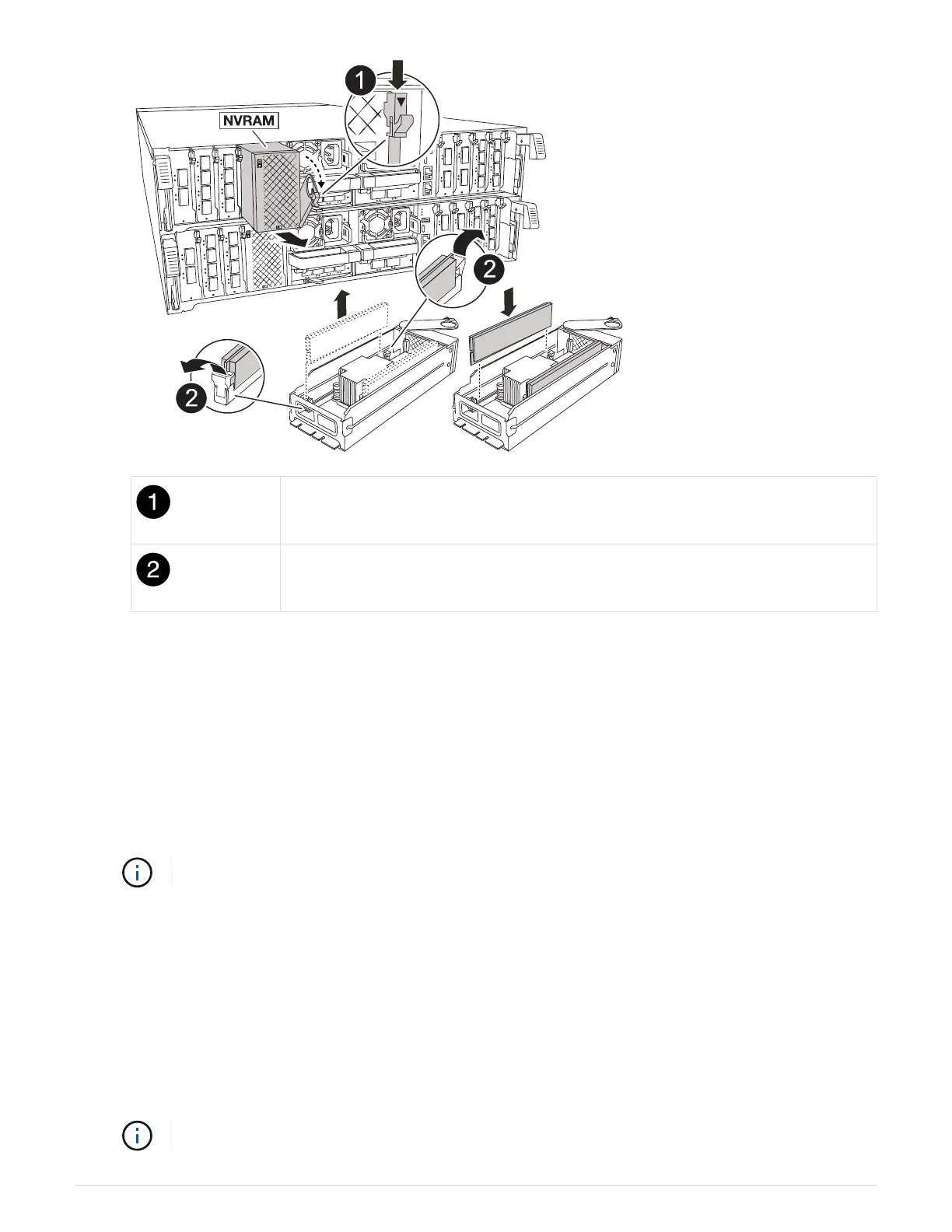
Cam locking button
DIMM locking tabs
6. Set the NVRAM module on a stable surface.
7. Remove the DIMMs, one at a time, from the impaired NVRAM module and install them in the replacement
NVRAM module.
8. Install the replacement NVRAM module into the chassis:
a. Align the module with the edges of the chassis opening in slot 4/5.
b. Gently slide the module into the slot all the way, and then push the cam latch all the way up to lock the
module in place.
9. Recable the PSU.
If your system has DC power supplies, reconnect the power cable block to the PSU.
10. Rotate the cable management tray up to the closed position.
Step 3: Replace a NVRAM DIMM
To replace NVRAM DIMMs in the NVRAM module, you must remove the NVRAM module, and then replace the
target DIMM.
1. If you are not already grounded, properly ground yourself.
2. Unplug the power cord from both PSUs.
If your system has DC power supplies, disconnect the power cable block from the PSU.
62



 To Next Page