FS728TP Smart Switch Software Administration Manual
Configuring Switching Settings 4-55
v1.1, September 2009
Address Table
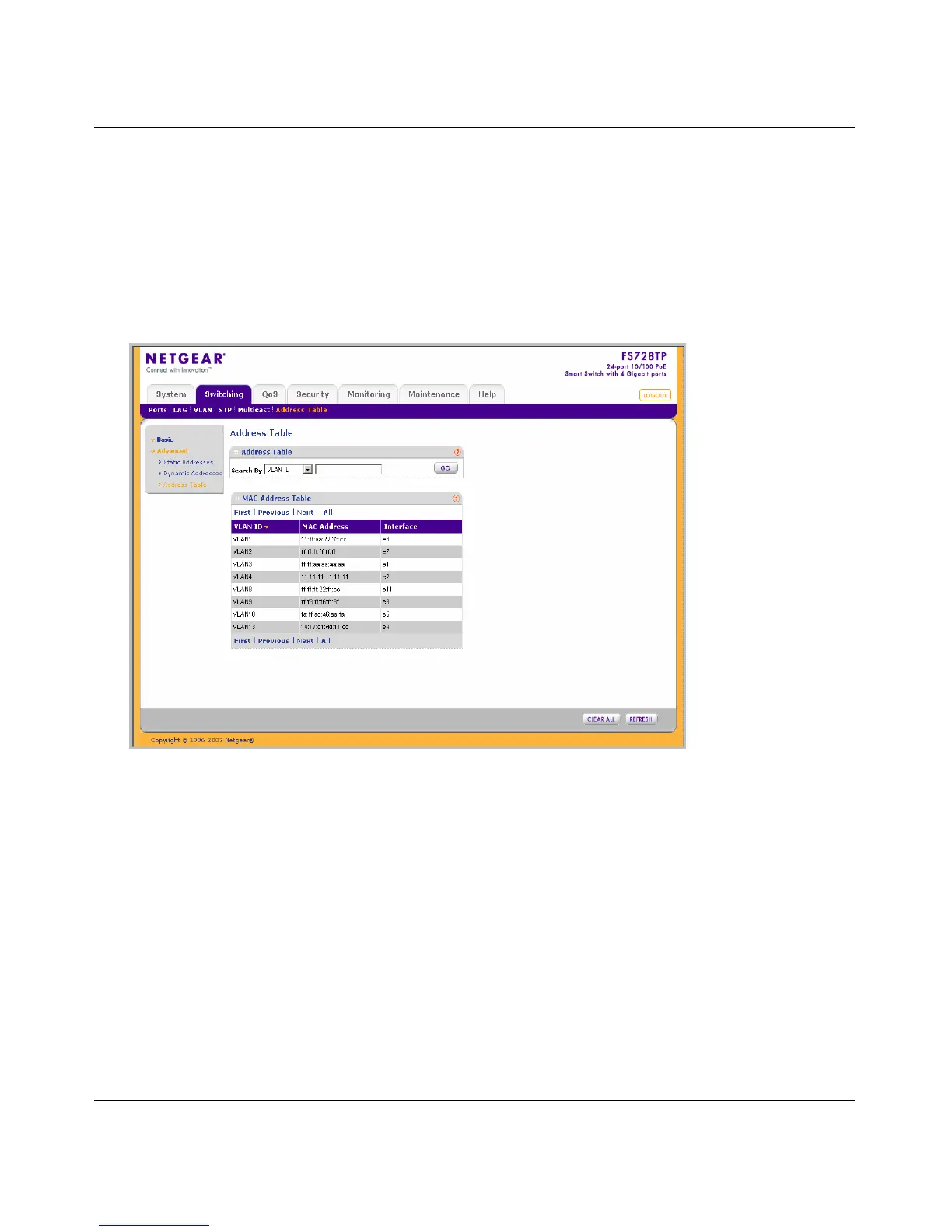
The Advanced Address Table screen displays the MAC Address table according to the defined
categories.
To query the Advanced MAC Address Table:
1. Click Switching > Address Table > Advanced > Address Table. The Advanced Address
Table screen displays:
The Advanced Address Table screen contains the following fields:
• Search By – Display the MAC Address which
can be sorted according to VLAN ID,
MAC Address or Interface. The possible field values are:
– VLAN ID – Display the MAC Address table entries that relate to the specific VLAN
ID.
– MAC Address – Display the MAC Address table entries that relate to MAC address.
– Interface – Display the MAC Address table entries that relate to the specific interface.
• VLAN ID – Displays the VLAN ID number to which the entry refers.
• MAC Address – Displays the MAC address to which the entry refers.
Figure 4-31






 To Next Page