87
Nets SmartPOS N950 user manual
3.8 Refunds
Note!
Only payments that were made 24h ago can be refunded. Also note, for now, you can partial refunds can only
made once. Also note, that you cannot cancel the refunds!
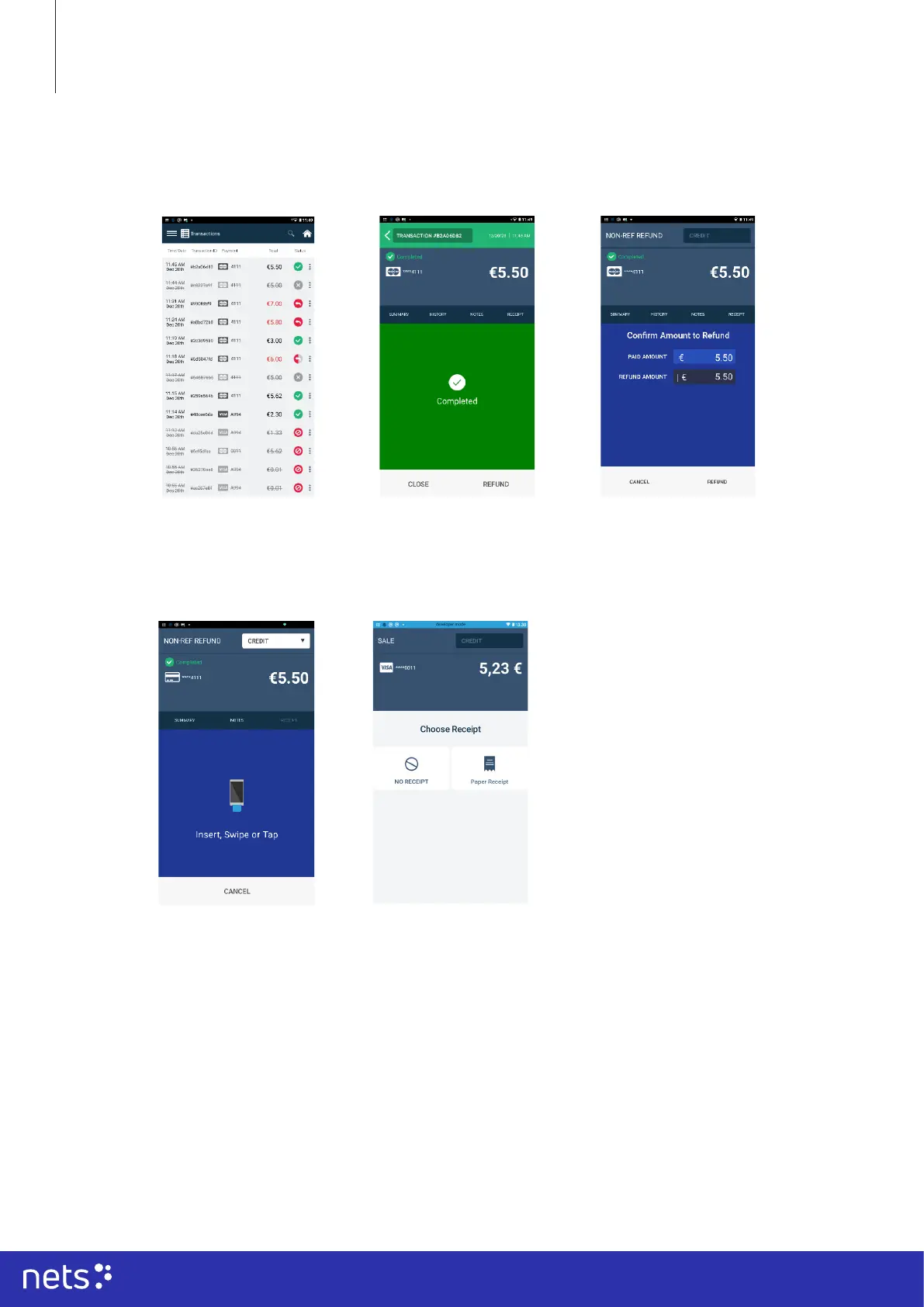
To make the refund, click on the ‘Home’ icon on your terminal screen.
You will see your
transaction in the list.
Click on the transaction
on the list.
When choosing the
option to refund a
message conrming
the amount to refund
will appear. For partial
refunds, insert the
amount in the text box
or make the full refund.
You will see a refund
button appear in the
lower right corner of
your terminal screen.
Tap the payment card
on the NFC area using
the same card that the
original payment was
made with.
Choose to print or
disregard the receipt.
A message that conrms
your refund will appear
on the screen. Conrm
your option by pressing
desired are on the
screen.



 To Next Page