C70 Digital Readout System
Zero Approach
SETUP, Zero Approach
NOTES
Newall Measurement Systems Ltd 13
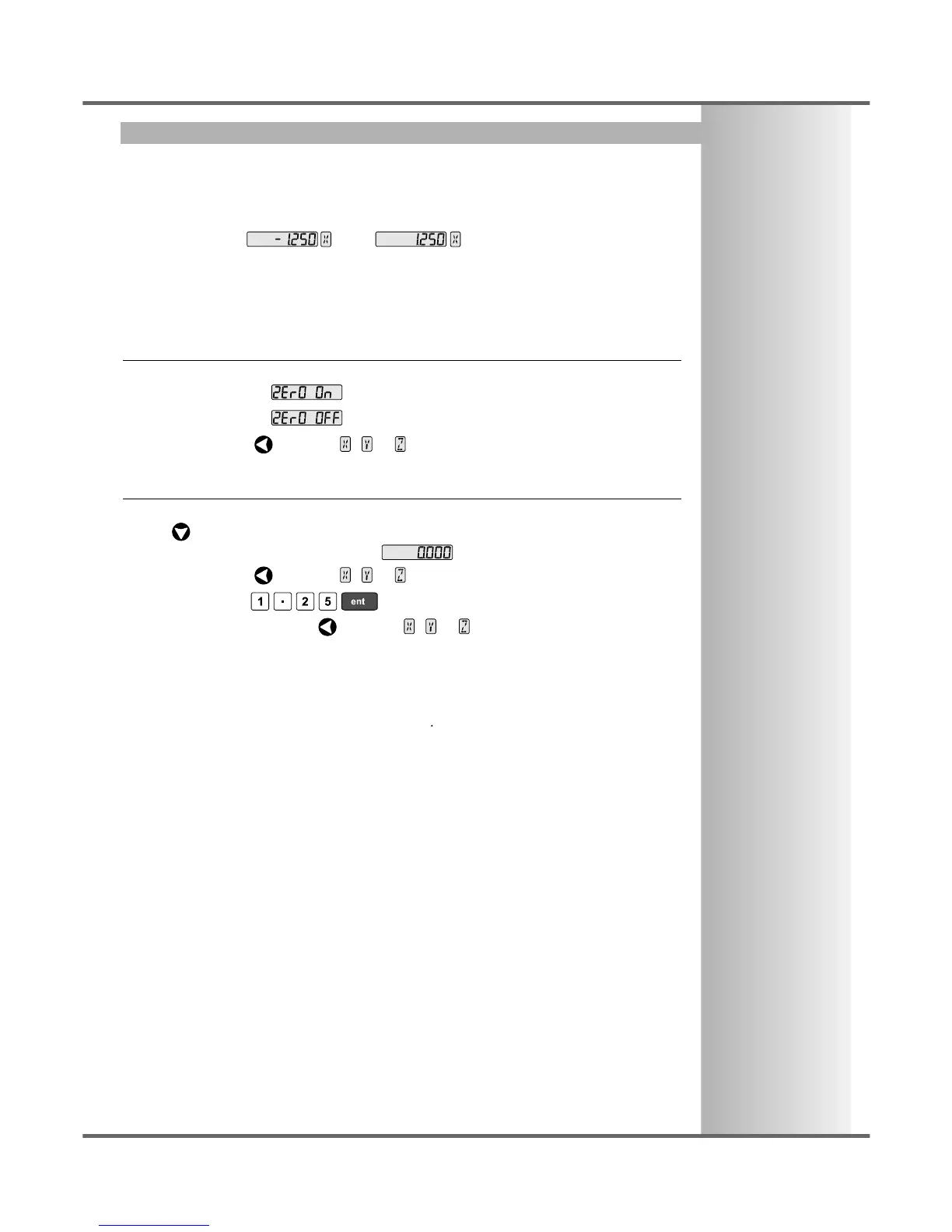
This setting provides a visual indication that one or more axes are approaching zero, by flashing the
Axis Label display.
For Example: If Zero Approach is turned on for the X axis, with a Zero Approach Limit of 1.25, then
the axis label display will flash for values
from to
• When the axis is within:
0.05mm (0.002”) for a Spherosyn encoder or
0.025mm (0.001”) for a Microsyn encoder
the display will stop flashing.
Zero Approach On / Off
There are two possible settings for each axis:
Zero Approach On
Zero Approach Off
• Press the Select Key next to the , or to cycle between the two settings for each axis.
Zero Approach Limit
This setting allows you to choose how close to zero the axis needs to be for the display to flash.
• Press after setting Zero Approach On / Off.
The displays for the selected axes change to or a previously entered value.
• Press the Select Key next to the , or to choose which axis to edit.
• For Example: Press to enter a limit of 1.25.
• If required, press the Select Key next to the , or to enter the limit for another axis.



 To Next Page