Understanding the Displays
Using the Keypad
OPERATION
OPERATION, Understanding the Displays, Using the Keypad C70 Digital Readout System
NOTES
At the beginning of each
working session, set the
datum in Absolute
Mode, then switch the
C70 to Incremental
Mode.
By using the C70 in this
way, you will be able to
return the machine to its
absolute datum at any
time, simply by switching
back to Absolute Mode.
Newall Measurement Systems Ltd6
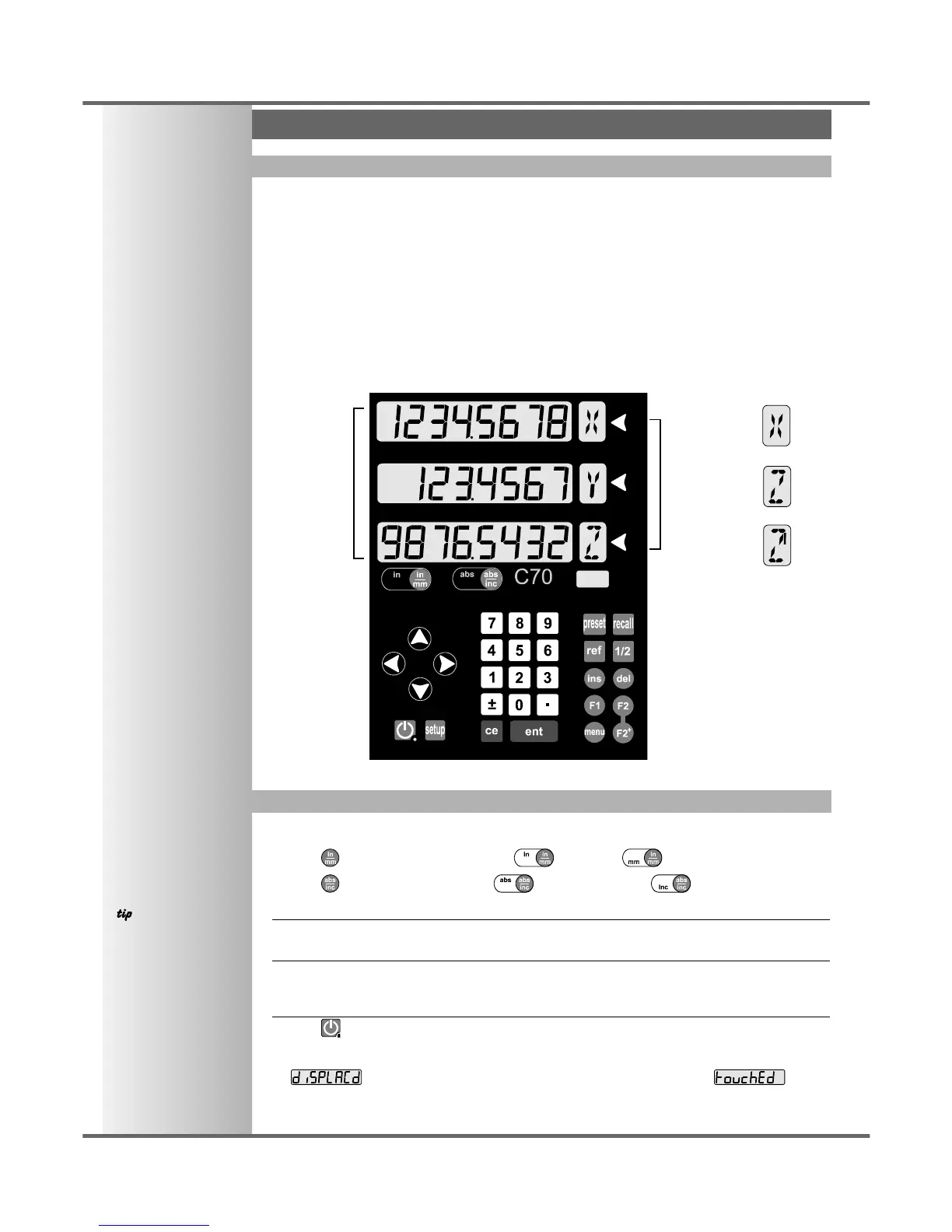
• The three Axis displays normally show the positions of the X, Y and Z axes.
• The three Axis Label displays normally show X, Y and Z, (in Lathe Mode X, Z and Z’).
• While any axis is moving, the Function display shows the Feedrate of the fastest moving axis, and
the feed indicator next to the display will illuminate.
Feedrate is displayed in mm/sec or inches/min, to a resolution on 0.1.
• The lathe and mill indicators will be illuminated depending on whether the lathe or mill functions
or both, are available.
Function Display
Navigation
Keys
Numeric Keys
Function
Keys
Axis
Select
Keys
Axis
Label
Displays
Axis Labels
in Lathe
Mode
Axis
Displays
In normal operation, the keys are used as follows:
• Press to toggle the displays between inches and millimetres.
• Press to toggle the C70 between absolute mode and incremental mode.
Absolute Mode
•
In this mode, the C70 will display the positions of the three axes relative to a fixed datum.
Incremental Mode
•
In this mode, the C70 can be used to display each position relative to the last position. This is also
known as point-to-point use.
Sleep Mode
• Press to temporarily turn off the displays and the keypad.
While the unit is in Sleep Mode, all settings are preserved, but the positions of the three axes are
updated. If any of the axes are moved while in Sleep Mode, the centre display will show
, and if any of the keys are touched, the centre display will show .



 To Next Page